Logo
MINECRAFTBIBLE
Items
Items

All game items

Blocks
Blocks

Building blocks

Mobs
Mobs

Creatures & monsters

Biomes
Biomes

World biomes

Structures
Structures

Generated structures

Recipes
Recipes

Crafting guides

Advancements
Advancements

Achievements

Loot Tables
Loot Tables

Drop rates

Tags
Tags

Item groupings

All Versions
View all data →
Capes
Cape ArchiveNEW

Browse rare Minecon capes, OptiFine capes, and custom capes from players worldwide

Browse

Player Database
Player DatabasePopular

Search any player

Skin Browser
Skin Browser

Browse & download skins

Cape Gallery
Cape GalleryNEW

Minecon & OptiFine capes

Seed Vault
Seed Vault

Curated seeds

Learn

Guides
GuidesNew

Tutorials & tips

Blog
Blog

News & updates

Community

Community Hub
Community HubHub

Posts, discussions & more

All Versions
View community →
Seed Analyzer
Seed Analyzer

World seed analysis

Loot Explorer
Loot Explorer

Drop rates

Crafting Calculator
Crafting Calculator

Material planning

Enchant Calculator
Enchant Calculator

Probability math

Redstone Lab
Redstone Lab

Signal timing

Trading Profit
Trading Profit

Villager ROI

All Versions
View all tools →
Mods
Mods

Browse all mods

Plugins
Plugins

Server plugins

Resource Packs
Resource Packs

Textures & sounds

Shaders
Shaders

Visual enhancements

Datapacks
Datapacks

World logic

Scanner
Mod Intelligence

Scan & analyze any mod

All Versions
View all mods →
Loading...
IntroductionIntroductionVersion HistoryVersion HistoryGuidesGuidesBlog & NewsBlog & News
ItemsItemsBlocksBlocksMobsMobsRecipesRecipesBiomesBiomesStructuresStructuresAdvancementsAdvancementsLoot TablesLoot TablesTagsTags
ModsModsPluginsPluginsResource PacksResource PacksShadersShadersDatapacksDatapacks

MinecraftBible

The Ultimate Wiki

Logo
MINECRAFTBIBLE

The ultimate Minecraft reference. Every item, block, mob, and recipe documented with precision.

Community

  • Skin Browser
  • Cape Gallery
  • Seed Vault
  • Blog
  • Guides

Database

  • Items
  • Blocks
  • Mobs
  • Recipes
  • Biomes
  • Structures

Tools

  • Seed Analyzer
  • Mod Intelligence
  • Crafting Calculator
  • Enchant Calculator

Mods & Packs

  • Mods
  • Plugins
  • Resource Packs
  • Shaders
  • Datapacks

Site & Legal

  • About
  • Authors
  • Editorial Policy
  • Corrections
  • Contact
  • Privacy Policy
  • Terms of Service
  • DMCA
  • Sitemap

© 2026 MinecraftBible. Not affiliated with Mojang or Microsoft.

PrivacyTermsContact
CloudBackupMC
PluginMIT

CloudBackupMC

☁️ CloudBackupMC: Seamless Cloud Backups for Minecraft Stop worrying about data loss. CloudBackupMC is the ultimate solution for Minecraft server owners and players to automate server backups directly to personal cloud storage.

23
Downloads
0
Followers
3 months ago
Updated
📦
1
Versions
managementstorageutilitybukkitpaperpurpurspigot
Download Latestv2.0.0View on Modrinth

📖About CloudBackupMC

☁️ CloudBackupMC: Seamless Cloud Backups for Minecraft

Stop worrying about data loss. CloudBackupMC is the ultimate solution for Minecraft server owners and players to automate server backups directly to personal cloud storage. Whether you're a server owner wanting a secure off-site copy or a player wanting to secure your own data, we've got you covered.


✨ Key Features

  • 🌍 One-Click OneDrive Sync: Link your Microsoft OneDrive account in seconds using a simple device code—no complex API setups required!
  • 📂 Automatic Organization: Backups are automatically sorted into folders named after your server (e.g., SurvivalServer Minecraft Backups).
  • 🕒 Scheduled Backups: Set it and forget it! Configure automated backup intervals to keep your data current without lifting a finger.
  • 🛡️ Smart Retention: Keep your local storage clean by automatically pruning old backups while maintaining your history in the cloud.
  • 👥 Multi-User Support: Allow specific players to link their own cloud accounts for personalized data security.
  • ⚡ High Performance: Asynchronous zipping and uploading ensures your server performance stays smooth during the backup process.

🛠️ Commands & Permissions

Command Description Permission
/cloud connect onedrive Link your personal OneDrive account
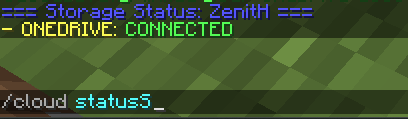
/cloud status Check your connection status
/backup Trigger an immediate manual backup
/cloud reload Reload configuration and whitelist
/cloud whitelist add <player> Authorize a player to use cloud backups

🚀 Easy Setup

  1. Drop the CloudBackupMC.jar into your plugins folder.
  2. Restart your server.
  3. Optional: Set your server-name in config.yml or let the plugin detect it automatically!
  4. Run /cloud connect onedrive in-game and follow the link to authorize.
  5. You're protected! Your first backup is ready to go.

Privacy Focused: This plugin uses the official Microsoft Graph API. We never see your password; your authorization is handled directly and securely by Microsoft.

👥 Team & Contributors

forgamesicanplay
forgamesicanplayOwner

⚙️ Compatibility

Environment
🖥️ Server-side
Loaders
bukkitpaperpurpurspigot
Minecraft Versions
1.131.13.11.13.21.141.14.11.14.21.14.31.14.4+38 more

🔗 Links

Modrinth Page