


ChatTracker
A light chat moderation & logging plugin with staff chat, rank-colored chat, easy in-game reporting
📖About ChatTracker

Track conversations, analyze chat logs, and keep your server community safe and fun.
Description
ChatTracker monitors all chat activity on your server, logging messages with timestamps and player names so you always have a record. Its Big Brother feature checks messages for banned words or phrases, flags them, and notifies online moderators automatically.
Staff Chat lets moderators communicate privately without interfering with public chat.
Hoverable and clickable reports allow players to report inappropriate messages in-game directly to staff.
New in v1.3: Staff can now issue clickable punishments (Warn, Kick, Ban) directly from reports, with all punishments logged for transparency.
ChatTracker helps staff stay on top of rule-breaking behavior efficiently and reliably, with enhanced message formatting to make chat clear and readable.
Features
- Tracks all player chat messages in real time.
- Color-coded chat for ranks, messages stand out according to group.
- Hoverable and clickable reports to quickly flag inappropriate messages.
- Clickable punishments (Warn, Kick, Ban) with full logging.
- Logs all messages, reports, and punishments with timestamps for staff review.
- Flags inappropriate messages automatically using the Big Brother system.
- Staff Chat – private channel for moderators, fully implemented with toggle functionality.
- Temporary rank overrides with commands for testing or promotions.
- Lightweight and optimized for performance.
- Easy setup with minimal configuration required.
Roadmap
Player Monitoring
- /check → Shows info (IP, alts, punishments, reports, last login).
- /history → See all punishments and reports tied to them.
- /seen → Last online time.
Staff Utilities
- CommandSpy → View commands players are running.
- SocialSpy → View private messages between players.
- /freeze → Temporarily freeze a player for investigation.
- Silent Join/Leave → Staff can log in/out without alerts.
- Staff Mode → Special gamemode with inspector tools (teleport, vanish, freeze, randomTP).
Punishment Enhancements
- Timed Punishments → e.g., /ban 7d .
- Mute System → Temporary/permanent mute with reasons.
- Warning Escalation → X warnings = auto mute/ban.
- Appeals Log → Optional system to mark punishments as appealed.
Logs & Analytics
- MySQL / SQLite support → Store punishments/reports in a database.
- Web Panel support → Optional frontend for staff to review punishments/reports.
- Export Logs → Generate staff activity reports weekly/monthly.
Player Protection
- Anti-Alt Detection → Alert staff if players with the same IP join.
- VPN/Proxy detection → Optional alerts if suspicious connections are used.
- Chat Filter → Block certain words with staff alerts (already partly in).
Quality of Life
- Clickable Teleports in reports (click player name to teleport).
- Customizable GUI Menus (e.g., for punishments, staff tools).
- Integration with LuckPerms for rank syncing.
- Discord Integration → Send reports & punishments to a staff Discord channel.
Screenshots & Demo
Video Showcase
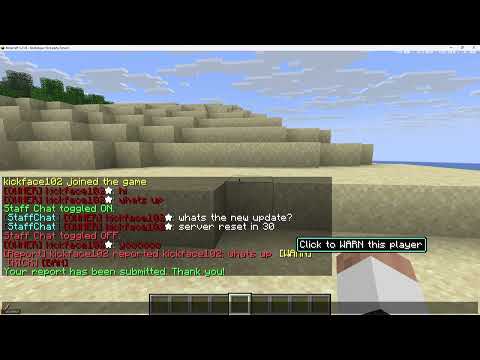
Click to watch ChatTracker in action — see staff chat, hoverable reports, and flagged message alerts in-game.
Screenshots


Examples of Staff Chat, hoverable clickable reports, and flagged message notifications in-game.
Installation
- Download the latest release from GitHub Releases.
- Place the
ChatTracker.jarfile into your server's/pluginsfolder. - Restart your server.
- Configuration files will be generated automatically on first run.
Permissions
chattracker.view– Allows viewing tracked chat logs.chattracker.moderate– Allows receiving flagged message alerts, reports, and issuing punishments.chattracker.staffchat– Access to the completed Staff Chat channel.chattracker.setrank– Allows temporary rank changes.chattracker.admin– Full access to ChatTracker commands.
Commands
/chattracker reload– Reloads the configuration./chattracker logs– Displays recent chat logs in-game./staffchat <message>– Sends a message to all online staff (toggle functionality included)./setrank <player> <group>– Temporarily sets a player's rank./resetrank <player>– Resets a player to their config-defined rank./report <player> <message>– Report a message in-game (clickable through hoverable chat)./punish <player> <warn|kick|ban>– Issue punishments (clickable buttons also available).
Changelog
v1.3 (Current Release)
- Clickable punishments (Warn, Kick, Ban) added.
- Full punishment logging implemented.
- Expanded logging system for chat, reports, and punishments.
- UX improvements for staff workflow.
v1.2
- Hoverable and clickable message reporting implemented.
- Color-coded chat messages per rank.
- Enhanced chat logging and report logging system.
- Temporary rank override commands for quick testing or promotions.
- Improved Staff Chat toggle functionality.
v1.1
- Staff Chat feature fully implemented for moderators.
- Improved flagged message notifications.
- Enhanced log formatting and organization.
v1.0-BigBrother
- Core chat tracking system.
- Permissions system added.
- Commands for reloading and viewing logs.
- Big Brother flagged word alerts to staff.
Dependencies
PaperMC (latest recommended build). No additional plugins required.
License
This project is licensed under the MIT License.