Logo
MINECRAFTBIBLE
Items
Items

All game items

Blocks
Blocks

Building blocks

Mobs
Mobs

Creatures & monsters

Biomes
Biomes

World biomes

Structures
Structures

Generated structures

Recipes
Recipes

Crafting guides

Advancements
Advancements

Achievements

Loot Tables
Loot Tables

Drop rates

Tags
Tags

Item groupings

All Versions
View all data →
Capes
Cape ArchiveNEW

Browse rare Minecon capes, OptiFine capes, and custom capes from players worldwide

Browse

Player Database
Player DatabasePopular

Search any player

Skin Browser
Skin Browser

Browse & download skins

Cape Gallery
Cape GalleryNEW

Minecon & OptiFine capes

Seed Vault
Seed Vault

Curated seeds

Learn

Guides
GuidesNew

Tutorials & tips

Blog
Blog

News & updates

Community

Community Hub
Community HubHub

Posts, discussions & more

All Versions
View community →
Seed Analyzer
Seed Analyzer

World seed analysis

Loot Explorer
Loot Explorer

Drop rates

Crafting Calculator
Crafting Calculator

Material planning

Enchant Calculator
Enchant Calculator

Probability math

Redstone Lab
Redstone Lab

Signal timing

Trading Profit
Trading Profit

Villager ROI

All Versions
View all tools →
Mods
Mods

Browse all mods

Plugins
Plugins

Server plugins

Resource Packs
Resource Packs

Textures & sounds

Shaders
Shaders

Visual enhancements

Datapacks
Datapacks

World logic

Scanner
Mod Intelligence

Scan & analyze any mod

All Versions
View all mods →
Loading...
IntroductionIntroductionVersion HistoryVersion HistoryGuidesGuidesBlog & NewsBlog & News
ItemsItemsBlocksBlocksMobsMobsRecipesRecipesBiomesBiomesStructuresStructuresAdvancementsAdvancementsLoot TablesLoot TablesTagsTags
ModsModsPluginsPluginsResource PacksResource PacksShadersShadersDatapacksDatapacks

MinecraftBible

The Ultimate Wiki

Logo
MINECRAFTBIBLE

The ultimate Minecraft reference. Every item, block, mob, and recipe documented with precision.

Community

  • Skin Browser
  • Cape Gallery
  • Seed Vault
  • Blog
  • Guides

Database

  • Items
  • Blocks
  • Mobs
  • Recipes
  • Biomes
  • Structures

Tools

  • Seed Analyzer
  • Mod Intelligence
  • Crafting Calculator
  • Enchant Calculator

Mods & Packs

  • Mods
  • Plugins
  • Resource Packs
  • Shaders
  • Datapacks

Site & Legal

  • About
  • Authors
  • Editorial Policy
  • Corrections
  • Contact
  • Privacy Policy
  • Terms of Service
  • DMCA
  • Sitemap

© 2026 MinecraftBible. Not affiliated with Mojang or Microsoft.

PrivacyTermsContact
Cannons Revamped
PluginGPL-3.0-only

Cannons Revamped

Multiblock cannons in minecraft.

1.6K
Downloads
8
Followers
5 months ago
Updated
📦
16
Versions
equipmentgame-mechanicsbukkitfoliapaperspigot
Download Latestv3.4.2View on Modrinth

📖About Cannons Revamped

Cannons-Revamped

New mantained fork for Paper made by Vaan1310 / Intybyte, original by DerPavlov

Original Description:

What can it do?

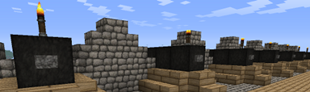
Cannons is a highly configurable plugin which allows you to fire block build cannons. It is possible to aim and load different amounts of gunpowder to hit targets at different ranges. The power of redstone makes it possible to set the gun to auto load and activate the rapid fire mode. Choose your projectile from a broad spectrum of cannonballs and smash the enemy.

With Cannons 2.0 you are also able to design your own cannons using .schematic files and give each cannon their own settings, as well as different types of projectiles.
Features

  • Build a cannon out blocks
  • Design your own cannon and save it as .schematic
  • Design and fire different projectiles to smash your enemy
  • Use redstone to fire guns from distance
  • Rapid fire with auto-load possible
  • Destroyed blocks can be restored with CreeperHeal (if 'custom' option is true)
  • Cannons will stay load and aligned due to the database
  • Movement plugins (e.g. Movecraft) are supported if a cannon has a sign to store a tag
  • API for ships plugins (e.g. iSails) to use cannons on ships without signs.

Videos

by ServerMiner
https://www.youtube.com/watch?v=g-boSAAQFB0

Recommended plugins

  • ObsidianDestroyer
  • WorldGuard (flag protection: '/region flag NAME other-explosion deny')
  • CreeperHeal (set 'custom explosion' for your world to repair cannon damage)

Installation

  • Install WorldEdit first (don't forget this)
  • Copy the cannons.jar into your Bukkit's "plugins" directory, then run the server.

Dependencies

This plugin requires:

  • WorldEdit

Metrics
This plugin utilises Hidendra's plugin metrics system, which means that the following information is collected and sent to mcstats.org:

  • A unique identifier
  • The server's version of Java
  • Whether the server is in offline or online mode
  • The plugin's version
  • The server's version
  • The OS version/name and architecture
  • The core count for the CPU
  • The number of players online
  • The Metrics version If you wish to disable this feature (/me cries), you can do so by opt-ing out, which you can do in - the config file under /plugins/PluginMetrics/

Information for Cannons 2.x

Tutorial:

  • Cannons Tutorial
  • Developers Guide a bit dated, don't forget to use this plugin as a dependency instead of the old one

Additional information:

  • Creating Custom Cannons
  • Main Config
  • Projectile Config
  • Cannon Config
  • Commands
  • Permissions

Cannon Designs

  • Share your designs with other people: Cannon Designs

Known Bugs

  • The cannon ball (snowball) becomes invisible after 60 blocks but hits the target.
  • Voxelsniper will delete Buttons/Torches when you load the gun (be careful when you click the barrel)

Credits

  • DerPavlov
  • Raser4000
  • DreTax
  • JlJlJl

and many more

👥 Team & Contributors

Intybyte
IntybyteOwner

⚙️ Compatibility

Environment
🖥️ Server-side
Loaders
bukkitfoliapaperspigot
Minecraft Versions
1.191.19.11.19.21.19.31.19.41.201.20.11.20.2+16 more

🔗 Links

Modrinth Page