Logo
MINECRAFTBIBLE
Items
Items

All game items

Blocks
Blocks

Building blocks

Mobs
Mobs

Creatures & monsters

Biomes
Biomes

World biomes

Structures
Structures

Generated structures

Recipes
Recipes

Crafting guides

Advancements
Advancements

Achievements

Loot Tables
Loot Tables

Drop rates

Tags
Tags

Item groupings

All Versions
View all data →
Capes
Cape ArchiveNEW

Browse rare Minecon capes, OptiFine capes, and custom capes from players worldwide

Browse

Player Database
Player DatabasePopular

Search any player

Skin Browser
Skin Browser

Browse & download skins

Cape Gallery
Cape GalleryNEW

Minecon & OptiFine capes

Seed Vault
Seed Vault

Curated seeds

Learn

Guides
GuidesNew

Tutorials & tips

Blog
Blog

News & updates

Community

Community Hub
Community HubHub

Posts, discussions & more

All Versions
View community →
Seed Analyzer
Seed Analyzer

World seed analysis

Loot Explorer
Loot Explorer

Drop rates

Crafting Calculator
Crafting Calculator

Material planning

Enchant Calculator
Enchant Calculator

Probability math

Redstone Lab
Redstone Lab

Signal timing

Trading Profit
Trading Profit

Villager ROI

All Versions
View all tools →
Mods
Mods

Browse all mods

Plugins
Plugins

Server plugins

Resource Packs
Resource Packs

Textures & sounds

Shaders
Shaders

Visual enhancements

Datapacks
Datapacks

World logic

Scanner
Mod Intelligence

Scan & analyze any mod

All Versions
View all mods →
Loading...
IntroductionIntroductionVersion HistoryVersion HistoryGuidesGuidesBlog & NewsBlog & News
ItemsItemsBlocksBlocksMobsMobsRecipesRecipesBiomesBiomesStructuresStructuresAdvancementsAdvancementsLoot TablesLoot TablesTagsTags
ModsModsPluginsPluginsResource PacksResource PacksShadersShadersDatapacksDatapacks

MinecraftBible

The Ultimate Wiki

Logo
MINECRAFTBIBLE

The ultimate Minecraft reference. Every item, block, mob, and recipe documented with precision.

Community

  • Skin Browser
  • Cape Gallery
  • Seed Vault
  • Blog
  • Guides

Database

  • Items
  • Blocks
  • Mobs
  • Recipes
  • Biomes
  • Structures

Tools

  • Seed Analyzer
  • Mod Intelligence
  • Crafting Calculator
  • Enchant Calculator

Mods & Packs

  • Mods
  • Plugins
  • Resource Packs
  • Shaders
  • Datapacks

Site & Legal

  • About
  • Authors
  • Editorial Policy
  • Corrections
  • Contact
  • Privacy Policy
  • Terms of Service
  • DMCA
  • Sitemap

© 2026 MinecraftBible. Not affiliated with Mojang or Microsoft.

PrivacyTermsContact
BlockShips
PluginLicenseRef-BLOCKSHIPS-NON-COMMERCIAL-LICENSE-v1.0

BlockShips

build ships or airships out of blocks and sail or fly them smoothly - without client side mods or resource packs!

1.5K
Downloads
20
Followers
2 months ago
Updated
📦
15
Versions
adventurecursedtransportationpaperpurpur
Download Latestv0.0.15View on Modrinth

📖About BlockShips

BlockShips

A Minecraft plugin that lets players create rideable, physics-enabled ships. Build custom ships from blocks or spawn pre-built vessels, then sail the seas or take to the skies. All of this without any client side mods or resource packs!
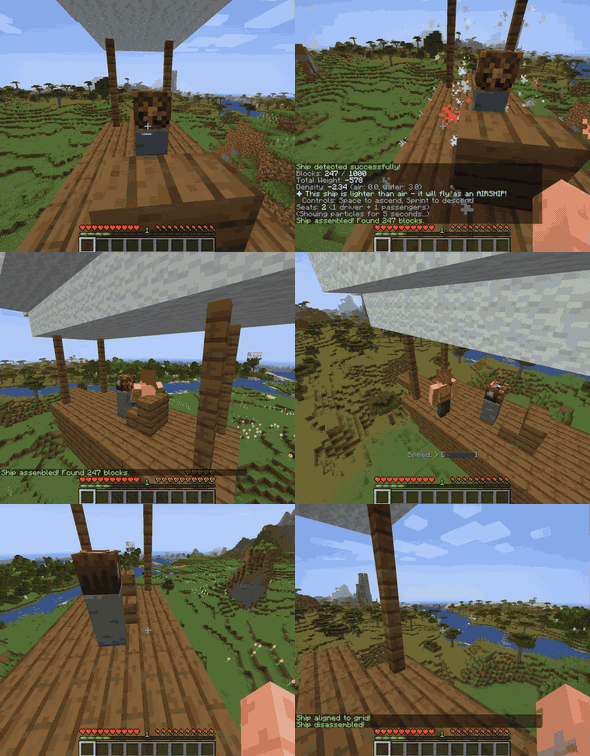
Demo Gif

WARNING: THIS PROJECT IS IN PRE-ALPHA. EXPECT BUGS, MISSING FEATURES, AND BREAKING CHANGES. USE AT YOUR OWN RISK, AND BACKUP YOUR WORLD OFTEN. THE DEVELOPER IS NOT RESPONSIBLE FOR ANY DAMAGE CAUSED BY THIS PLUGIN.

For reporting bugs, either submit a github issue or email me at def9a2a4 <AT> d3420b8b7fe04 <DOT> name. Sign up for the mailing list at def9a2a4.github.io/signup
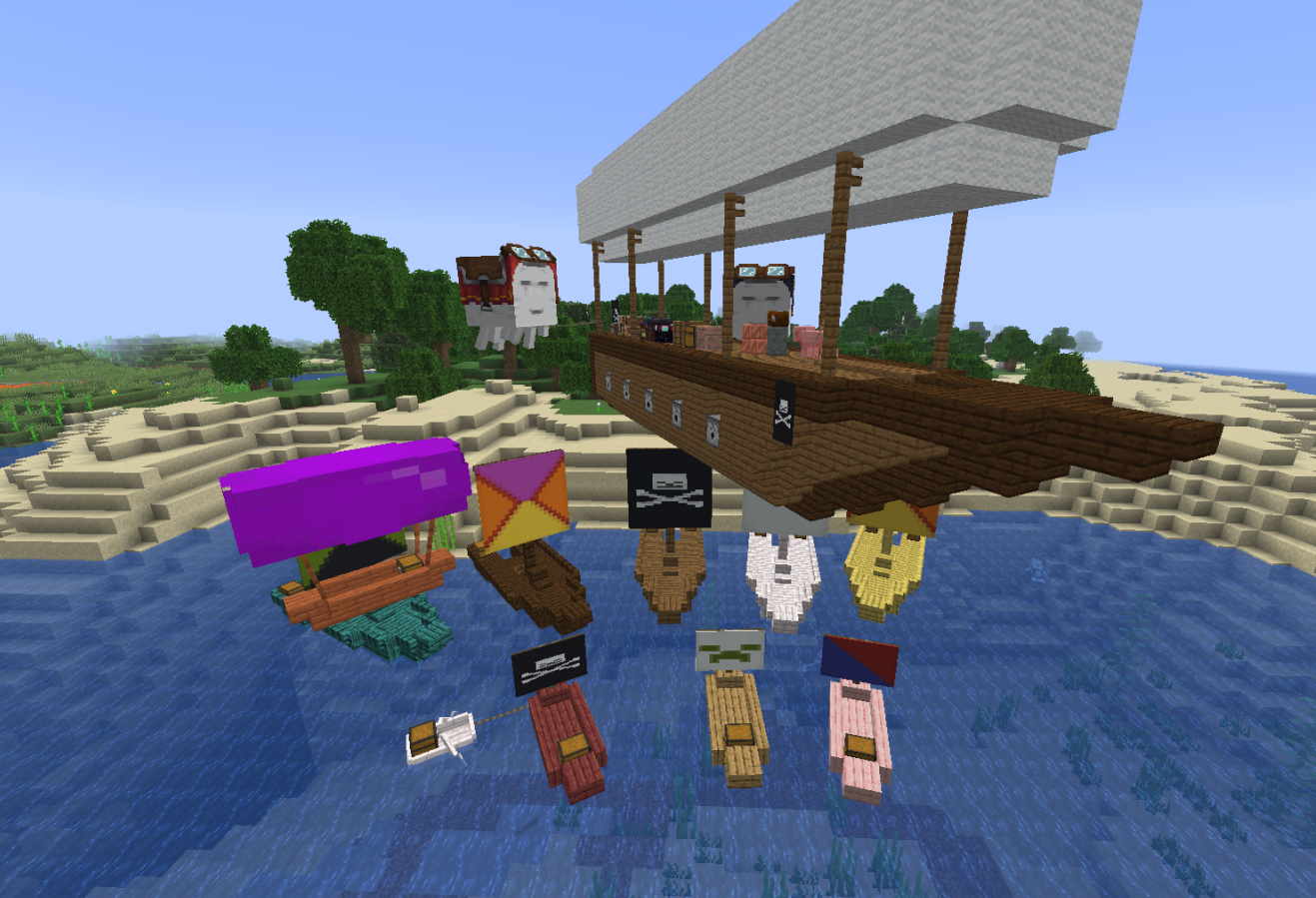
BlockShips

Features

Ships can include:

  • Functional blocks - Crafting tables, anvils, enchanting tables work as normal. (furnaces/brewing stands don't yet work)
  • Seats - Stairs for passengers
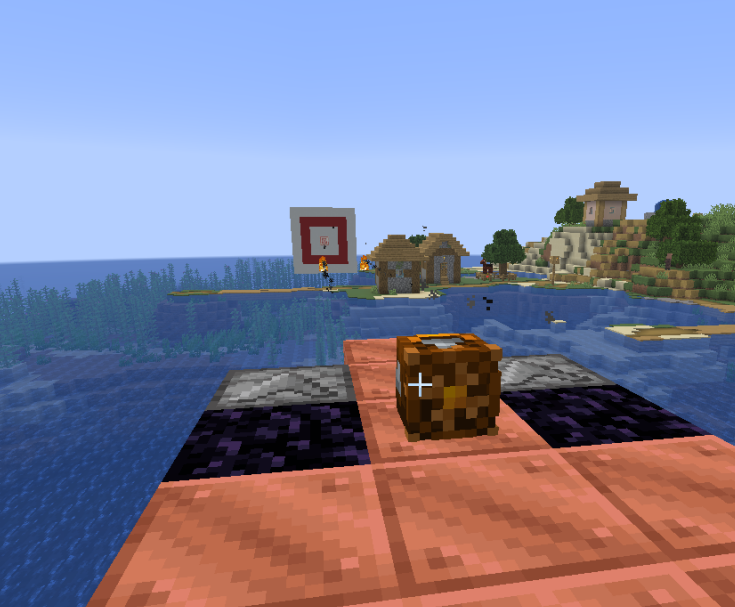
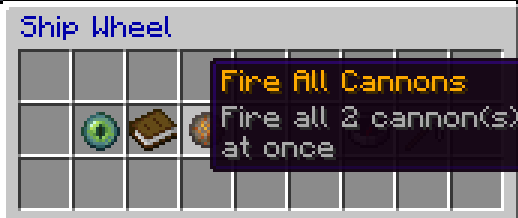
  • Cannons - a dispenser with a block of obsidian behind it will shoot its contents. fire all through the ship menu, or right click on the obsidian to fire.
Cannons Firing Cannon Menu
Cannons Firing Cannon Menu (or, right click obsidian to fire individually)
  • Storage - Chests, barrels, dispensers remain accessible
  • Lead points - Anything leashed to a fence will stay tied to the ship. You can lead things to the ship while its moving. Prefab ships have a single lead point.

Custom Ships

  1. Build a structure from allowed blocks (see or edit this in blocks.yml)
  • generally, wood/metal/functional blocks are allowed, while stone/dirt/other natural blocks are not
  • light-giving blocks, like glowstone, end rods, and beacons, serve as floatation aids. enough of these, and you get an airship!
  1. Craft a "Ship Wheel"
  2. Place the wheel on your structure
  3. Right-click the wheel to assemble
  4. Right-click again to board and steer
  5. Right-click the wheel, or sneak right-click, to open menu and disassemble

Prefab Ships

Spawn ready-to-use ships, with customizable banners/colors/wood types:

  • Small Ship - Fast, lightweight water vessel
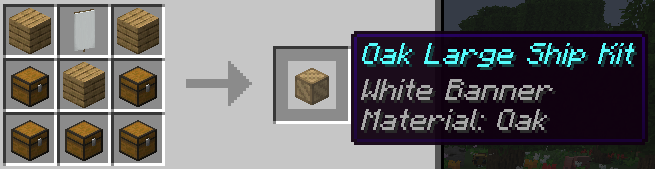
  • Large Ship - Larger water vessel with more health
  • Small Airship - Floats in the air with vertical controls

Command: /blockships give <small_ship|large_ship|small_airship>

Physics System

  • Walk on your ships - Players can walk around on deck while sailing/flying. this is still buggy!
  • Buoyancy - Ships float based on block weight and density. this is buggy sometimes!
  • Movement - Acceleration, drag, and collision response
  • Collision detection - Ships interact with terrain and entities (interacting with other ships is buggy)

Controls

Key Action
W Move forward
S Move backward / brake
A Rotate left
D Rotate right
Space Ascend (airships only)
Sprint Descend (airships only)

Crafting Recipes

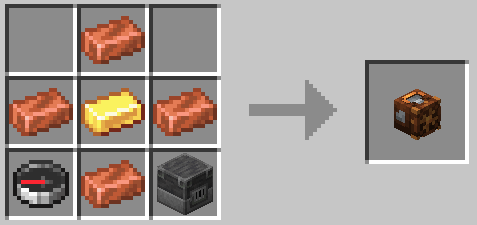
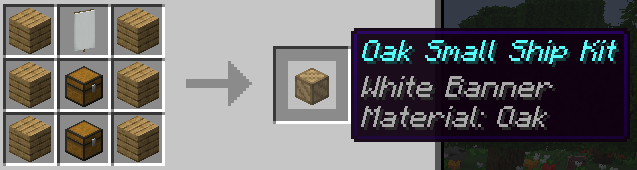
Item Recipe
Ship Wheel Ship Wheel
Small Ship
Wood type, banner customizable
Small Ship
Large Ship
Wood type, banner customizable
Large Ship
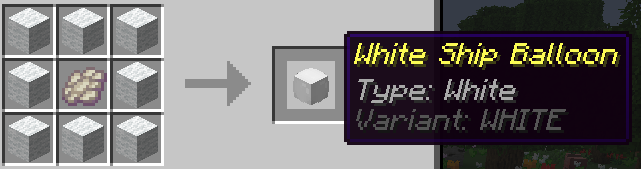
Ship Balloon
Wool color customizable
Ship Balloon
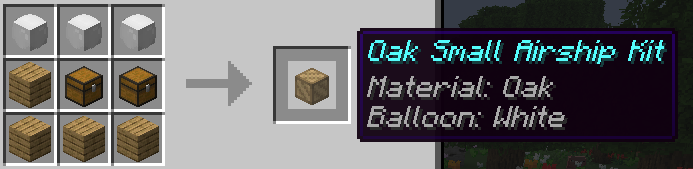
Small Airship
Wood type, balloon type customizable
Small Airship

Commands

Command Description Permission
/blockships reload Reload configuration blockships.reload
/blockships give <type> Give yourself a prefab ship kit blockships.give
/blockships recipes [player] Unlock crafting recipes blockships.recipes
/blockships forcedisassembleall (DANGEROUS) Disassemble all custom ships blockships.admin
/blockships killentities (DANGEROUS) Remove all ship entities blockships.admin

Installation

  1. Download the BlockShips jar file
  2. IMPORTANT: Download ProtocolLib
  3. Place both jars in your server's plugins folder
  4. Restart the server

Configuration

config.yml

Main plugin settings including:

  • Ship physics (speed, acceleration, drag)
  • Buoyancy values (density, strength)
  • Collision settings (mass, response)
  • Crafting recipes

blocks.yml

Configure which blocks can be used in custom ships:

  • Weight scale - Affects buoyancy
  • Collider - Custom collision shapes
  • Seat/storage - Special block behaviors

Inspiration

This plugin is inspired by mods which also implement rideable ships, as well as plugins which have attempted similar functionality. I made this plugin because I realized that with the addition of display entities, it might be possible to create a better ship plugin than previously possible, but without requiring any client-side mods. No code from any of other project has been used. In particular, this plugin was inspired by:

  • Ships and Movecraft plugins
  • Archimedes Ships mod
  • Eureka Ships / Valkyrian Skies mods

License

You are free to use this plugin only for non-commercial projects and servers. For commercial use, please contact the author for a license. For more details, see the LICENSE.txt file.

👥 Team & Contributors

D
def9a2a4Owner

⚙️ Compatibility

Environment
🖥️ Server-side
Loaders
paperpurpur
Minecraft Versions
1.211.21.11.21.21.21.31.21.41.21.51.21.61.21.7+7 more

🔗 Links

Modrinth Page