Logo
MINECRAFTBIBLE
Items
Items

All game items

Blocks
Blocks

Building blocks

Mobs
Mobs

Creatures & monsters

Biomes
Biomes

World biomes

Structures
Structures

Generated structures

Recipes
Recipes

Crafting guides

Advancements
Advancements

Achievements

Loot Tables
Loot Tables

Drop rates

Tags
Tags

Item groupings

All Versions
View all data →
Capes
Cape ArchiveNEW

Browse rare Minecon capes, OptiFine capes, and custom capes from players worldwide

Browse

Player Database
Player DatabasePopular

Search any player

Skin Browser
Skin Browser

Browse & download skins

Cape Gallery
Cape GalleryNEW

Minecon & OptiFine capes

Seed Vault
Seed Vault

Curated seeds

Learn

Guides
GuidesNew

Tutorials & tips

Blog
Blog

News & updates

Community

Community Hub
Community HubHub

Posts, discussions & more

All Versions
View community →
Seed Analyzer
Seed Analyzer

World seed analysis

Loot Explorer
Loot Explorer

Drop rates

Crafting Calculator
Crafting Calculator

Material planning

Enchant Calculator
Enchant Calculator

Probability math

Redstone Lab
Redstone Lab

Signal timing

Trading Profit
Trading Profit

Villager ROI

All Versions
View all tools →
Mods
Mods

Browse all mods

Plugins
Plugins

Server plugins

Resource Packs
Resource Packs

Textures & sounds

Shaders
Shaders

Visual enhancements

Datapacks
Datapacks

World logic

Scanner
Mod Intelligence

Scan & analyze any mod

All Versions
View all mods →
Loading...
IntroductionIntroductionVersion HistoryVersion HistoryGuidesGuidesBlog & NewsBlog & News
ItemsItemsBlocksBlocksMobsMobsRecipesRecipesBiomesBiomesStructuresStructuresAdvancementsAdvancementsLoot TablesLoot TablesTagsTags
ModsModsPluginsPluginsResource PacksResource PacksShadersShadersDatapacksDatapacks

MinecraftBible

The Ultimate Wiki

Logo
MINECRAFTBIBLE

The ultimate Minecraft reference. Every item, block, mob, and recipe documented with precision.

Community

  • Skin Browser
  • Cape Gallery
  • Seed Vault
  • Blog
  • Guides

Database

  • Items
  • Blocks
  • Mobs
  • Recipes
  • Biomes
  • Structures

Tools

  • Seed Analyzer
  • Mod Intelligence
  • Crafting Calculator
  • Enchant Calculator

Mods & Packs

  • Mods
  • Plugins
  • Resource Packs
  • Shaders
  • Datapacks

Site & Legal

  • About
  • Authors
  • Editorial Policy
  • Corrections
  • Contact
  • Privacy Policy
  • Terms of Service
  • DMCA
  • Sitemap

© 2026 MinecraftBible. Not affiliated with Mojang or Microsoft.

PrivacyTermsContact
Bingo Reloaded
PluginGPL-3.0-only

Bingo Reloaded

The Definitive Bingo Plugin for modern Minecraft. Maximum customizability, 4 different gamemodes, customizable kits, cards, teams, and a ton of other features.

1.8K
Downloads
19
Followers
5 months ago
Updated
📦
18
Versions
adventureequipmentminigamebukkitpaperpurpurspigot
Download Latestv3.4.2View on Modrinth

📖About Bingo Reloaded

Bingo Reloaded

A Minecraft Bingo 1.18+ Plug-In

A Minecraft 1.18/1.19/1.20/1.21+ Spigot Plugin, take a look at the card viewer!
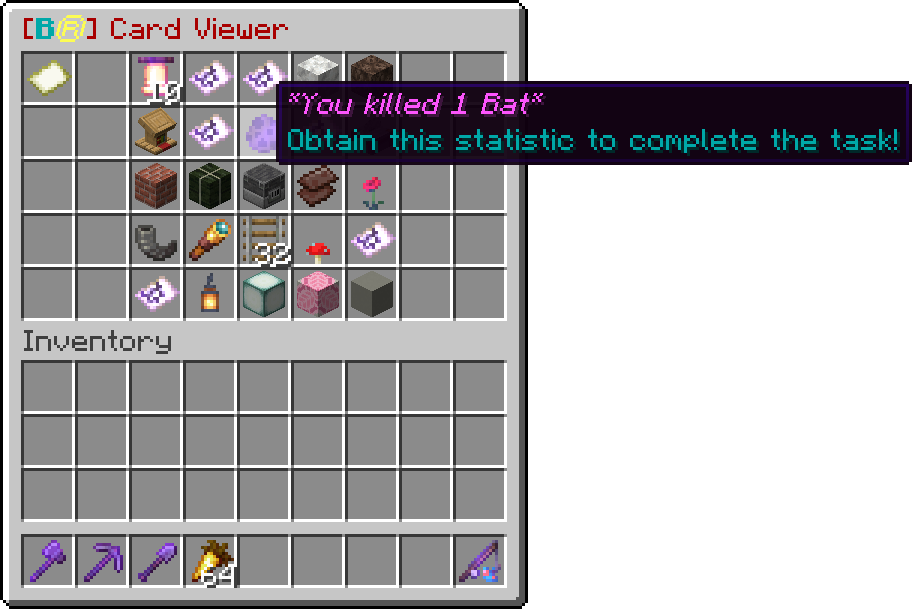
Bingo Card menu

Newly Added:

Bingo Reloaded Companion: Download the client-side mod to improve your experience when playing Bingo. Click here for more information

Key Features

  • Collect items, achieve advancements and complete statistic goals to finish tasks on the card.
  • Play 4 different gamemodes
    • Regular
    • Lockout
    • Complete-all / Blackout
    • Hot-Swap (lockout but tasks expire)
  • Select between 4 premade kits and create up to 5 custom kits.
    • Hardcore
    • Normal
    • Overpowered
    • Reloaded
  • Give all players passive effects such as water breathing and speed.
  • Different card sizes for shorter or longer games.
  • Choose between 16 premade teams and create even more teams yourself.
  • Different tasks for every game, the game will choose between a list of over 230 tasks by default.
  • Create your own cards using the in-game card creator.
  • Have players vote for options before the game starts.
  • All settings can be configured using the /autobingo commands, click here for more information.
  • All messages can be translated, click here for more information
  • Separate configurations to play a single game or to play multiple games at once across different worlds and dimensions.

Overview

This plugin is written for Minecraft version 1.18 and up!

Players can join the game by selecting a team using the team selection item.
Players can also vote for certain game settings using the vote item.

Admins can start a bingo game manually using the /bingo command as well as change other settings.
Otherwise a game will start once enough players have joined a team (4 by default).

If during the game your Bingo card has been lost, use /bingo getcard to get it back! When you obtain the right items the task should be completed immediately. If this is not the case you can complete items from the card by throwing them out of your inventory (using q when holding an item or dragging them with the mouse outside of the inventory slots).

👥 Team & Contributors

Steaf23
Steaf23Owner

⚙️ Compatibility

Environment
🖥️ Server-side
Loaders
bukkitpaperpurpurspigot
Minecraft Versions
1.21.11

🔗 Links

Modrinth Page