Logo
MINECRAFTBIBLE
Items
Items

All game items

Blocks
Blocks

Building blocks

Mobs
Mobs

Creatures & monsters

Biomes
Biomes

World biomes

Structures
Structures

Generated structures

Recipes
Recipes

Crafting guides

Advancements
Advancements

Achievements

Loot Tables
Loot Tables

Drop rates

Tags
Tags

Item groupings

All Versions
View all data →
Capes
Cape ArchiveNEW

Browse rare Minecon capes, OptiFine capes, and custom capes from players worldwide

Browse

Player Database
Player DatabasePopular

Search any player

Skin Browser
Skin Browser

Browse & download skins

Cape Gallery
Cape GalleryNEW

Minecon & OptiFine capes

Seed Vault
Seed Vault

Curated seeds

Learn

Guides
GuidesNew

Tutorials & tips

Blog
Blog

News & updates

Community

Community Hub
Community HubHub

Posts, discussions & more

All Versions
View community →
Seed Analyzer
Seed Analyzer

World seed analysis

Loot Explorer
Loot Explorer

Drop rates

Crafting Calculator
Crafting Calculator

Material planning

Enchant Calculator
Enchant Calculator

Probability math

Redstone Lab
Redstone Lab

Signal timing

Trading Profit
Trading Profit

Villager ROI

All Versions
View all tools →
Mods
Mods

Browse all mods

Plugins
Plugins

Server plugins

Resource Packs
Resource Packs

Textures & sounds

Shaders
Shaders

Visual enhancements

Datapacks
Datapacks

World logic

Scanner
Mod Intelligence

Scan & analyze any mod

All Versions
View all mods →
Loading...
IntroductionIntroductionVersion HistoryVersion HistoryGuidesGuidesBlog & NewsBlog & News
ItemsItemsBlocksBlocksMobsMobsRecipesRecipesBiomesBiomesStructuresStructuresAdvancementsAdvancementsLoot TablesLoot TablesTagsTags
ModsModsPluginsPluginsResource PacksResource PacksShadersShadersDatapacksDatapacks

MinecraftBible

The Ultimate Wiki

Logo
MINECRAFTBIBLE

The ultimate Minecraft reference. Every item, block, mob, and recipe documented with precision.

Community

  • Player Database
  • Skin Browser
  • Cape Gallery
  • Community Hub
  • Seed Vault

Database

  • Items
  • Blocks
  • Mobs
  • Recipes
  • Biomes
  • Structures

Tools

  • Seed Analyzer
  • Mod Intelligence
  • Crafting Calculator
  • Enchant Calculator

Mods & Packs

  • Mods
  • Plugins
  • Resource Packs
  • Shaders
  • Datapacks

© 2026 MinecraftBible. Not affiliated with Mojang or Microsoft.

PrivacyTermsContact
BannerForLabyMod
PluginLicenseRef-All-Rights-Reserved

BannerForLabyMod

Display a custom banner over the tab, simple and easy (LabyMod 4 required)

99
Downloads
2
Followers
1 years ago
Updated
📦
1
Versions
managementtechnologyutilitybukkitpaperpurpurspigot
Download Latestv2.0View on Modrinth

📖About BannerForLabyMod

BannerForLabyMod

Display a custom banner over the tab, simple and easy (LabyMod 4 required).

ATTENTION

The LabyMod API plugin is required for BannerForLabyMod to work, download it together with BannerForLabyMod here. The download should start immediately.

(If you are NOT using PaperMC/Spigot/Bukkit this plugin will not work. Unfortunately, this plugin is not compatible with velocity or bungeecord. Support for proxies is planned for the future)

In addition the aspect ratio of the image must be 5:1 and the recommended resolution is 1280x256 pixels. If you scale the image higher, always keep the ratio 5:1!

Preview
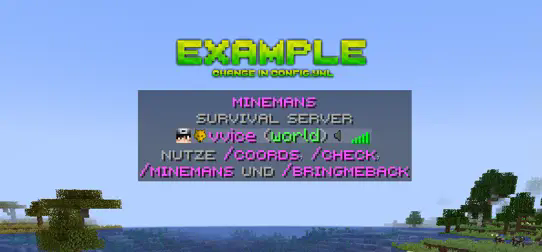
Preview

How it works

Every player who uses the client LabyMod 4 will see a banner above the TabList. It's as simple as it sounds. LabyMod is a German Survival/PvP client with over 4 million unique users. Try it out! Go to LabyMod's Website

Features

  • High-resolution banners up to 5K
  • Easy handling
  • Simple config
  • No impact on performance

Permissons

No permission is required for the players. All players using the client LabyMod 4 will see the banner.

Bug report & support

If you need help or have a bug please contact me via discord (add hassanbwo). I will guarantee quick help - Thanks for supporting :)

config.yml

Simple config. Just change the link to your own personalized banner link (make sure it is a direct link).

# ==========================================
# BannerForLabyMod – config.yml
# ==========================================
# Here you can change the url of the banner:
# Make sure you use a direct link, where only the picture is opened!
# ==========================================
# When you create a banner:
# Please note the aspect ratio of the image must be 5:1 and the recommended resolution is 1280x256 pixels!
# ==========================================

banner_url: "https://i.ibb.co/7rBhrfn/example.png"

👥 Team & Contributors

No authors recorded.

⚙️ Compatibility

Environment
🖥️ Server-side
Loaders
bukkitpaperpurpurspigot
Minecraft Versions
1.21.11.21.21.21.31.21.41.21.101.21.11

🔗 Links

Modrinth Page