Logo
MINECRAFTBIBLE
Items
Items

All game items

Blocks
Blocks

Building blocks

Mobs
Mobs

Creatures & monsters

Biomes
Biomes

World biomes

Structures
Structures

Generated structures

Recipes
Recipes

Crafting guides

Advancements
Advancements

Achievements

Loot Tables
Loot Tables

Drop rates

Tags
Tags

Item groupings

All Versions
View all data →
Capes
Cape ArchiveNEW

Browse rare Minecon capes, OptiFine capes, and custom capes from players worldwide

Browse

Player Database
Player DatabasePopular

Search any player

Skin Browser
Skin Browser

Browse & download skins

Cape Gallery
Cape GalleryNEW

Minecon & OptiFine capes

Seed Vault
Seed Vault

Curated seeds

Learn

Guides
GuidesNew

Tutorials & tips

Blog
Blog

News & updates

Community

Community Hub
Community HubHub

Posts, discussions & more

All Versions
View community →
Seed Analyzer
Seed Analyzer

World seed analysis

Loot Explorer
Loot Explorer

Drop rates

Crafting Calculator
Crafting Calculator

Material planning

Enchant Calculator
Enchant Calculator

Probability math

Redstone Lab
Redstone Lab

Signal timing

Trading Profit
Trading Profit

Villager ROI

All Versions
View all tools →
Mods
Mods

Browse all mods

Plugins
Plugins

Server plugins

Resource Packs
Resource Packs

Textures & sounds

Shaders
Shaders

Visual enhancements

Datapacks
Datapacks

World logic

Scanner
Mod Intelligence

Scan & analyze any mod

All Versions
View all mods →
Loading...
IntroductionIntroductionVersion HistoryVersion HistoryGuidesGuidesBlog & NewsBlog & News
ItemsItemsBlocksBlocksMobsMobsRecipesRecipesBiomesBiomesStructuresStructuresAdvancementsAdvancementsLoot TablesLoot TablesTagsTags
ModsModsPluginsPluginsResource PacksResource PacksShadersShadersDatapacksDatapacks

MinecraftBible

The Ultimate Wiki

Logo
MINECRAFTBIBLE

The ultimate Minecraft reference. Every item, block, mob, and recipe documented with precision.

Community

  • Skin Browser
  • Cape Gallery
  • Seed Vault
  • Blog
  • Guides

Database

  • Items
  • Blocks
  • Mobs
  • Recipes
  • Biomes
  • Structures

Tools

  • Seed Analyzer
  • Mod Intelligence
  • Crafting Calculator
  • Enchant Calculator

Mods & Packs

  • Mods
  • Plugins
  • Resource Packs
  • Shaders
  • Datapacks

Site & Legal

  • About
  • Authors
  • Editorial Policy
  • Corrections
  • Contact
  • Privacy Policy
  • Terms of Service
  • DMCA
  • Sitemap

© 2026 MinecraftBible. Not affiliated with Mojang or Microsoft.

PrivacyTermsContact
Attack indicator
PluginMIT

Attack indicator

Customizable floating damage indicators for Paper servers. Clearly display damage dealt to mobs with stylish placeholders!

2.1K
Downloads
20
Followers
6 months ago
Updated
📦
11
Versions
equipmentgame-mechanicsmobsbukkitpaperpurpurspigot
Download Latestv2.3View on Modrinth

📖About Attack indicator

AttackIndicator

A modern, lightweight damage indicator plugin for Paper/Spigot servers. Display beautiful animated floating damage numbers when entities take damage.

Version Support

The plugin automatically detects your server version and uses the best available method:

Version Method Features
1.19.4+ Display Entities Smooth animations, scalable, best performance
1.16.5-1.19.3 Armor Stands MiniMessage support (hex colors, gradients)
1.8-1.16.4 Armor Stands Legacy ChatColor (basic colors: &c, &6, &a, etc.)

Key Features

  • Smooth Animations - Floating damage indicators with configurable speed and duration
  • Rich Text Formatting - MiniMessage support on 1.16.5+ (hex colors, gradients, styles)
  • Highly Customizable - Control appearance, size, position, speed, and behavior
  • Smart Filtering - Show indicators based on damage source (all/player-only/no-self)
  • Player Damage Support - Optional indicators on players
  • Entity Filtering - Whitelist/blacklist specific entity types
  • Random Positioning - Natural look with random offsets to prevent stacking
  • Auto-Update Checker - Get notified when new versions are available
  • World Management - Disable indicators in specific worlds
  • Performance Optimized - Minimal server impact on all versions

Commands

  • /ai reload - Reload plugin configuration
  • Aliases: /attackindicator

Configuration

All settings are in config.yml with detailed comments explaining version compatibility.

Quick Examples

# Works on all versions
indicator-format: "<#ffffff>-{damage}<#ff5555>♥"  # Hex colors on 1.16.5+
indicator-format: "&f-{damage}&c♥"                # Legacy format for 1.8-1.16.4

# Scale (1.19.4+ only)
indicator-scale: 1.5

# Display mode (all versions)
display-mode: PLAYER_ONLY

Attack indicator >2.0 stats
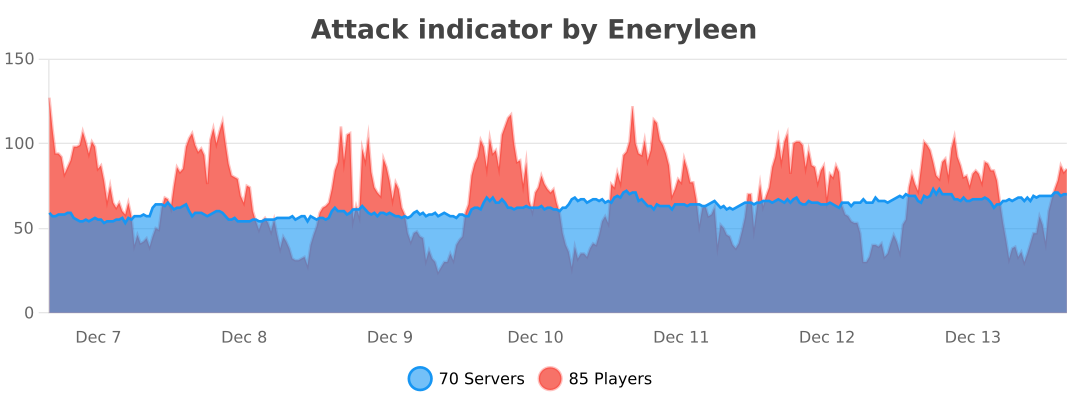
bstats

👥 Team & Contributors

Eneryleen
Eneryleen
Member

⚙️ Compatibility

Environment
🖥️ Server-side
Loaders
bukkitpaperpurpurspigot
Minecraft Versions
1.81.8.11.8.21.8.31.8.41.8.51.8.61.8.7+62 more

🔗 Links

Modrinth Page