
MINECRAFTBIBLE
Loading...


BigDoors v2: Create big, ANIMATED doors, drawbridges, portcullises, flags, windmills, and more!

AnimatedArchitecture is a plugin for the Minecraft server mod Spigot. Its aim is to enhance your
server with animated blocks that can be used to create many kinds of animated architectural structures.
AnimatedArchitecture is a rewrite of the old BigDoors plugin. You can find the legacy BigDoors plugin
here.
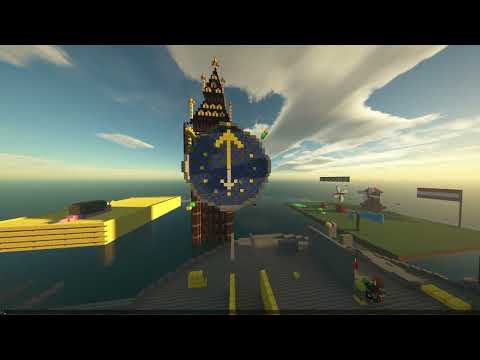
(Click the image to go to YouTube and watch the video)
The following structure types are currently supported:
AnimatedArchitecture-Spigot.jar file.AnimatedArchitecture-Spigot.jar in the plugins directory of your server.AnimatedArchitecture folder.As of release Alpha 0.1.8.44, BigDoors has a command that allows
you to export the old database to the new format. Newer versions may contain additional improvements to the export
process, so it is recommended to use the latest version of BigDoors to export your database.
While running a supported version, you can run the BigDoors PrepareDatabaseForV2 command in
the console to export the database. Read the output in the console to see if everything was exported correctly.
Running this command does not affect the existing database for BigDoors.
After the export process has completed, you can copy the new structures.db file out of the BigDoors folder into
the AnimatedArchitecture folder. You will now be able to use the structures you created in BigDoors!
Please note that the export process may not always produce a perfect conversion, potentially leading to minor
inconsistencies, such as incorrect opening directions under certain circumstances. Despite these occasional
discrepancies, the majority of exported structures should function properly. Any errors can be easily rectified in-game
using available commands or the menu.
Official translations are managed through Weblate:
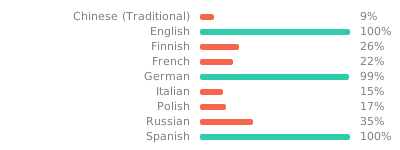
By default, the plugin will use the messages from localization/translations.bundle.
This file is regenerated every time the plugin restart, so please do not edit this file manually.
All translation keys used by the plugin are also written to a localization/translations.properties file.
When you provide one or more keys with a value, the plugin will create a new file the next time it restarts:localization/translations_patched.properties. This file contains the same data as the 'base' bundle, except for any
lines you changed in the properties file.
To put it simply, you can override any of the official translations using the properties file.
One thing to keep in mind when trying to override translations is that it respects the locale entry.
This means that the translations.properties file only overrides the base localization messages.
The way the localization system works, is that it first tries to get the translated message from the locale defined in
the config, and, if that does not exist, from the base localization file.
For example, if you set the locale to nl_NL (Dutch) in the config, the plugin will try to retrieve messages fromtranslations_nl_NL.properties first. If no value is provided for the key the plugin is looking for, it will try thetranslations.properties file next.
So, if you have set your locale to nl_NL in the config and want to override the default translations,
follow these steps:
translations.properties to translations_nl_NL.properties.localization/translations.bundle to see the current translations./AnimatedArchitecture restartCompilation requirements:
You can then compile the project by running the following command in this directory:
mvn package
To also run all the tests, static analysis tools etc., you can run the following command:
mvn -P=errorprone test package checkstyle:checkstyle pmd:check
The AnimatedArchitecture-Spigot.jar file can then be found
in animatedarchitecture-spigot/spigot-core/target/AnimatedArchitecture-Spigot.jar.
The jars for each structure type can be found in structures/StructuresOutput/<StructureType>.jar.
This project can be included as a dependency using JitPack.
For the artifactId field, you can use any of the core modules. For the following examples below, we will
use spigot-core. This module contains the implementations for the Spigot platform, as well as some utility methods and
classes that make it easier to work with.
You could also use animatedarchitecture-core if you wish to only use the API and not the Spigot platform.
<repositories>
    <repository>
        <id>jitpack.io</id>
        <url>https://jitpack.io</url>
    </repository>
</repositories>
<dependencies>
    <dependency>
        <groupId>com.github.PimvanderLoos.AnimatedArchitecture</groupId>
        <artifactId>spigot-core</artifactId>
        <version>0.7.2</version>
        <scope>provided</scope>
    </dependency>
</dependencies>
repositories {
    maven { url "https://jitpack.io/" }
}

dependencies {
    compileOnly("com.github.PimvanderLoos.AnimatedArchitecture", "spigot-core", "0.7.2")
}
The javadocs for this project can be found here.