Logo
MINECRAFTBIBLE
Items
Items

All game items

Blocks
Blocks

Building blocks

Mobs
Mobs

Creatures & monsters

Biomes
Biomes

World biomes

Structures
Structures

Generated structures

Recipes
Recipes

Crafting guides

Advancements
Advancements

Achievements

Loot Tables
Loot Tables

Drop rates

Tags
Tags

Item groupings

All Versions
View all data →
Capes
Cape ArchiveNEW

Browse rare Minecon capes, OptiFine capes, and custom capes from players worldwide

Browse

Player Database
Player DatabasePopular

Search any player

Skin Browser
Skin Browser

Browse & download skins

Cape Gallery
Cape GalleryNEW

Minecon & OptiFine capes

Seed Vault
Seed Vault

Curated seeds

Learn

Guides
GuidesNew

Tutorials & tips

Blog
Blog

News & updates

Community

Community Hub
Community HubHub

Posts, discussions & more

All Versions
View community →
Seed Analyzer
Seed Analyzer

World seed analysis

Loot Explorer
Loot Explorer

Drop rates

Crafting Calculator
Crafting Calculator

Material planning

Enchant Calculator
Enchant Calculator

Probability math

Redstone Lab
Redstone Lab

Signal timing

Trading Profit
Trading Profit

Villager ROI

All Versions
View all tools →
Mods
Mods

Browse all mods

Plugins
Plugins

Server plugins

Resource Packs
Resource Packs

Textures & sounds

Shaders
Shaders

Visual enhancements

Datapacks
Datapacks

World logic

Scanner
Mod Intelligence

Scan & analyze any mod

All Versions
View all mods →
Loading...
IntroductionIntroductionVersion HistoryVersion HistoryGuidesGuidesBlog & NewsBlog & News
ItemsItemsBlocksBlocksMobsMobsRecipesRecipesBiomesBiomesStructuresStructuresAdvancementsAdvancementsLoot TablesLoot TablesTagsTags
ModsModsPluginsPluginsResource PacksResource PacksShadersShadersDatapacksDatapacks

MinecraftBible

The Ultimate Wiki

Logo
MINECRAFTBIBLE

The ultimate Minecraft reference. Every item, block, mob, and recipe documented with precision.

Community

  • Skin Browser
  • Cape Gallery
  • Seed Vault
  • Blog
  • Guides

Database

  • Items
  • Blocks
  • Mobs
  • Recipes
  • Biomes
  • Structures

Tools

  • Seed Analyzer
  • Mod Intelligence
  • Crafting Calculator
  • Enchant Calculator

Mods & Packs

  • Mods
  • Plugins
  • Resource Packs
  • Shaders
  • Datapacks

Site & Legal

  • About
  • Authors
  • Editorial Policy
  • Corrections
  • Contact
  • Privacy Policy
  • Terms of Service
  • DMCA
  • Sitemap

© 2026 MinecraftBible. Not affiliated with Mojang or Microsoft.

PrivacyTermsContact
Animated Frames
PluginLicenseRef-All-Rights-Reserved

Animated Frames

Display GIFs PNGs & JPG in Screen

6.2K
Downloads
18
Followers
4 months ago
Updated
📦
30
Versions
decorationutilitybukkitfabricforgeneoforgepaperpurpurspigot
Download Latestv1.6.2View on Modrinth

📖About Animated Frames

Banner

📺 AnimatedFrames — v1.6.1

Display GIFs, PNGs, JPGs, JPEGs and MP4 videos on screen!

AnimatedFrames allows you to display GIFs, PNGs, JPGs, JPEGs and MP4 videos within Minecraft using commands.

Requirements

  • Loader support: Forge • Fabric • NeoForge • purpur • spigot • & forks
  • Dependency: Watermedia

Wiki

📝 Commands

Client-side commands (/mediac) — only you see them

  • /mediac show <name> [duration] [position] [scale] [volume] Display media locally from your files. Example: /mediac show sunny.gif 10 center 1.0 80

  • /mediac stop Stop the current media.

  • /mediac list List files in your local folder.

  • /mediac lang <en|es> Change the language (English or Spanish).

Server-side commands (/medias) — requires OP

  • /medias show <player|@a> <name> [duration] [position] [scale] [volume] Send media to the selected players. Example: /medias show @a example.gif 15 topleft 2.0 80

  • /medias stop <player|@a> Stop media for selected players.

Important: The media file must exist in each player's own client folder. Players without the mod or without the file will not see anything.


⚠️ File Location

Folder (client only): .minecraft/config/animatedframes/media/

  • Place your .gif, .png, .jpg, .jpeg, .mp4 files here
  • Folder is created automatically on first use
  • No server folder — each player needs the file in their own client

🔌 Plugin Support

AnimatedFrames also has a Bukkit/Spigot/Paper plugin version for server-side control. With the plugin, server admins can trigger media on players' screens without needing the mod on the server.

Players still need the client mod and the media files on their own .minecraft folder.


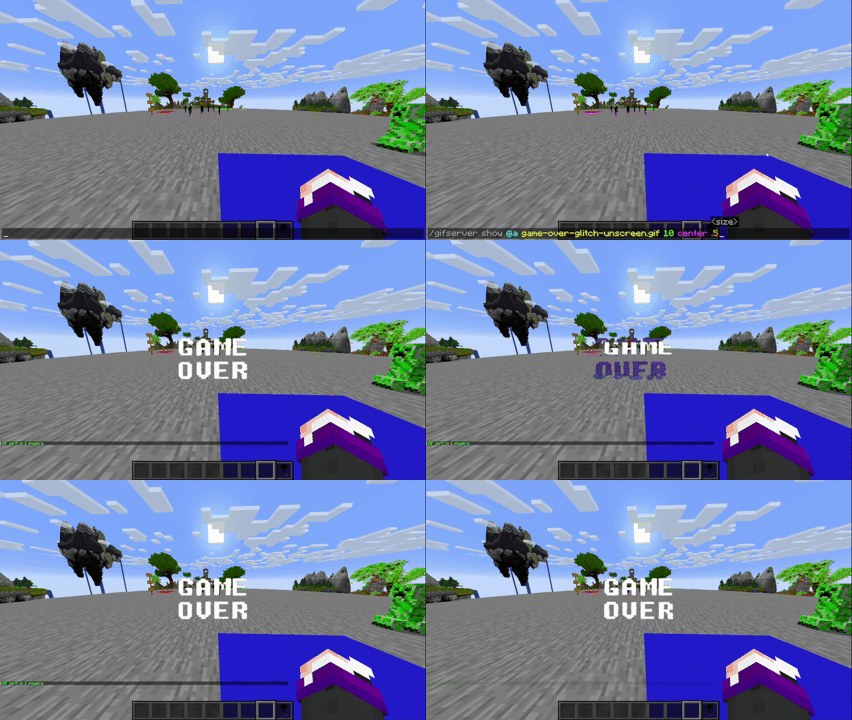
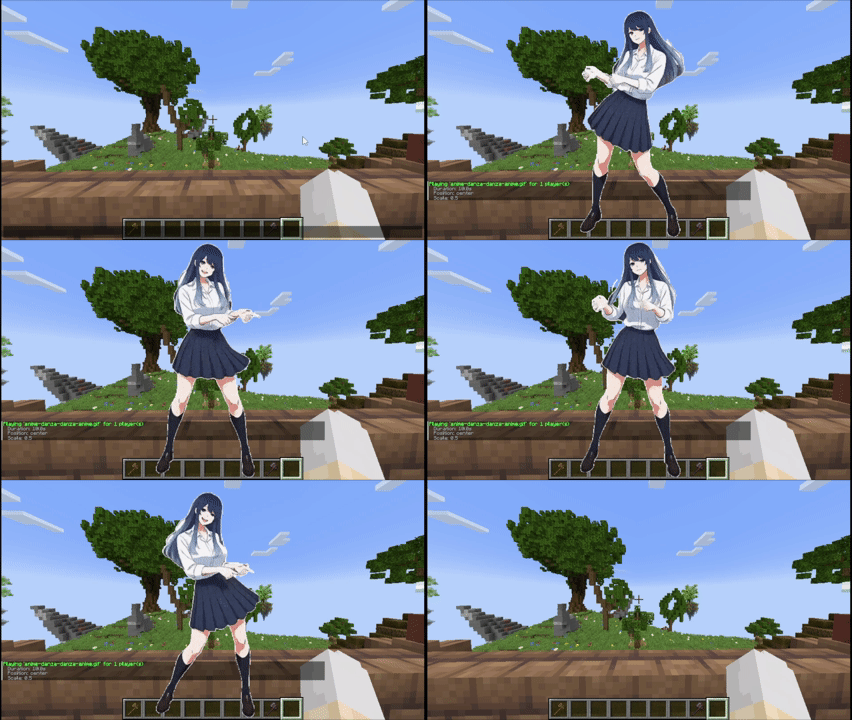
  • GIF, PNG, JPG or JPEG displayed locally (client):

    client

  • GIF, PNG, JPG or JPEG sent to players (server):

    Server

  • GIF, PNG, JPG or JPEG sent to players (plugin): plugin


Tutorial

Placing files (Client only)

Folder Location: .minecraft/config/animatedframes/media/

Steps:

  1. Copy your GIF, PNG, JPG, JPEG or MP4 file into the media folder.
  2. Make sure the file has the correct extension (.gif, .png, .jpg, .jpeg, .mp4).
  3. Display it in-game:
    • Local (only you): /mediac show sunny.gif 10 center 1.0 80
    • Send to others: /medias show @a sunny.gif 15 center 1.0 80

Notes:

  • /mediac show → only visible to you
  • /medias show → sends to other players — they must have the mod AND the file in their own client folder
  • No need to upload anything to the server
  • Large files (>1MB) may cause slight delays
  • Invalid files show an error in chat
  • Use /mediac list to see your available files
  • Volume range: 0–100 (default: 80)
  • Media stops automatically when you disconnect

Available positions (10 options)

center topleft topright bottomleft bottomright topcenter bottomcenter leftcenter rightcenter fullscreen

fullscreen — fills the entire screen maintaining the aspect ratio of the media


Credits

  • Created by @SunnyAim_
  • 🎬 Mp4 Integration made possible with the help of @SoyKatto1
  • Support: Contact @SunnyAim_ for help or questions.

👥 Team & Contributors

SunnyMp
SunnyMpOwner

⚙️ Compatibility

Environment
✅ Client & Server
Loaders
bukkitfabricforgeneoforgepaperpurpurspigot
Minecraft Versions
1.21.4

🔗 Links

Modrinth Page