

Amend
A plugin that auto updates paper or purpur to the newest version based on the Minecraft version.
📖About Amend

Amend
A plugin that auto updates paper or purpur to the newest version based on the Minecraft version.
The plugin updates your server right before shutdown and has a SUPER LOW CHANCE of causing any problems, but just incase please use at your own risk.
(there have been no problems though so far based on different types of sized worlds and what else I have tested. Still, be careful anyways :D)
Download
Currently as of now you can download it on our new website @ amend.mrtron.dev/download
Windows
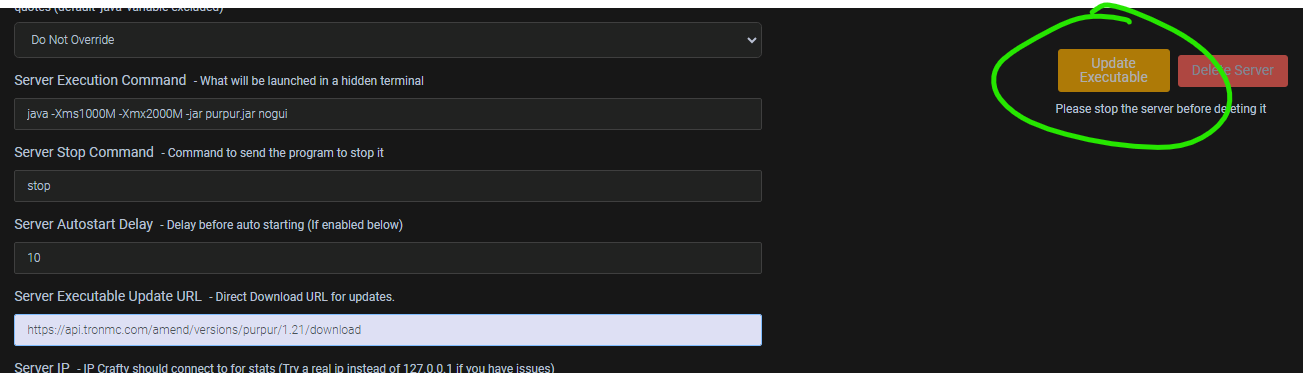
Windows is NOT fully supported, this is because of the way Windows handles files compared to Linux. If you would like to use this on Windows, the only support Amend has is through Crafty's Executable URL.
You can place https://api.tronmc.com/amend/versions/(SERVER TYPE HERE)/1.21.7/download/ into the executable URL and click Update Executable to download the latest version of the server jar.
How to make it work
You can use either paper or purpur.
It grabs the latest version from our API and just replaces the server jar.
If you would like to use it there are a few things you need to do.
- First make sure purpur/paper is installed and name the jar to whatever you'd like. Please make sure to change it in the config though, so the system can find your jar file.
- Second choose your server type. WE have AUTO (which detects it for you) or if you would like to force one, you may type it in.
Automatic Detection
Amend now has Automatic Server Detection. AUTO (Automatic Updating Type Observer [i wanted an acronym it seems cool]) is now the default setting for the plugin. This allows the plugin to read the jar file and determine the type of server it is.
#
#    ╭━━━╮╱╱╱╱╱╱╱╱╱╱╭╮
#    ┃╭━╮┃╱╱╱╱╱╱╱╱╱╱┃┃
#    ┃┃╱┃┣╮╭┳━━┳━╮╭━╯┃
#    ┃╰━╯┃╰╯┃┃━┫╭╮┫╭╮┃
#    ┃╭━╮┃┃┃┃┃━┫┃┃┃╰╯┃
#    ╰╯╱╰┻┻┻┻━━┻╯╰┻━━╯

# --YOU MAY EDIT THIS WHILE THE SERVER IS ON, DO NOT WORRY!...THE CONFIG REFRESHES TO SEE THE CHANGES YOU MADE AUTOMATICALLY--

# This changes the jar file name. PLEASE MAKE SURE IT MATCHES THE JAR FILE NAME OR ELSE IT WILL CREATE A NEW JAR FILE.
# Also make sure to include ".jar".
jar-name: "server.jar"

# This how you can customize the type of server you would like. It is defaulted to "AUTO".
# AUTO allows the server to read the JAR file and determine for itself the type of server. However, you can override this.
# The current options for selecting the server jar are "purpur" or "paper".
server-type: "AUTO"

# Config Version. Like every spigot dev, we ask that you DO NOT CHANGE THIS PLEASE.
config-version: 9
- Then place the (plugin) jar in and it will automatically update it to the newest version, please note as of now the plugin is updating the latest
1.21.7builds and will continue to update until a new release comes out, then you will need to come back here to get the newest plugin update.
Update checks for the plugin are currently unavailable to switch off, but we only create the update notification if it's a critical update, not a fancy one.