Logo
MINECRAFTBIBLE
Items
Items

All game items

Blocks
Blocks

Building blocks

Mobs
Mobs

Creatures & monsters

Biomes
Biomes

World biomes

Structures
Structures

Generated structures

Recipes
Recipes

Crafting guides

Advancements
Advancements

Achievements

Loot Tables
Loot Tables

Drop rates

Tags
Tags

Item groupings

All Versions
View all data →
Capes
Cape ArchiveNEW

Browse rare Minecon capes, OptiFine capes, and custom capes from players worldwide

Browse

Player Database
Player DatabasePopular

Search any player

Skin Browser
Skin Browser

Browse & download skins

Cape Gallery
Cape GalleryNEW

Minecon & OptiFine capes

Seed Vault
Seed Vault

Curated seeds

Learn

Guides
GuidesNew

Tutorials & tips

Blog
Blog

News & updates

Community

Community Hub
Community HubHub

Posts, discussions & more

All Versions
View community →
Seed Analyzer
Seed Analyzer

World seed analysis

Loot Explorer
Loot Explorer

Drop rates

Crafting Calculator
Crafting Calculator

Material planning

Enchant Calculator
Enchant Calculator

Probability math

Redstone Lab
Redstone Lab

Signal timing

Trading Profit
Trading Profit

Villager ROI

All Versions
View all tools →
Mods
Mods

Browse all mods

Plugins
Plugins

Server plugins

Resource Packs
Resource Packs

Textures & sounds

Shaders
Shaders

Visual enhancements

Datapacks
Datapacks

World logic

Scanner
Mod Intelligence

Scan & analyze any mod

All Versions
View all mods →
Loading...
IntroductionIntroductionVersion HistoryVersion HistoryGuidesGuidesBlog & NewsBlog & News
ItemsItemsBlocksBlocksMobsMobsRecipesRecipesBiomesBiomesStructuresStructuresAdvancementsAdvancementsLoot TablesLoot TablesTagsTags
ModsModsPluginsPluginsResource PacksResource PacksShadersShadersDatapacksDatapacks

MinecraftBible

The Ultimate Wiki

Logo
MINECRAFTBIBLE

The ultimate Minecraft reference. Every item, block, mob, and recipe documented with precision.

Community

  • Skin Browser
  • Cape Gallery
  • Seed Vault
  • Blog
  • Guides

Database

  • Items
  • Blocks
  • Mobs
  • Recipes
  • Biomes
  • Structures

Tools

  • Seed Analyzer
  • Mod Intelligence
  • Crafting Calculator
  • Enchant Calculator

Mods & Packs

  • Mods
  • Plugins
  • Resource Packs
  • Shaders
  • Datapacks

Site & Legal

  • About
  • Authors
  • Editorial Policy
  • Corrections
  • Contact
  • Privacy Policy
  • Terms of Service
  • DMCA
  • Sitemap

© 2026 MinecraftBible. Not affiliated with Mojang or Microsoft.

PrivacyTermsContact
AliienChatColor - LITE
PluginMIT

AliienChatColor - LITE

Lite version of my original chat color plugin

39
Downloads
0
Followers
1 months ago
Updated
📦
3
Versions
economysocialutilityfoliapaperpurpurspigot
Download Latestv1.0.2View on Modrinth

📖About AliienChatColor - LITE

⭐ This is the FREE/LITE version of AliienChatColor! Premium Download Links ⭐

🎨 Why Choose AliienChatColor Lite?

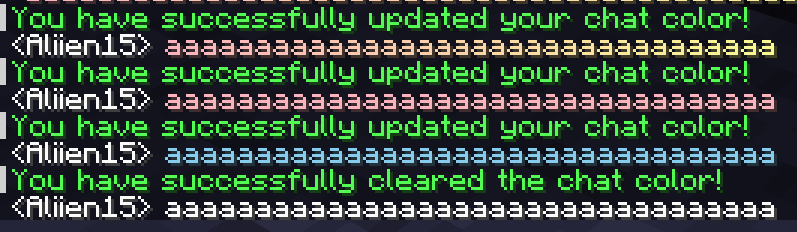
AliienChatColor Lite is the ultimate lightweight chat colors plugin for your Minecraft server! It allows you to add a brand new type of chat-based cosmetics to your server, giving your players access to beautiful single colors and multi-color gradients while remaining incredibly optimized.

✨ Key Features

  • Highly Optimized: This plugin has been tested and proven to be incredibly efficient in terms of performance. It handles chat formatting with zero impact on your server's TPS.
  • Custom Gradients & Hex Support: This plugin uses MiniMessage, which means you can format your chat colors in the config using exact hex codes (e.g., <#FF0000>) or stunning multi-color gradients!
  • PlaceholderAPI Integration: PlaceholderAPI is an optional dependency, allowing you to easily hook your players' active chat colors into your favorite chat formatting plugins (like EssentialsChat or Chatty).

⌨️ Commands & Permissions

AliienChatColor provides granular control over exactly what your players can do.

Player Commands:

  • /cc set <color> - Manually equip a specific chat color from the config.
    • Permissions: aliien.chatcolor.set AND aliien.color.<colorId> (e.g., aliien.color.cotton_candy)
  • /cc clear - Removes your active chat color.
    • Permission: aliien.chatcolor.clear

Admin Commands:

  • /cc admin reload - Safely reloads the config and messages files.
    • Permission: aliien.chatcolor.admin.reload (Base permission: aliien.chatcolor.admin)

Other Permissions:

  • aliien.chatcolor.version-notify - Receive in-game notifications when a new plugin update is released.

🔌 Available Placeholders

  • %aliienchatcolor_format% - Returns the raw MiniMessage tags of the active color (e.g., <#FF0000>)
  • %aliienchatcolor_active% - Returns the raw ID of the player's equipped color (e.g., cotton_candy).
  • %aliienchatcolor_has_<colorId>% - Returns "True" or "False" if the player has permission for that specific color.

📦 Dependencies & Installation

  • Permissions Plugin: Required (e.g., LuckPerms).
  • PlaceholderAPI: Optional.
  1. Download the latest AliienChatColor-Lite.jar.
  2. Drop the .jar file into your server's plugins/ folder.
  3. Restart your server.

💬 Professional Support

I am dedicated to maintaining my "Aliien" suite of plugins. If you find a bug or have a feature request, join the Discord for a fast response.

Discord Server


Thank you for downloading! If you enjoy the free version, please consider leaving a ⭐⭐⭐⭐⭐ review to help support the project!

👥 Team & Contributors

aliien15
aliien15Owner

⚙️ Compatibility

Environment
🖥️ Server-side
Loaders
foliapaperpurpurspigot
Minecraft Versions
1.211.21.11.21.21.21.31.21.41.21.51.21.61.21.7+4 more

🔗 Links

Modrinth Page