

AdminWatchdog
AdminWatchdog lets you monitor what staff members do on your server. When an admin runs a command, changes gamemode, or takes items from creative mode, the plugin sends a message to your Discord channel. This helps server owners keep track of staff activit
📖About AdminWatchdog
AdminWatchdog


Monitor what your admins are doing and get notified on Discord
What is AdminWatchdog?
AdminWatchdog monitors what staff members do on your server. When an admin runs a command, changes gamemode, or takes items from creative mode, the plugin sends a message to your Discord channel. Helps you keep track of staff activity and catch misuse.
What it does
- Sends Discord messages when admins run commands
- Tracks gamemode switches
- Logs items taken from creative inventory
- Sets up custom alerts for specific commands
- Only monitors who you want to monitor
- Lets trusted admins bypass monitoring
Screenshots
Discord messages
Creative inventory tracking
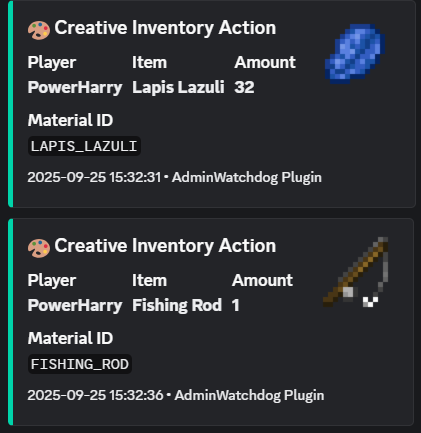
When someone takes items from creative mode, you get a Discord message showing exactly what they took:
Command alerts
Custom alerts
Set up special messages for important commands:
Gamemode changes
Features
Discord alerts
- Instant notifications in your Discord server
- Nice looking messages with item pictures
- Ping specific roles for important commands
- Works with any Discord channel using webhooks
What gets monitored
- Commands run by admins
- Commands run from console
- Gamemode changes
- Items taken from creative inventory
Who gets monitored
You choose:
- Only OPs
- Only players with certain permissions
- Or everyone
You can also give trusted admins a bypass permission so they don't get logged.
Custom command alerts
Set up special alerts for commands you care about. You can even match specific command patterns:
ban- matches any ban commandlp user- matches LuckPerms user commandslp user * permission set *- matches only when someone sets a permission
Get pinged only for the important stuff, like when someone grants a dangerous permission.
How to install
- Download the plugin from the Downloads tab
- Put the JAR file in your server's
pluginsfolder - Restart your server
- Edit
plugins/AdminWatchdog/config.yml - Add your Discord webhook URL
- Run
/adminwatchdog reload
Setting up Discord
- In Discord, go to your channel settings
- Click "Integrations" then "Webhooks"
- Create a new webhook
- Copy the webhook URL
- Paste it in your config.yml
Configuration
Basic setup
discord:
  webhook-url: "YOUR_WEBHOOK_URL_HERE"
  enabled: true
Custom alerts
Set up alerts for specific commands:
custom-responses:
  enabled: true

  # Alert when someone uses /ban
  ban: "**BAN** - %player% banned someone at %time%"

  # Alert and ping a role when someone uses /op
  op: "**CRITICAL** - %player% used OP! <@&YOUR_ROLE_ID> at %time%"

  # Alert for specific LuckPerms commands
  "lp user * permission set *": "**PERMISSION** - %player% set permission: %command%"
What the placeholders mean
%player%- The player who ran the command%sender%- For console commands%command%- The full command they typed%time%- When it happened
Mentioning roles in Discord
To ping a role, you need the role ID. In Discord, type \@RoleName to get the ID, then use it like <@&123456789> in your config.
Commands
| Command | What it does |
|---|---|
/adminwatchdog or /aw |
Shows plugin info |
/adminwatchdog version |
Shows version number |
/adminwatchdog reload |
Reloads the config |
/adminwatchdog update |
Checks for updates |
Permissions
| Permission | What it does | Who has it |
|---|---|---|
adminwatchdog.reload |
Lets you reload config | OPs only |
adminwatchdog.monitor |
Makes you get monitored | OPs only |
adminwatchdog.bypass.commands |
Stops your commands being logged | Nobody |
adminwatchdog.bypass.creative |
Stops creative inventory being logged | Nobody |
adminwatchdog.bypass.customresponses |
Stops custom alerts for you | Nobody |
adminwatchdog.bypass.gamemode |
Stops gamemode changes being logged | Nobody |
How to stop being monitored
Give yourself one of the bypass permissions. For example, if you don't want custom responses pinging you:
/lp user YourName permission set adminwatchdog.bypass.customresponses true
Need help?
- Check if someone already asked about your problem in Issues
- Join the Discord server
- Open a new issue on GitHub
Requirements
- Paper or Spigot server (Paper recommended)
- Minecraft 1.20 or newer
- Java 21 or newer
License
This plugin has a proprietary license. You can use it on your server, but you cannot modify the code or redistribute it.
Made by TejasLamba2006