Logo
MINECRAFTBIBLE
Items
Items

All game items

Blocks
Blocks

Building blocks

Mobs
Mobs

Creatures & monsters

Biomes
Biomes

World biomes

Structures
Structures

Generated structures

Recipes
Recipes

Crafting guides

Advancements
Advancements

Achievements

Loot Tables
Loot Tables

Drop rates

Tags
Tags

Item groupings

All Versions
View all data →
Capes
Cape ArchiveNEW

Browse rare Minecon capes, OptiFine capes, and custom capes from players worldwide

Browse

Player Database
Player DatabasePopular

Search any player

Skin Browser
Skin Browser

Browse & download skins

Cape Gallery
Cape GalleryNEW

Minecon & OptiFine capes

Seed Vault
Seed Vault

Curated seeds

Learn

Guides
GuidesNew

Tutorials & tips

Blog
Blog

News & updates

Community

Community Hub
Community HubHub

Posts, discussions & more

All Versions
View community →
Seed Analyzer
Seed Analyzer

World seed analysis

Loot Explorer
Loot Explorer

Drop rates

Crafting Calculator
Crafting Calculator

Material planning

Enchant Calculator
Enchant Calculator

Probability math

Redstone Lab
Redstone Lab

Signal timing

Trading Profit
Trading Profit

Villager ROI

All Versions
View all tools →
Mods
Mods

Browse all mods

Plugins
Plugins

Server plugins

Resource Packs
Resource Packs

Textures & sounds

Shaders
Shaders

Visual enhancements

Datapacks
Datapacks

World logic

Scanner
Mod Intelligence

Scan & analyze any mod

All Versions
View all mods →
Loading...
IntroductionIntroductionVersion HistoryVersion HistoryGuidesGuidesBlog & NewsBlog & News
ItemsItemsBlocksBlocksMobsMobsRecipesRecipesBiomesBiomesStructuresStructuresAdvancementsAdvancementsLoot TablesLoot TablesTagsTags
ModsModsPluginsPluginsResource PacksResource PacksShadersShadersDatapacksDatapacks

MinecraftBible

The Ultimate Wiki

Logo
MINECRAFTBIBLE

The ultimate Minecraft reference. Every item, block, mob, and recipe documented with precision.

Community

  • Player Database
  • Skin Browser
  • Cape Gallery
  • Community Hub
  • Seed Vault

Database

  • Items
  • Blocks
  • Mobs
  • Recipes
  • Biomes
  • Structures

Tools

  • Seed Analyzer
  • Mod Intelligence
  • Crafting Calculator
  • Enchant Calculator

Mods & Packs

  • Mods
  • Plugins
  • Resource Packs
  • Shaders
  • Datapacks

© 2026 MinecraftBible. Not affiliated with Mojang or Microsoft.

PrivacyTermsContact
Weird Wares
ModLicenseRef-The-Lambda-License

Weird Wares

Weird wares for your wacky world! This mod adds various unobtainable and forgotten items, blocks, and features plus a few extras.

5.0K
Downloads
9
Followers
4 months ago
Updated
📦
8
Versions
curseddecorationutilityfabric
Download Latestv0.3.0+1.21.11View on Modrinth

📖About Weird Wares

Weird Wares

Weird wares for your wacky world! This mod adds various unobtainable and forgotten items, blocks, and features plus a few extras.

Showcased at BlanketCon '25

Glitter

Fair warning: Excessive use of glitter may result in frame drops.

Glitter can be used to add enchantment glint to items and blocks in your world. In the inventory, select a stack of glitter, then apply (left click) the glitter on another item stack. Enchanted blocks that are placed down will appear enchanted in the world.

A Nether Reactor Core (left) next to an enchanted Glowing Obsidian block (right)

Crafting

You can craft a Nether Reactor Core with by placing a vertical line of 3 iron ingots on the left, 3 diamonds in the middle, and 3 iron ingots on the right.
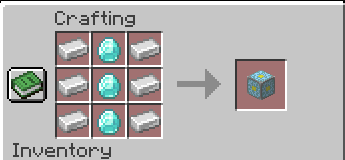
The Nether Reactor Core crafting recipe

Unobtainables

There are a few unobtainable blocks that Weird Wares adds to the Creative menu. For example, there is now an "info update" block and an Unknown block.

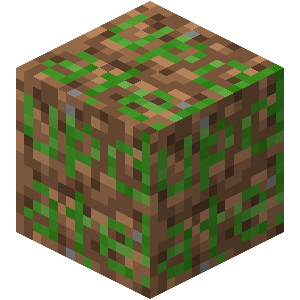
An unknown block: a dirt block with a question mark superimposed on its surface
An info update block: a dirt block with "update" written in green on its surface

Credit to the Minecraft Wiki for renders of unknown.png and info_update.png.

Sculk Remote

When used, the Sculk Remote can remotely interact with a block. When sneaking and used, the Sculk Remote sets its target position and dimension to the target block. When dispensed in a dispenser block, the Sculk Remote remotely interacts with its target block, effectively enabling remote redstone. Additionally, Sculk Remotes can shift right-click in a dispenser if the player holds shift and left-clicks a block.
The crafting recipe for a Sculk Remote
The metadata tooltip of a Sculk Remote
The lever is off before using a Sculk Remote bound to the Lever
The lever is now on after using a Sculk Remote bound to the Lever

More to Come

This mod is in its early stages. New features will be released periodically as they are requested. There is no guarantee that any one idea will make it into the mod, but you may create an issue on the issue tracker.

Usage Permission

You may use this mod in your Modpack provided you give adequate and direct credit, via a link to the mod's page as well as a copy of the source code. You may not redistribute binary builds of the Software if you do not also provide the Source Code.

License

By contributing, you agree to the license terms found in LICENSE. You may create forks for the purpose of contributing code upstream.

Special Thanks To...

  • Oliver-makes-code for helping with asset creation.

👥 Team & Contributors

Sylv
Sylv
Maintainer

⚙️ Compatibility

Environment
✅ Client & Server
Loaders
fabric
Minecraft Versions
1.21.11

🔗 Links

Modrinth Page