Logo
MINECRAFTBIBLE
Items
Items

All game items

Blocks
Blocks

Building blocks

Mobs
Mobs

Creatures & monsters

Biomes
Biomes

World biomes

Structures
Structures

Generated structures

Recipes
Recipes

Crafting guides

Advancements
Advancements

Achievements

Loot Tables
Loot Tables

Drop rates

Tags
Tags

Item groupings

All Versions
View all data →
Capes
Cape ArchiveNEW

Browse rare Minecon capes, OptiFine capes, and custom capes from players worldwide

Browse

Player Database
Player DatabasePopular

Search any player

Skin Browser
Skin Browser

Browse & download skins

Cape Gallery
Cape GalleryNEW

Minecon & OptiFine capes

Seed Vault
Seed Vault

Curated seeds

Learn

Guides
GuidesNew

Tutorials & tips

Blog
Blog

News & updates

Community

Community Hub
Community HubHub

Posts, discussions & more

All Versions
View community →
Seed Analyzer
Seed Analyzer

World seed analysis

Loot Explorer
Loot Explorer

Drop rates

Crafting Calculator
Crafting Calculator

Material planning

Enchant Calculator
Enchant Calculator

Probability math

Redstone Lab
Redstone Lab

Signal timing

Trading Profit
Trading Profit

Villager ROI

All Versions
View all tools →
Mods
Mods

Browse all mods

Plugins
Plugins

Server plugins

Resource Packs
Resource Packs

Textures & sounds

Shaders
Shaders

Visual enhancements

Datapacks
Datapacks

World logic

Scanner
Mod Intelligence

Scan & analyze any mod

All Versions
View all mods →
Loading...
IntroductionIntroductionVersion HistoryVersion HistoryGuidesGuidesBlog & NewsBlog & News
ItemsItemsBlocksBlocksMobsMobsRecipesRecipesBiomesBiomesStructuresStructuresAdvancementsAdvancementsLoot TablesLoot TablesTagsTags
ModsModsPluginsPluginsResource PacksResource PacksShadersShadersDatapacksDatapacks

MinecraftBible

The Ultimate Wiki

Logo
MINECRAFTBIBLE

The ultimate Minecraft reference. Every item, block, mob, and recipe documented with precision.

Community

  • Skin Browser
  • Cape Gallery
  • Seed Vault
  • Blog
  • Guides

Database

  • Items
  • Blocks
  • Mobs
  • Recipes
  • Biomes
  • Structures

Tools

  • Seed Analyzer
  • Mod Intelligence
  • Crafting Calculator
  • Enchant Calculator

Mods & Packs

  • Mods
  • Plugins
  • Resource Packs
  • Shaders
  • Datapacks

Site & Legal

  • About
  • Authors
  • Editorial Policy
  • Corrections
  • Contact
  • Privacy Policy
  • Terms of Service
  • DMCA
  • Sitemap

© 2026 MinecraftBible. Not affiliated with Mojang or Microsoft.

PrivacyTermsContact
Utility Belt
ModMIT

Utility Belt

Adds a wearable secondary hotbar to help manage your tools and clear inventory clutter

259.6K
Downloads
379
Followers
4 months ago
Updated
📦
30
Versions
adventureequipmentstoragefabricforgeneoforgequilt
Download Latestv3.0.0+1.21.10View on Modrinth

📖About Utility Belt

Utility Belt: Free your hotbar; adds an extra hotbar for storing your tools

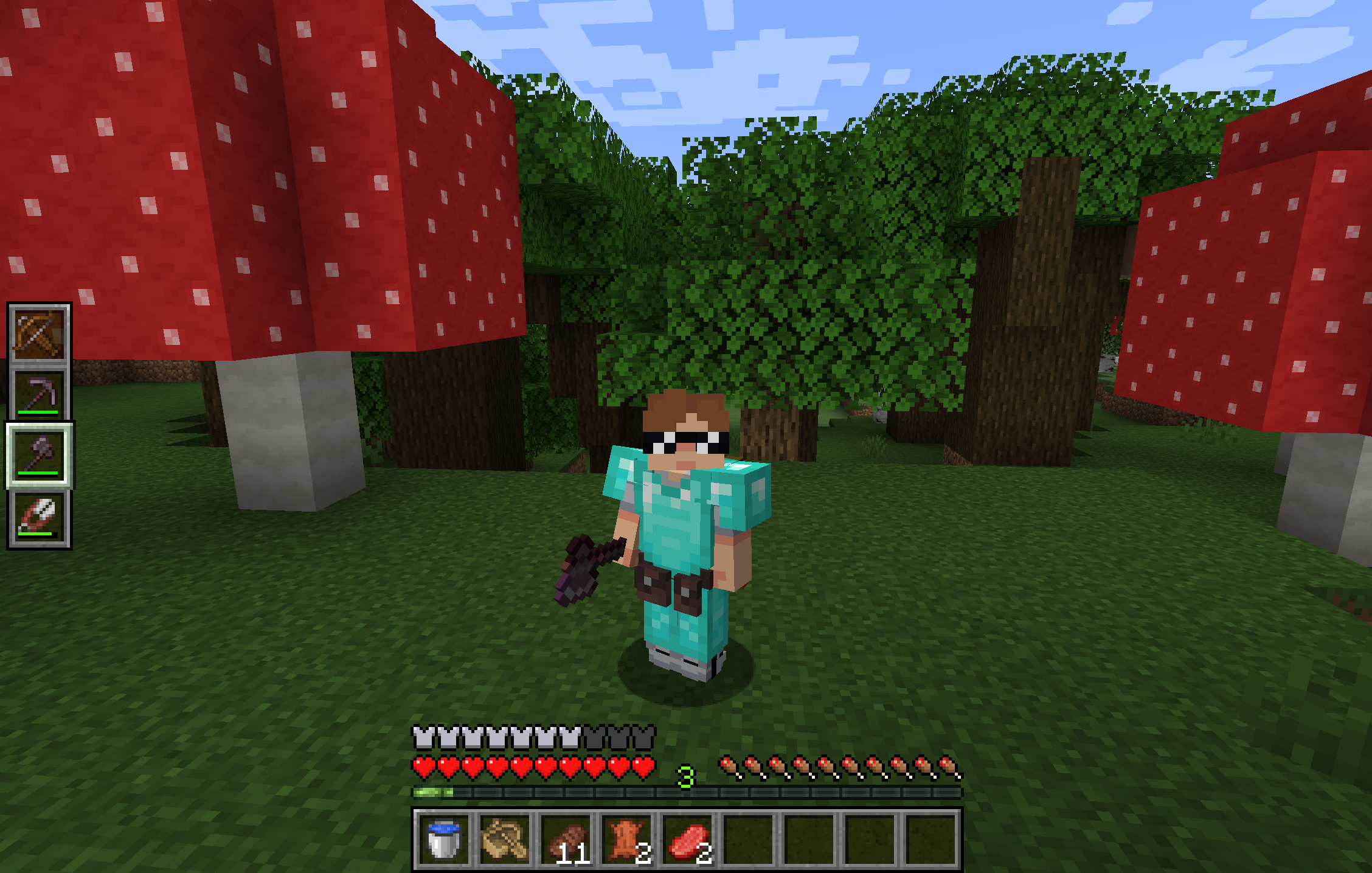
A screenshot of a player wearing a Utility Belt

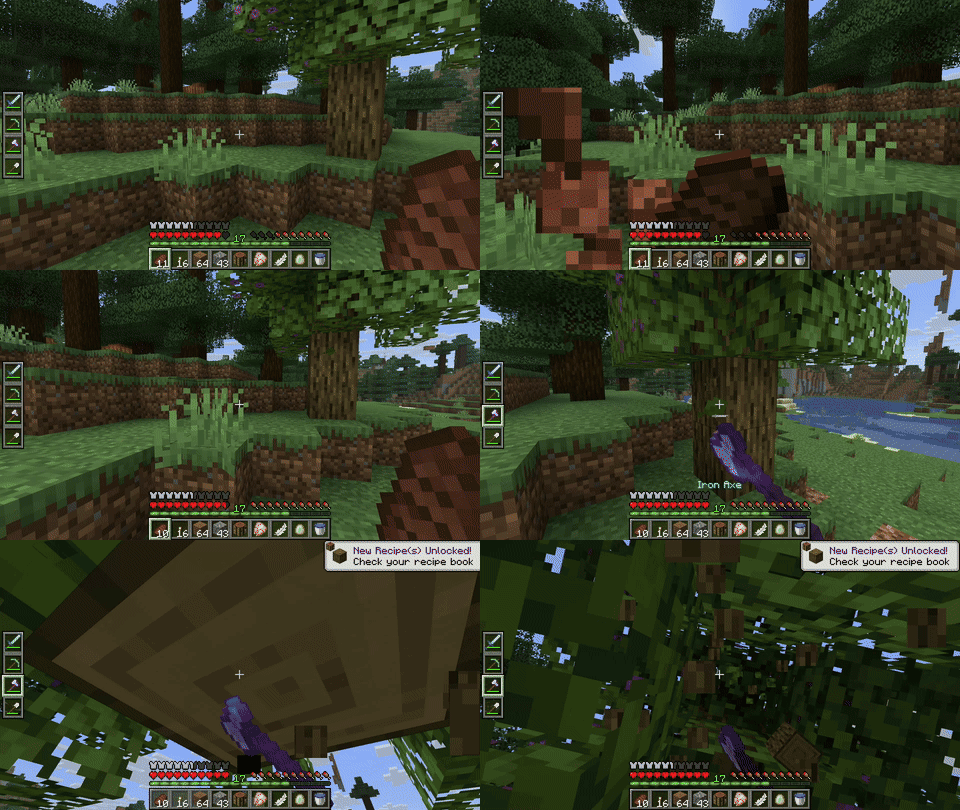
A GIF of a player using a Utility Belt

Report Issues • Chat on Discord • CurseForge • Modrinth

Utility Belt will solve your inventory clutter issues. 9 hotbar slots are not enough, especially when playing with mods. Wearing a Utility Belt gives you a second hotbar where only tools and weapons can be stored.

🛠️ Getting Started
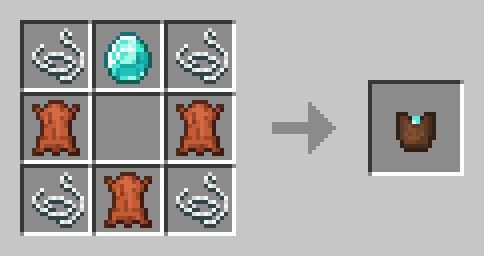
The recipe for the belt pouch

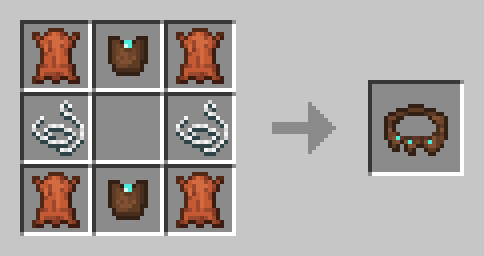
The recipe for the belt

  1. Craft two belt pouches using the recipe above.
  2. Craft a Utility Belt using the recipe above.
  3. Equip it in your belt slot.
  4. Fill it with your tools and weapons.

⬆️ Upgrading the Belt

By default, the belt has 4 slots and can be upgraded to have up to 6 slots (these values can be changed in the mod configuration). You can add a slot to a belt in a Smithing Table using the recipe below.
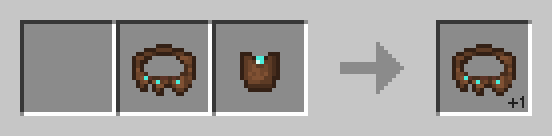
The recipe for the belt upgrade

🎮 Controls

Action Default Keybind Description
Open Belt Screen ' Opens the belt GUI to store items in the belt
Swap Hotbar B (toggle), N (hold) Switches between your main hotbar and the belt hotbar
Quick Transfer Sneak + Swap Swap the item in your hand between your main hotbar and the belt

⚙️ Configuration

You can customize Utility Belt's options using the in-game configuration screen:

  • Fabric: Accessible using ModMenu.
  • Forge/NeoForge: Accessible using the Mods screen.

To change which items are accepted in the belt, you can make a datapack and add items to the allowed_in_utility_belt tag.

🔗 Compatibility

  • LambDynamicLights: torches and lanterns in your belt will light up the world around you.

🐛 Bugs and Suggestions

You can report any issues and suggest changes on the GitHub issue tracker. Try out the /utilitybelt fixme command to see if it resolves the issue while you wait for a fix.

Always keep backups of your world, especially when playing versions marked as beta.

Rent a server with Bisect Hosting: Use Code jamalam to get 25% off

👥 Team & Contributors

Jomlom
Jomlom
Artist

⚙️ Compatibility

Environment
✅ Client & Server
Loaders
fabricforgeneoforgequilt
Minecraft Versions
1.21.10

🔗 Links

Modrinth Page