
MINECRAFTBIBLE
Loading...

A simple, easy-to-set-up config library using YACL and Mod Menu to create simple or complex config menus
A simple settings manager library, which implements YACL to easily generate config screens for Mod Menu.
If you would like to use this mod to generate config menus for your own mod, I recommend contacting me, as I may not keep this page updated as the mod updates.
NOTE: This mod does nothing by itself. It is a library for other mods.
in build.gradle
repositories {
    maven { url = "https://api.modrinth.com/maven" }
    maven {
        name = "Terraformers"
        url = "https://maven.terraformersmc.com/"}
    maven {
        name 'Xander Maven'
        url 'https://maven.isxander.dev/releases'}
}

dependencies {
    modImplementation("maven.modrinth:settingsmanagerlib:${project.modmenu_version}")
    modImplementation("com.terraformersmc:modmenu:${project.modmenu_version}")
    modImplementation "dev.isxander:yet-another-config-lib:${project.yacl_version}"
}
in gradle.properties
settingsmanagerlib_version=LATEST_VERSION_NUMBER (e.g. 1.0.0+1.21.11)
modmenu_version=LATEST_VERSION_NUMBER (e.g. 15.0.0)
yacl_version=LATEST_VERSION_NUMBER (e.g. 3.7.1+1.21.6-fabric)
in fabric.mod.json
"entrypoints": {
"modmenu": [ "com.example.mod.ModMenuAPI" ]
}
Then create a new class ModMenuAPI
public class ModMenuAPI implements ModMenuApi {
     @Override
     public ConfigScreenFactory<?> getModConfigScreenFactory() {
            return parentScreen -> ExampleModClient.settings.getConfig(parentScreen);
     }
}
in ExampleModClient
public static Settings settings;

@Override
public void onInitializeClient() {
     settings = new Settings().setup("Example Mod", "examplemod");
     settings.loadFromFile();
}
Note: supports Strings, Booleans, Integers, Floats, Colors, and custom Enums.
Standard Strings/Integers/Floatsin ExampleModClient
@Override
public void onInitializeClient() {
     settings.add(String settingId, String page, String group, String/int/float defaultValue, String settingName, String description)

     settings.add("guiName", "Visual Settings", "Overlay", "Default Gui Name", "Gui Scale", "This text will appear as a tooltip when you click on the option.");
}
in ExampleModClient
@Override
public void onInitializeClient() {
     settings.addSlider(String settingId, String page, String group, int/float defaultValue, String settingName, String description, int/float min, int/float max, int/float step)

     settings.add("guiScale", "Visual Settings", "Overlay", 1.0f, "Gui Scale", "This text will appear as a tooltip when you click on the option.", 0.5f, 5.0f, 0.1f);
}
in ExampleModClient
@Override
public void onInitializeClient() {
     settings.addSlider(String settingId, String page, String group, boolean defaultValue, String settingName, String description, BooleanFormat valueFormat)

     settings.add("doRenderGui", "Visual Settings", "Overlay", true, "Render Gui", "This text will appear as a tooltip when you click on the option.", BooleanFormat.ONOFF);
}
BooleanFormat - the displayed value of the boolean:
BooleanFormat.ONOFF - "On" or "Off"BooleanFormat.TRUEFALSE - "True" or "False"BooleanFormat.YESNO - "Yes" or "No"BooleanFormat.TICKBOX - A box that is either checked or uncheckedin ExampleModClient
@Override
public void onInitializeClient() {
     settings.addColor(String settingId, String page, String group, int defaultValue, String settingName, String description)

     settings.addColor("guiBackgroundColor", "Visual Settings", "Overlay", net.minecraft.util.Colors.GRAY, "Gui Background Color", "This text will appear as a tooltip when you click on the option.");
}
Note that the value of settings automatically persist after restarting the client, however, you still need to add them to the config menu, which can be accomplished by creating the config menu inside onInitializeClient()
To get the value of a setting, use the following where typeInstance is a value with the same type as the value of the setting you are getting. Refer to the examples below for implementations. Note that the second parameter of settings.get() is irrelevant; only its type needs to be the same as the return type.
ExampleModClient.settings.get("settingId", typeInstance);

ExampleModClient.settings.get("doRenderGui", true); //to return a boolean
ExampleModClient.settings.get("guiBackgroundColor", net.minecraft.util.Colors.GRAY); //to return a color
ExampleModClient.settings.get("guiScale", 1.0f); //to return a float
ExampleModClient.settings.get("guiName", "Default Gui Name"); //to return a string
ExampleModClient.settings.get("guiSliderMin", 1); //to return an integer
By default, the value of a setting is set to its default value, unless the user changes it. To manually set the value of a setting, use the following.
ExampleModClient.settings.set("settingId", newValue);

ExampleModClient.settings.set("doRenderGui", false); //example with a boolean
Settings are organized by pages and groups. Refer to the image below for an example. The page is the bar at the top, and you can open one page at a time. A group is a collapsible collection of settings. You can have unlimited groups and unlimited settings on each page. Each setting must have a page, but does not require a group. To create a setting without a group as shown in the image below, set the group to "" or "none".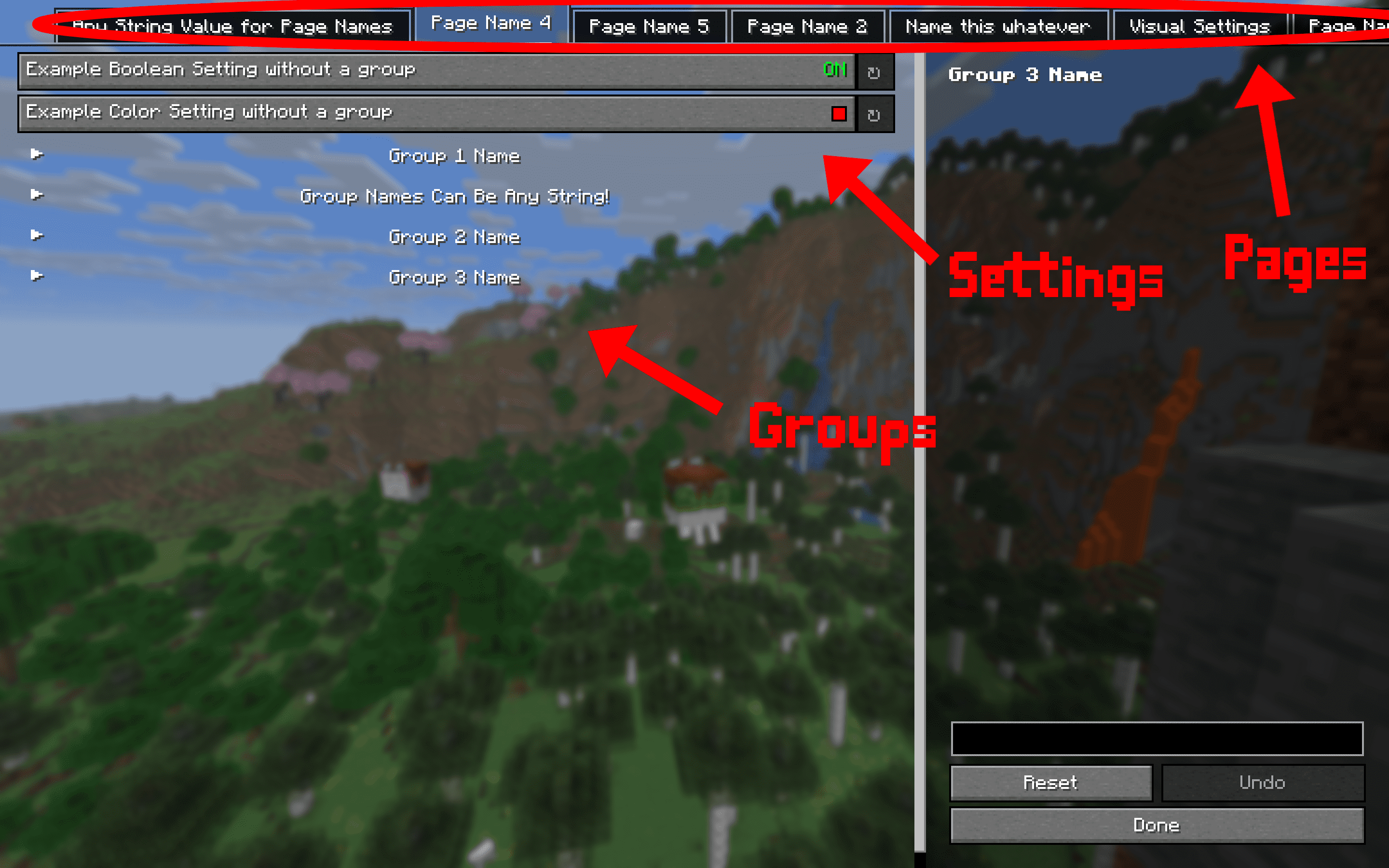
This mod requires multiple other mods in order to function.