Logo
MINECRAFTBIBLE
Items
Items

All game items

Blocks
Blocks

Building blocks

Mobs
Mobs

Creatures & monsters

Biomes
Biomes

World biomes

Structures
Structures

Generated structures

Recipes
Recipes

Crafting guides

Advancements
Advancements

Achievements

Loot Tables
Loot Tables

Drop rates

Tags
Tags

Item groupings

All Versions
View all data →
Capes
Cape ArchiveNEW

Browse rare Minecon capes, OptiFine capes, and custom capes from players worldwide

Browse

Player Database
Player DatabasePopular

Search any player

Skin Browser
Skin Browser

Browse & download skins

Cape Gallery
Cape GalleryNEW

Minecon & OptiFine capes

Seed Vault
Seed Vault

Curated seeds

Learn

Guides
GuidesNew

Tutorials & tips

Blog
Blog

News & updates

Community

Community Hub
Community HubHub

Posts, discussions & more

All Versions
View community →
Seed Analyzer
Seed Analyzer

World seed analysis

Loot Explorer
Loot Explorer

Drop rates

Crafting Calculator
Crafting Calculator

Material planning

Enchant Calculator
Enchant Calculator

Probability math

Redstone Lab
Redstone Lab

Signal timing

Trading Profit
Trading Profit

Villager ROI

All Versions
View all tools →
Mods
Mods

Browse all mods

Plugins
Plugins

Server plugins

Resource Packs
Resource Packs

Textures & sounds

Shaders
Shaders

Visual enhancements

Datapacks
Datapacks

World logic

Scanner
Mod Intelligence

Scan & analyze any mod

All Versions
View all mods →
Loading...
IntroductionIntroductionVersion HistoryVersion HistoryGuidesGuidesBlog & NewsBlog & News
ItemsItemsBlocksBlocksMobsMobsRecipesRecipesBiomesBiomesStructuresStructuresAdvancementsAdvancementsLoot TablesLoot TablesTagsTags
ModsModsPluginsPluginsResource PacksResource PacksShadersShadersDatapacksDatapacks

MinecraftBible

The Ultimate Wiki

Logo
MINECRAFTBIBLE

The ultimate Minecraft reference. Every item, block, mob, and recipe documented with precision.

Community

  • Skin Browser
  • Cape Gallery
  • Seed Vault
  • Blog
  • Guides

Database

  • Items
  • Blocks
  • Mobs
  • Recipes
  • Biomes
  • Structures

Tools

  • Seed Analyzer
  • Mod Intelligence
  • Crafting Calculator
  • Enchant Calculator

Mods & Packs

  • Mods
  • Plugins
  • Resource Packs
  • Shaders
  • Datapacks

Site & Legal

  • About
  • Authors
  • Editorial Policy
  • Corrections
  • Contact
  • Privacy Policy
  • Terms of Service
  • DMCA
  • Sitemap

© 2026 MinecraftBible. Not affiliated with Mojang or Microsoft.

PrivacyTermsContact
Server Backpacks!
ModMIT

Server Backpacks!

A server-side backpacks mod that uses Polymer, with added GeyserMC support.

21.8K
Downloads
74
Followers
3 months ago
Updated
📦
30
Versions
adventurestoragefabric
Download Latestv1.4.11+1.21.11View on Modrinth

📖About Server Backpacks!

**Banner!**

A server-sided mod that adds backpacks using Polymer by Patbox

Overview

Trinkets, commands, and config are only supported in version 1.3 and above.

GeyserMC (Bedrock) support is only for the latest Minecraft versions supported by GeyserMC.

Before updating, it's recommended to check the changelog for breaking changes.

Additions

This mod adds 5 items.

  • A small backpack, that has 9 slots.
  • A medium backpack, that has 18 slots.
  • A large backpack, that has 27 slots.
  • A ender backpack, a backpack that lets you access your ender chest from anywhere!
  • A global backpack, that has 54 slots and it's inventory can be shared by linking it with other global backpacks using an ender pearl by dropping 2 global backpacks on the ground plus an ender pearl!

Modules

  • Currently, this mod adds:
    • Crafting Module
    • Void Module
    • Vacuum Module
    • Jukebox Module
  • To apply them to the backpack:

    • Put the module and the backpack inside a smithing table.
  • To use them:

    • Crafting Module: Sneak and open the backpack normally in the air, then you can click on the crafting module to open a crafting ui.
    • Void Module: You can add to it's filter by putting it inside a crafting table and add the items you want to filter around it. The backpack will void any nearby items you specified in the filter.
    • Vacuum Module: The same as void module, but you can change it's mode to whitelist, blacklist or match backpack's content.
    • Jukebox Module: To use it, first you need to integrate it with a backpack, and go inside the backpack's upgrade container GUI. To put the music disc, click the Jukebox Module while your mouse cursor is holding the music disc. Slowly change the mode as you can take it out if you click too fast.

It also adds an enchantment!

  • Capacity, an enchantment that increases your backpack's storage by 9 additional slots per level! (Note: Can be applied on medium and large backpack only).

Also, Regular backpacks are dyeable like bundles!

1.3 and above

  • Backpacks are like bundles. You can use the item form of a backpack to input item into it like a bundle. Backpacks only allows inserting item.
  • Backpacks. backpacks. You can right click a backpack in a inventory to open it.
  • Placeable backpacks.

Note: This below requires you have the Trinkets (Polymer Port) mod!

  • You can put backpacks on a trinkets back slot. To open the backpack do /open.
  • You also place it! Just shift right click on the ground with an empty hand.
Recipes
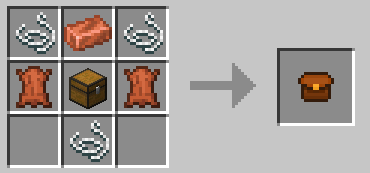
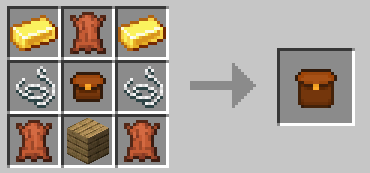
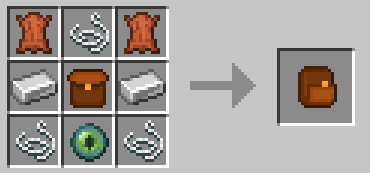
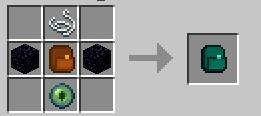
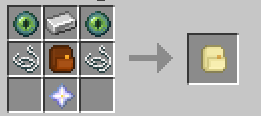
SMALL BACKPACK RECIPE
MEDIUM BACKPACK RECIPE
LARGE BACKPACK RECIPE

ENDER BACKPACK RECIPE
GLOBAL BACKPACK RECIPE

Commands
  • /backpacks:

    • /backpack backup Makes a backup.
    • /backpacks list: Lists created backpack instances.
    • /backpacks open <UUID>: Specify an UUID to open a backpack instance.
  • /backpacks open config :

    • /backpacks open config reset: Resets the backpack's config.
    • /backpacks open config reload: Saves the backpack's config.
    • /backpacks open config save: Reloads the backpack's config.

  • /open :

    • Allows to open a backpack when it is equipped on the trinkets back slot.

Configuration
  • back_positions: Adjusts the backpack’s position on the player’s back.
  • back_yaw: Controls horizontal rotation (left/right) of the backpack.
  • back_pitch_when_sneaking: Alters the tilt angle of the backpack when the player is sneaking.

  • display_back: <default: true> Determines whether or not the backpack should be displayed on the back when equipped.
  • breaks_with_flow <default: true> Determines whether or not the backpack should break when water flows to it.

  • types_of_backpacks : Add or remove an entry to remove or create a backpack.

Adding Textures

Write /polymer generate command.
Resource pack will be located in your server folder as polymer-resourcepack.zip or you can enable auto-host in polymer's config.

Geyser Support Geyser is fully supported, but not when your wearing the backpacks. That is the only unsupported thing, but java players can fully see the backpacks on the back if you wear it.

Example in game
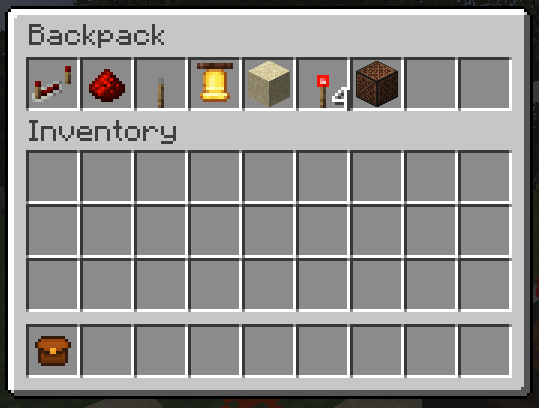
Small Backpack

Bugs

Please report
any bugs that might occur while using this mod.

Credits

Fork based on Server Backpacks by Octal, although as of 1.2 and above, all of the code has been rewritten.

👥 Team & Contributors

Rouesvm
RouesvmOwner

⚙️ Compatibility

Environment
🖥️ Server-side
Loaders
fabric
Minecraft Versions
1.21.11

🔗 Links

Modrinth Page