Logo
MINECRAFTBIBLE
Items
Items

All game items

Blocks
Blocks

Building blocks

Mobs
Mobs

Creatures & monsters

Biomes
Biomes

World biomes

Structures
Structures

Generated structures

Recipes
Recipes

Crafting guides

Advancements
Advancements

Achievements

Loot Tables
Loot Tables

Drop rates

Tags
Tags

Item groupings

All Versions
View all data →
Capes
Cape ArchiveNEW

Browse rare Minecon capes, OptiFine capes, and custom capes from players worldwide

Browse

Player Database
Player DatabasePopular

Search any player

Skin Browser
Skin Browser

Browse & download skins

Cape Gallery
Cape GalleryNEW

Minecon & OptiFine capes

Seed Vault
Seed Vault

Curated seeds

Learn

Guides
GuidesNew

Tutorials & tips

Blog
Blog

News & updates

Community

Community Hub
Community HubHub

Posts, discussions & more

All Versions
View community →
Seed Analyzer
Seed Analyzer

World seed analysis

Loot Explorer
Loot Explorer

Drop rates

Crafting Calculator
Crafting Calculator

Material planning

Enchant Calculator
Enchant Calculator

Probability math

Redstone Lab
Redstone Lab

Signal timing

Trading Profit
Trading Profit

Villager ROI

All Versions
View all tools →
Mods
Mods

Browse all mods

Plugins
Plugins

Server plugins

Resource Packs
Resource Packs

Textures & sounds

Shaders
Shaders

Visual enhancements

Datapacks
Datapacks

World logic

Scanner
Mod Intelligence

Scan & analyze any mod

All Versions
View all mods →
Loading...
IntroductionIntroductionVersion HistoryVersion HistoryGuidesGuidesBlog & NewsBlog & News
ItemsItemsBlocksBlocksMobsMobsRecipesRecipesBiomesBiomesStructuresStructuresAdvancementsAdvancementsLoot TablesLoot TablesTagsTags
ModsModsPluginsPluginsResource PacksResource PacksShadersShadersDatapacksDatapacks

MinecraftBible

The Ultimate Wiki

Logo
MINECRAFTBIBLE

The ultimate Minecraft reference. Every item, block, mob, and recipe documented with precision.

Community

  • Player Database
  • Skin Browser
  • Cape Gallery
  • Community Hub
  • Seed Vault

Database

  • Items
  • Blocks
  • Mobs
  • Recipes
  • Biomes
  • Structures

Tools

  • Seed Analyzer
  • Mod Intelligence
  • Crafting Calculator
  • Enchant Calculator

Mods & Packs

  • Mods
  • Plugins
  • Resource Packs
  • Shaders
  • Datapacks

© 2026 MinecraftBible. Not affiliated with Mojang or Microsoft.

PrivacyTermsContact
Sculk Radio
ModApache-2.0

Sculk Radio

Use the magic of Sculk to connect Note Blocks to Jukeboxes as speakers.
632
Downloads
7
Followers
2 months ago
Updated
📦
8
Versions
game-mechanicssocialfabric
Download Latestv0.3.7+1.21.11View on Modrinth

📖About Sculk Radio

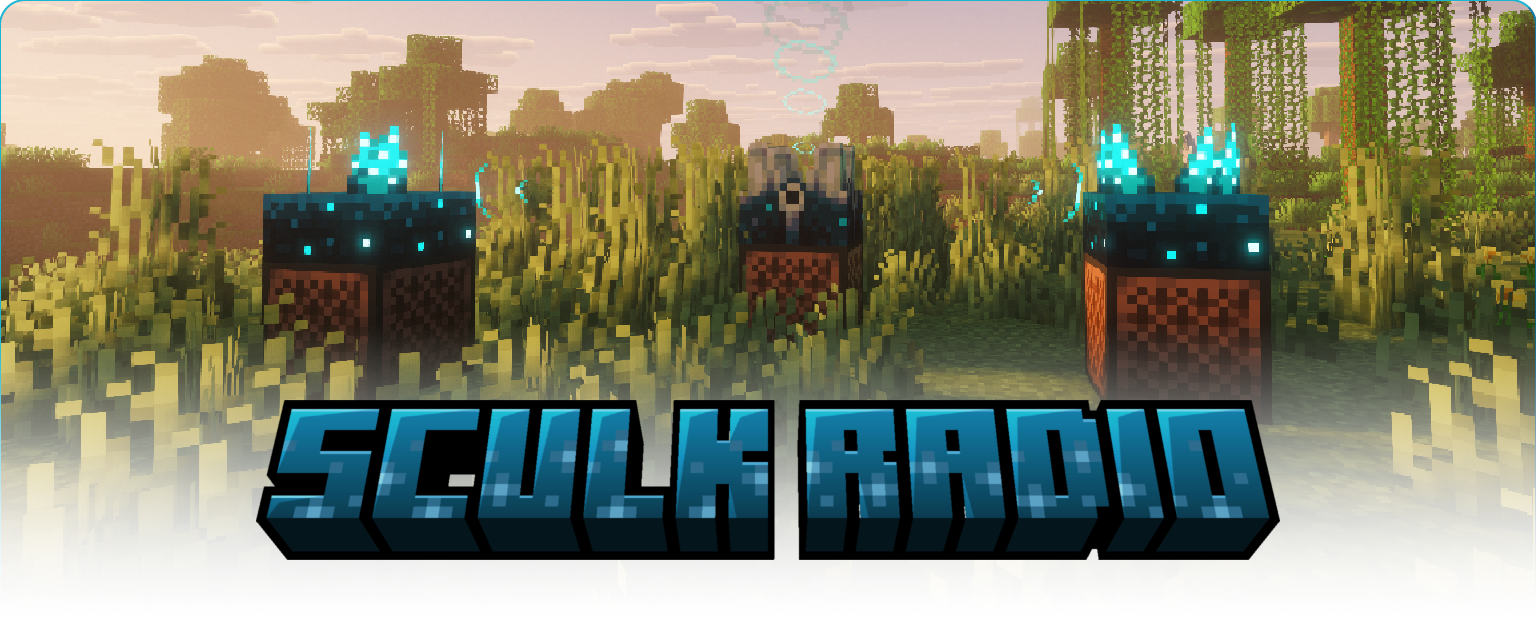
A jukebox with a sculk shrieker and 2 noteblocks with sculk sensors overlayed with a 3D logo of the mod name

Use the magic of Sculk to connect Note Blocks to Jukeboxes as speakers.

Custom discs

Sculk Radio has native support for AudioPlayer by henkelmax.
Custom music discs from this mod can be used on a radio and will act the same as vanilla discs.

How to use

To start of, place a shrieker on a jukebox, to turn it into a radio.
When a jukebox is used as a radio it will not give off any audio itself meaning it can be hidden within redstone contraptions.

To 'receive' the signal sent by a radio, you need a speaker.
A speaker is made by placing a sculk sensor on top of a note block.
The maximum distance a speaker can receive a signal from is 16 blocks.

To expand the range of a signal you can repeat it using a signal repeater.
A single repeater is made by placing a sculk sensor on top of a block of amethyst.
The maximum distance for receiving and repeating a signal is 16 blocks. Which means a single repeater can already double the range of a speaker.

Things to know

  • The max signal 'depth' is 8, which means a signal can be repeated 8 times making for a total max range of 128 blocks.
  • Radios and repeaters can each send to 8 receivers (speakers and/or repeaters).
  • Audio coming out of a speaker has the same distance and volume as if it came out of a jukebox.
  • Sculk blocks will not activate when they are part of a radio, speaker or repeater. Outside of these 'multiblocks' they have their vanilla behavior.

Other Mod compatibilities

Mods that add new music discs and resource packs that change vanilla discs should also work natively. But be sure to create an issue on the Github if there are incompatibilities.

If you're a mod developer, and you want to use Sculk Radio for your own projects, you can use the API provided by the mod.

Maven

<repository>
  <id>modrinth-repo</id>
  <url>https://api.modrinth.com/maven/</url>
</repository>

<dependency>
  <groupId>maven.modrinth</groupId>
  <artifactId>sculk-radio</artifactId>
  <version>0.3.7+1.21.11</version>
  <scope>provided</scope>
</dependency>

Gradle

repositories {
    exclusiveContent {
        forRepository { maven { url = "https://api.modrinth.com/maven" } }
        filter { includeGroup "maven.modrinth" }
    }
}

dependencies {
    compileOnly 'maven.modrinth:sculk-radio:0.3.7+1.21.11'
}

You can call the API like this:

import nl.gjorgdy.sculk_radio.SculkRadio;

SculkRadio.api();

Demo

👥 Team & Contributors

Gjorgdy
GjorgdyOwner

⚙️ Compatibility

Environment
🖥️ Server-side
Loaders
fabric
Minecraft Versions
1.21.11

🔗 Links

Modrinth Page