Logo
MINECRAFTBIBLE
Items
Items

All game items

Blocks
Blocks

Building blocks

Mobs
Mobs

Creatures & monsters

Biomes
Biomes

World biomes

Structures
Structures

Generated structures

Recipes
Recipes

Crafting guides

Advancements
Advancements

Achievements

Loot Tables
Loot Tables

Drop rates

Tags
Tags

Item groupings

All Versions
View all data →
Capes
Cape ArchiveNEW

Browse rare Minecon capes, OptiFine capes, and custom capes from players worldwide

Browse

Player Database
Player DatabasePopular

Search any player

Skin Browser
Skin Browser

Browse & download skins

Cape Gallery
Cape GalleryNEW

Minecon & OptiFine capes

Seed Vault
Seed Vault

Curated seeds

Learn

Guides
GuidesNew

Tutorials & tips

Blog
Blog

News & updates

Community

Community Hub
Community HubHub

Posts, discussions & more

All Versions
View community →
Seed Analyzer
Seed Analyzer

World seed analysis

Loot Explorer
Loot Explorer

Drop rates

Crafting Calculator
Crafting Calculator

Material planning

Enchant Calculator
Enchant Calculator

Probability math

Redstone Lab
Redstone Lab

Signal timing

Trading Profit
Trading Profit

Villager ROI

All Versions
View all tools →
Mods
Mods

Browse all mods

Plugins
Plugins

Server plugins

Resource Packs
Resource Packs

Textures & sounds

Shaders
Shaders

Visual enhancements

Datapacks
Datapacks

World logic

Scanner
Mod Intelligence

Scan & analyze any mod

All Versions
View all mods →
Loading...
IntroductionIntroductionVersion HistoryVersion HistoryGuidesGuidesBlog & NewsBlog & News
ItemsItemsBlocksBlocksMobsMobsRecipesRecipesBiomesBiomesStructuresStructuresAdvancementsAdvancementsLoot TablesLoot TablesTagsTags
ModsModsPluginsPluginsResource PacksResource PacksShadersShadersDatapacksDatapacks

MinecraftBible

The Ultimate Wiki

Logo
MINECRAFTBIBLE

The ultimate Minecraft reference. Every item, block, mob, and recipe documented with precision.

Community

  • Skin Browser
  • Cape Gallery
  • Seed Vault
  • Blog
  • Guides

Database

  • Items
  • Blocks
  • Mobs
  • Recipes
  • Biomes
  • Structures

Tools

  • Seed Analyzer
  • Mod Intelligence
  • Crafting Calculator
  • Enchant Calculator

Mods & Packs

  • Mods
  • Plugins
  • Resource Packs
  • Shaders
  • Datapacks

Site & Legal

  • About
  • Authors
  • Editorial Policy
  • Corrections
  • Contact
  • Privacy Policy
  • Terms of Service
  • DMCA
  • Sitemap

© 2026 MinecraftBible. Not affiliated with Mojang or Microsoft.

PrivacyTermsContact
Saved Commands
ModGPL-3.0-only

Saved Commands

This mod lets you save commands and chat messages for easier access later using keyboard shortcuts and the saved commands menu.

353
Downloads
5
Followers
5 months ago
Updated
📦
6
Versions
utilityfabric
Download Latestv1.1.0-beta+1.21.11View on Modrinth

📖About Saved Commands

Saved Commands

Saved Commands is a client Minecraft mod for Fabric that lets you save commands and
chat messages for easier access later using keyboard shortcuts and the
saved commands menu.

Installation

This mod is only supported by the Fabric mod loader. For installation guides regarding Fabric
please use the official Fabric player guides.

You can download the mod on either Modrinth or on GitHub
under releases.
This mod needs the following dependency:

Fabric API (Please pick an appropriate version for your Minecraft version)

Using the mod

To use the mod, open the Saved Commands screen by pressing the keybind
(defaults to Y on QWERTY and Z on QWERTZ keyboards).

On the Saved Commands screen, you can:
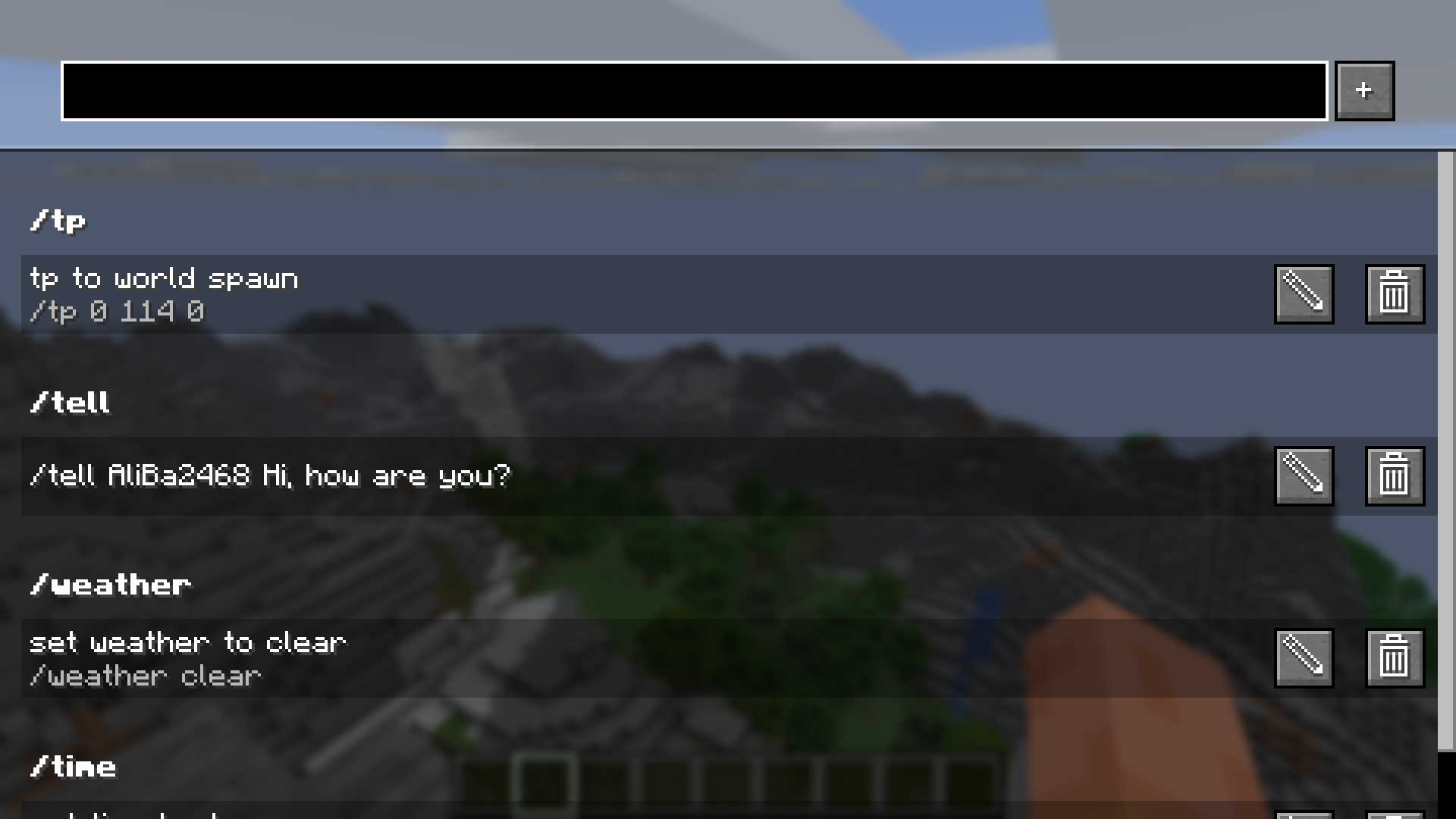
  • Add a new command to your saved ones by typing it into the top bar and pressing the "+"-button
  • Edit saved commands by clicking on the pen icon on the right. In the appearing popup, you can edit the command,
    add or edit a name and add or edit the keybind combination (shortcut).
  • Delete saved commands by clicking on the trash can icon on the right.
  • Send and run commands by clicking on them
  • Search for commands by entering the query into the top bar.

Saved Commands screen
The Saved Commands screen with some example commands
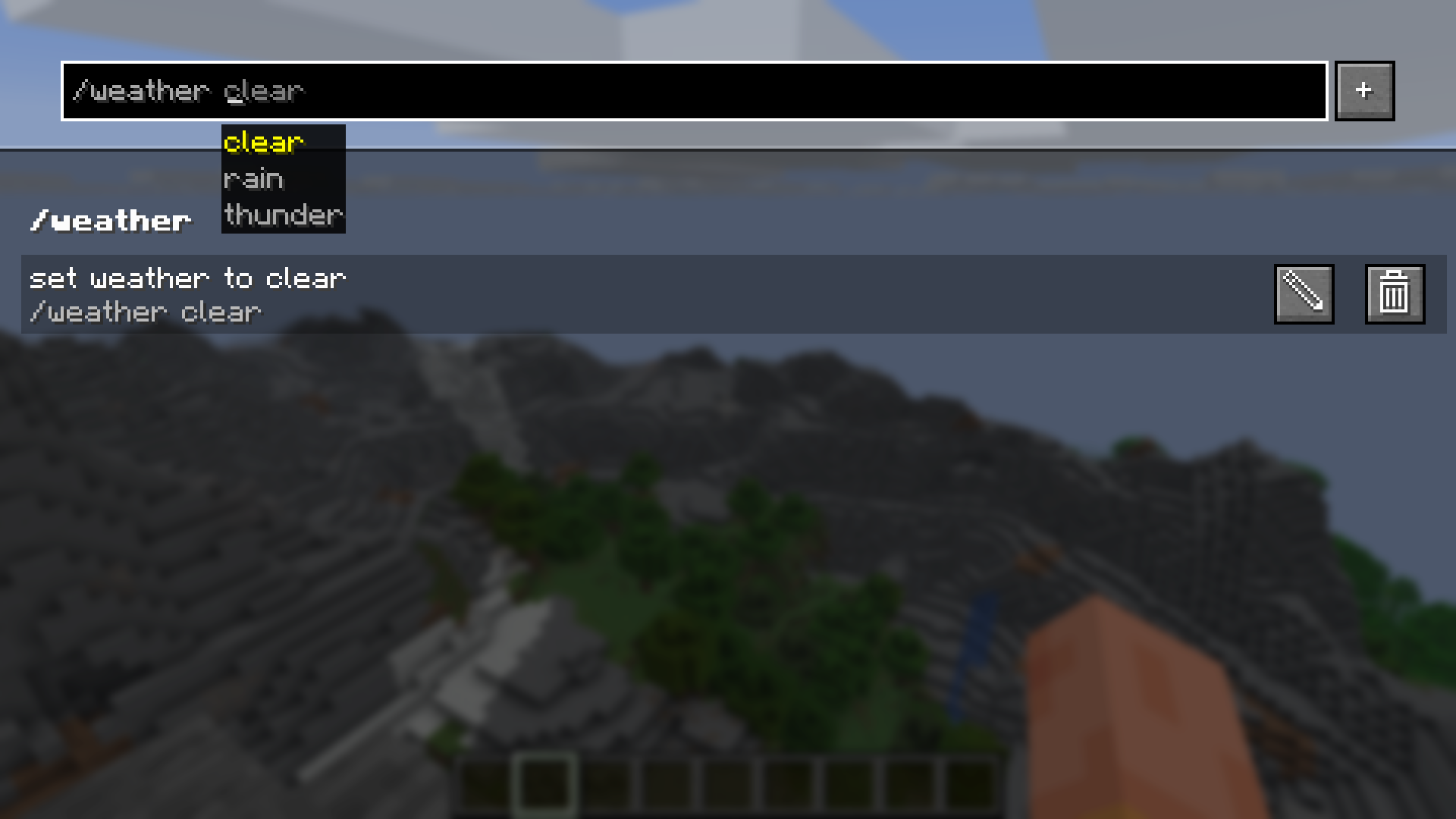
Search suggestion
In the top bar you can get command recommendations like in the chat
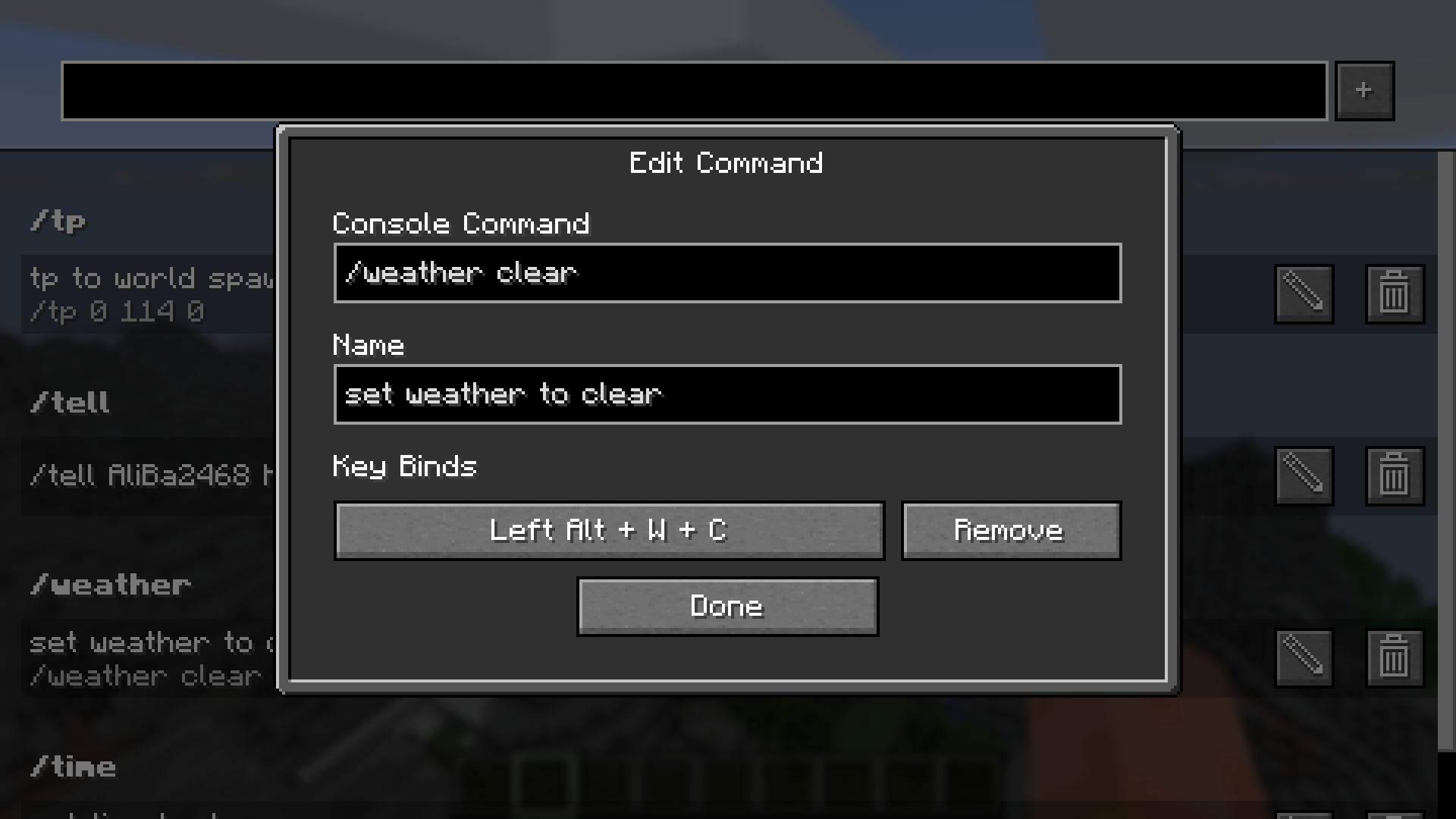
Edit command screen
In the edit command screen you can edit the name, command and keybind combination

We accept no liability for any damages caused by using this mod. Use at your own risk!

Working principles

The following things regarding the mod might be counterintuitive:

  • The mod separates every world and server from each other. This means, that you might have to set the same command up multiple times.
  • If you set a keybind to one that already exists in the Minecraft keybinds, it will block the Minecraft keybind. This only applies to
    the first key of a combination or if the next key of the combination is pressed (e.g. Alt + W: Alt is never triggered, W is triggered, if Alt is not pressed)
  • If you set two command keybinds to the same key or key combination, the one added first will be executed.

Reporting issues, getting help and suggesting features

If you have trouble using the mod, if you stumble upon a bug or if you want to suggest a feature to be implemented,
please don't hesitate to post an issue on GitHub.
We will try to respond as soon as possible and maybe ask follow-up questions.

👥 Team & Contributors

Pr77Pr77
Pr77Pr77Owner

⚙️ Compatibility

Environment
💻 Client-side
Loaders
fabric
Minecraft Versions
1.21.11

🔗 Links

Modrinth Page