Logo
MINECRAFTBIBLE
Items
Items

All game items

Blocks
Blocks

Building blocks

Mobs
Mobs

Creatures & monsters

Biomes
Biomes

World biomes

Structures
Structures

Generated structures

Recipes
Recipes

Crafting guides

Advancements
Advancements

Achievements

Loot Tables
Loot Tables

Drop rates

Tags
Tags

Item groupings

All Versions
View all data รขโ€ โ€™
Capes
Cape ArchiveNEW

Browse rare Minecon capes, OptiFine capes, and custom capes from players worldwide

Browse

Player Database
Player DatabasePopular

Search any player

Skin Browser
Skin Browser

Browse & download skins

Cape Gallery
Cape GalleryNEW

Minecon & OptiFine capes

Seed Vault
Seed Vault

Curated seeds

Learn

Guides
GuidesNew

Tutorials & tips

Blog
Blog

News & updates

Community

Community Hub
Community HubHub

Posts, discussions & more

All Versions
View community รขโ€ โ€™
Seed Analyzer
Seed Analyzer

World seed analysis

Loot Explorer
Loot Explorer

Drop rates

Crafting Calculator
Crafting Calculator

Material planning

Enchant Calculator
Enchant Calculator

Probability math

Redstone Lab
Redstone Lab

Signal timing

Trading Profit
Trading Profit

Villager ROI

All Versions
View all tools รขโ€ โ€™
Mods
Mods

Browse all mods

Plugins
Plugins

Server plugins

Resource Packs
Resource Packs

Textures & sounds

Shaders
Shaders

Visual enhancements

Datapacks
Datapacks

World logic

Scanner
Mod Intelligence

Scan & analyze any mod

All Versions
View all mods รขโ€ โ€™
Loading...
IntroductionIntroductionVersion HistoryVersion HistoryGuidesGuidesBlog & NewsBlog & News
ItemsItemsBlocksBlocksMobsMobsRecipesRecipesBiomesBiomesStructuresStructuresAdvancementsAdvancementsLoot TablesLoot TablesTagsTags
ModsModsPluginsPluginsResource PacksResource PacksShadersShadersDatapacksDatapacks

MinecraftBible

The Ultimate Wiki

Logo
MINECRAFTBIBLE

The ultimate Minecraft reference. Every item, block, mob, and recipe documented with precision.

Community

  • Skin Browser
  • Cape Gallery
  • Seed Vault
  • Blog
  • Guides

Database

  • Items
  • Blocks
  • Mobs
  • Recipes
  • Biomes
  • Structures

Tools

  • Seed Analyzer
  • Mod Intelligence
  • Crafting Calculator
  • Enchant Calculator

Mods & Packs

  • Mods
  • Plugins
  • Resource Packs
  • Shaders
  • Datapacks

Site & Legal

  • About
  • Authors
  • Editorial Policy
  • Corrections
  • Contact
  • Privacy Policy
  • Terms of Service
  • DMCA
  • Sitemap

ยฉ 2026 MinecraftBible. Not affiliated with Mojang or Microsoft.

PrivacyTermsContact
Save and Load Inventories
ModLicenseRef-All-Rights-Reserved

Save and Load Inventories

๐Ÿ’พ Save and load player inventories or kits to self and others by using commands.

26.6K
Downloads
52
Followers
7 months ago
Updated
๐Ÿ“ฆ
30
Versions
managementutilityfabricforgeneoforgequilt
Download Latestv1.21.11-3.5-fabric+forge+neoView on Modrinth

๐Ÿ“–About Save and Load Inventories

Requires the library mod Collective.

ย ย ย This mod is part of The Vanilla Experience modpack and Serilum's Customization Bundle mod.
Save and Load Inventories adds commands which allow the user to easily save their current inventory to a file, load an inventory from a file and list the current saved inventories. Useful for administrators or event servers. NBT tags are supported, any things like written books or enchantments won't be a problem. Players need cheat access to use the commands.

The inventories are saved in ./config/saveandloadinventories/*.txt.


Commands:
/saveinventory <inventory_name> - Saves the current inventory of the user as <inventory_name>.
ย  alias: /si <inventory_name>
/loadinventory <inventory_name> - Loads an inventory named <inventory_name> previously saved.
ย  alias: /li <inventory_name>
/loadinventory <inventory_name> <player_name>ย - Loads an inventory to the target player named <player_name>
ย  alias: /li <inventory_name> <player_name>
/listinventories
- Lists all saved inventories.

Examples:
Save the current inventory with the name 'diamond' (/saveinventory diamond):


And when loading it (/loadinventory diamond):

Show Spoiler

ย 
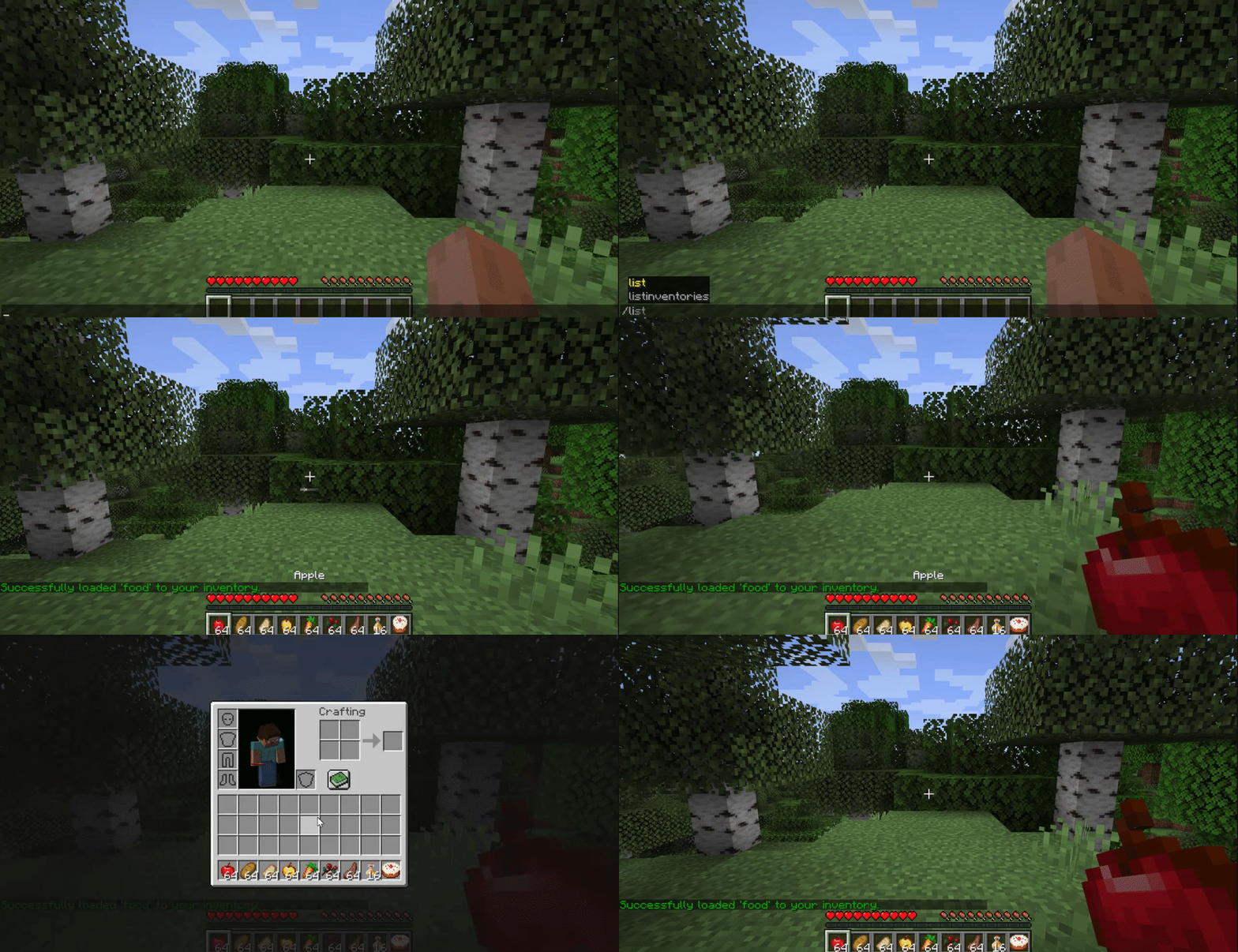
Save the current inventory as 'food' with the shortened alias command (/si food):


And loading it with the shortened command (/li food):
Show Spoiler

ย 


Here's an example of setting the inventory of another player:


------------------

You may freely use this mod in any modpack, as long as the download remains hosted within the Modrinth ecosystem.

Serilum.com contains an overview and more information on all mods available.

Comments are disabled as I'm unable to keep track of all the separate pages on each mod.
For issues, ideas, suggestions or anything else there is theย Github repo. Thanks!


๐Ÿ‘ฅ Team & Contributors

Serilum
SerilumOwner

โš™๏ธ Compatibility

Environment
๐Ÿ–ฅ๏ธ Server-side
Loaders
fabricforgeneoforgequilt
Minecraft Versions
1.21.11

๐Ÿ”— Links

Modrinth Page