Logo
MINECRAFTBIBLE
Items
Items

All game items

Blocks
Blocks

Building blocks

Mobs
Mobs

Creatures & monsters

Biomes
Biomes

World biomes

Structures
Structures

Generated structures

Recipes
Recipes

Crafting guides

Advancements
Advancements

Achievements

Loot Tables
Loot Tables

Drop rates

Tags
Tags

Item groupings

All Versions
View all data →
Capes
Cape ArchiveNEW

Browse rare Minecon capes, OptiFine capes, and custom capes from players worldwide

Browse

Player Database
Player DatabasePopular

Search any player

Skin Browser
Skin Browser

Browse & download skins

Cape Gallery
Cape GalleryNEW

Minecon & OptiFine capes

Seed Vault
Seed Vault

Curated seeds

Learn

Guides
GuidesNew

Tutorials & tips

Blog
Blog

News & updates

Community

Community Hub
Community HubHub

Posts, discussions & more

All Versions
View community →
Seed Analyzer
Seed Analyzer

World seed analysis

Loot Explorer
Loot Explorer

Drop rates

Crafting Calculator
Crafting Calculator

Material planning

Enchant Calculator
Enchant Calculator

Probability math

Redstone Lab
Redstone Lab

Signal timing

Trading Profit
Trading Profit

Villager ROI

All Versions
View all tools →
Mods
Mods

Browse all mods

Plugins
Plugins

Server plugins

Resource Packs
Resource Packs

Textures & sounds

Shaders
Shaders

Visual enhancements

Datapacks
Datapacks

World logic

Scanner
Mod Intelligence

Scan & analyze any mod

All Versions
View all mods →
Loading...
IntroductionIntroductionVersion HistoryVersion HistoryGuidesGuidesBlog & NewsBlog & News
ItemsItemsBlocksBlocksMobsMobsRecipesRecipesBiomesBiomesStructuresStructuresAdvancementsAdvancementsLoot TablesLoot TablesTagsTags
ModsModsPluginsPluginsResource PacksResource PacksShadersShadersDatapacksDatapacks

MinecraftBible

The Ultimate Wiki

Logo
MINECRAFTBIBLE

The ultimate Minecraft reference. Every item, block, mob, and recipe documented with precision.

Community

  • Skin Browser
  • Cape Gallery
  • Seed Vault
  • Blog
  • Guides

Database

  • Items
  • Blocks
  • Mobs
  • Recipes
  • Biomes
  • Structures

Tools

  • Seed Analyzer
  • Mod Intelligence
  • Crafting Calculator
  • Enchant Calculator

Mods & Packs

  • Mods
  • Plugins
  • Resource Packs
  • Shaders
  • Datapacks

Site & Legal

  • About
  • Authors
  • Editorial Policy
  • Corrections
  • Contact
  • Privacy Policy
  • Terms of Service
  • DMCA
  • Sitemap

© 2026 MinecraftBible. Not affiliated with Mojang or Microsoft.

PrivacyTermsContact
Quick Skin
ModLicenseRef-All-Rights-Reserved

Quick Skin

Sick of wasting time with Minecraft’s slow launcher just to change your skin? Quick Skin lets you swap skins instantly even on “offline” servers and gives you access to every official Minecraft cape.

31.0K
Downloads
80
Followers
2 months ago
Updated
📦
30
Versions
utilityfabricforgeneoforge
Download Latestv2.6.1.1View on Modrinth

📖About Quick Skin

✨ Quick Skin: Your Look, Your Way! ✨

The Problem This Mod Solves

The default Minecraft skin system is rigid. Changing your look requires leaving the game, you're stuck with standard resolutions, and cool customizations like animated capes are impossible. QuickSkin completely overhauls this experience, giving you total control over your appearance directly in-game with powerful features for both single-player and multiplayer.

🎨 Core Features

The Ultimate Skin Management GUI

Access a powerful and intuitive menu from the Title or Pause screen to manage your entire look.
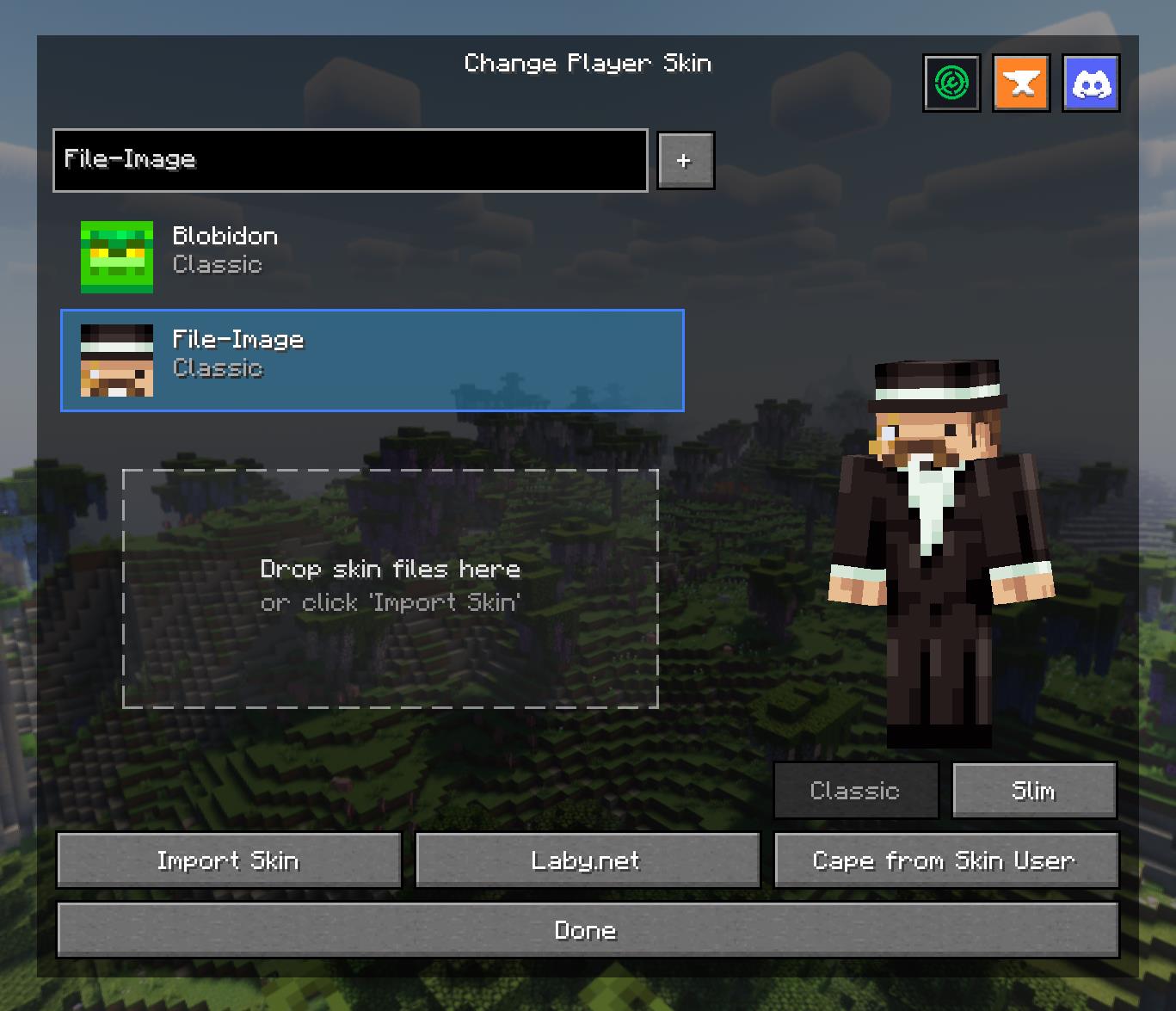
  • Skin Library: Save skins from other players by username or import your own local files.
  • Model Swapping: Instantly switch between Classic and Slim player models.
  • Drag & Drop: Simply drag skin files onto the menu to import them into your local library.
  • Cape Selector: Choose from a library of built-in capes or your own imported animated/static capes.

High-Definition Skin Engine

Break free from 64x64 limitations! QuickSkin's HD Texture Processor allows you to use high-resolution skins.
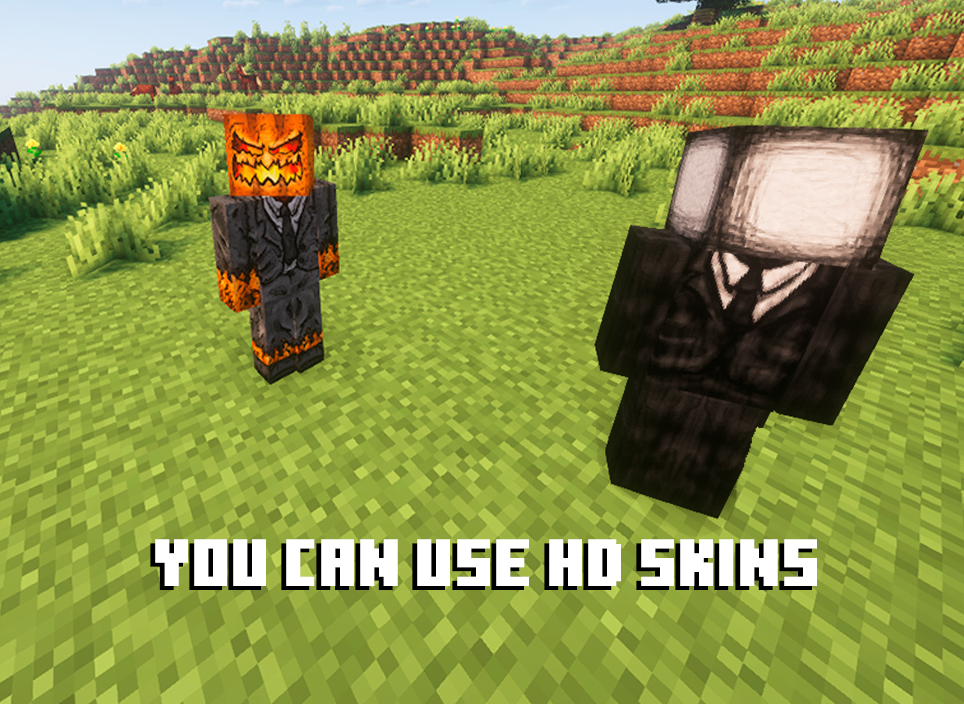
  • Automatic Normalization: The mod intelligently handles different skin formats, converting legacy skins (64x32) to the modern format on import.
  • Performance Scaling: HD skins are automatically downsampled for previews and thumbnails to ensure smooth UI performance, with quality settings available in the config.
  • Full Resolution In-Game: Enjoy your detailed HD skins in all their glory in the world.

Animated Cape Engine

Equip dynamic, eye-catching animated capes using standard GIF files.

  • GIF Processing: The mod automatically processes GIFs into an efficient texture atlas for smooth in-game animation.
  • Performance First: Control the maximum FPS, memory usage, and concurrent animations to keep your game running smoothly.
  • Speed Control: Adjust the playback speed of your animated cape in the Cape Selection menu to get the perfect effect.


🔧 Technical Details

  • Dependencies:
    • **Architectury API
  • Multiplayer: Full client-server support. The mod syncs skin changes and automatically transfers local texture files to other clients as needed.
  • Data Storage:
    • Local skins/capes are stored in .minecraft/quickskin/uploads/.
    • A cache for processed textures, profiles, and UV data is stored in .minecraft/quickskin_cache/.

🔮 The Result

QuickSkin transforms character customization from a chore into a core part of your gameplay. It empowers you with a suite of professional-grade tools wrapped in a simple, user-friendly interface. Express yourself with HD skins, stand out with animated capes, and share your unique style seamlessly with friends in any multiplayer world.

If you find any conflicts, please report them!

❤ Discord ➜ https://discord.gg/EeQgres2Fz

👥 Team & Contributors

ThePlum
ThePlumOwner

⚙️ Compatibility

Environment
❓ Unknown
Loaders
fabricforgeneoforge
Minecraft Versions
1.21.1

🔗 Links

Modrinth Page