Logo
MINECRAFTBIBLE
Items
Items

All game items

Blocks
Blocks

Building blocks

Mobs
Mobs

Creatures & monsters

Biomes
Biomes

World biomes

Structures
Structures

Generated structures

Recipes
Recipes

Crafting guides

Advancements
Advancements

Achievements

Loot Tables
Loot Tables

Drop rates

Tags
Tags

Item groupings

All Versions
View all data →
Capes
Cape ArchiveNEW

Browse rare Minecon capes, OptiFine capes, and custom capes from players worldwide

Browse

Player Database
Player DatabasePopular

Search any player

Skin Browser
Skin Browser

Browse & download skins

Cape Gallery
Cape GalleryNEW

Minecon & OptiFine capes

Seed Vault
Seed Vault

Curated seeds

Learn

Guides
GuidesNew

Tutorials & tips

Blog
Blog

News & updates

Community

Community Hub
Community HubHub

Posts, discussions & more

All Versions
View community →
Seed Analyzer
Seed Analyzer

World seed analysis

Loot Explorer
Loot Explorer

Drop rates

Crafting Calculator
Crafting Calculator

Material planning

Enchant Calculator
Enchant Calculator

Probability math

Redstone Lab
Redstone Lab

Signal timing

Trading Profit
Trading Profit

Villager ROI

All Versions
View all tools →
Mods
Mods

Browse all mods

Plugins
Plugins

Server plugins

Resource Packs
Resource Packs

Textures & sounds

Shaders
Shaders

Visual enhancements

Datapacks
Datapacks

World logic

Scanner
Mod Intelligence

Scan & analyze any mod

All Versions
View all mods →
Loading...
IntroductionIntroductionVersion HistoryVersion HistoryGuidesGuidesBlog & NewsBlog & News
ItemsItemsBlocksBlocksMobsMobsRecipesRecipesBiomesBiomesStructuresStructuresAdvancementsAdvancementsLoot TablesLoot TablesTagsTags
ModsModsPluginsPluginsResource PacksResource PacksShadersShadersDatapacksDatapacks

MinecraftBible

The Ultimate Wiki

Logo
MINECRAFTBIBLE

The ultimate Minecraft reference. Every item, block, mob, and recipe documented with precision.

Community

  • Skin Browser
  • Cape Gallery
  • Seed Vault
  • Blog
  • Guides

Database

  • Items
  • Blocks
  • Mobs
  • Recipes
  • Biomes
  • Structures

Tools

  • Seed Analyzer
  • Mod Intelligence
  • Crafting Calculator
  • Enchant Calculator

Mods & Packs

  • Mods
  • Plugins
  • Resource Packs
  • Shaders
  • Datapacks

Site & Legal

  • About
  • Authors
  • Editorial Policy
  • Corrections
  • Contact
  • Privacy Policy
  • Terms of Service
  • DMCA
  • Sitemap

© 2026 MinecraftBible. Not affiliated with Mojang or Microsoft.

PrivacyTermsContact
Nearby Crafting
ModMIT

Nearby Crafting

Allows crafting to access nearby chests or other containers, because that's how it should be!
36.7K
Downloads
52
Followers
1 years ago
Updated
📦
12
Versions
managementstorageutilityfabric
Download Latestv1.0.3View on Modrinth

📖About Nearby Crafting

Nearby Crafting Banner

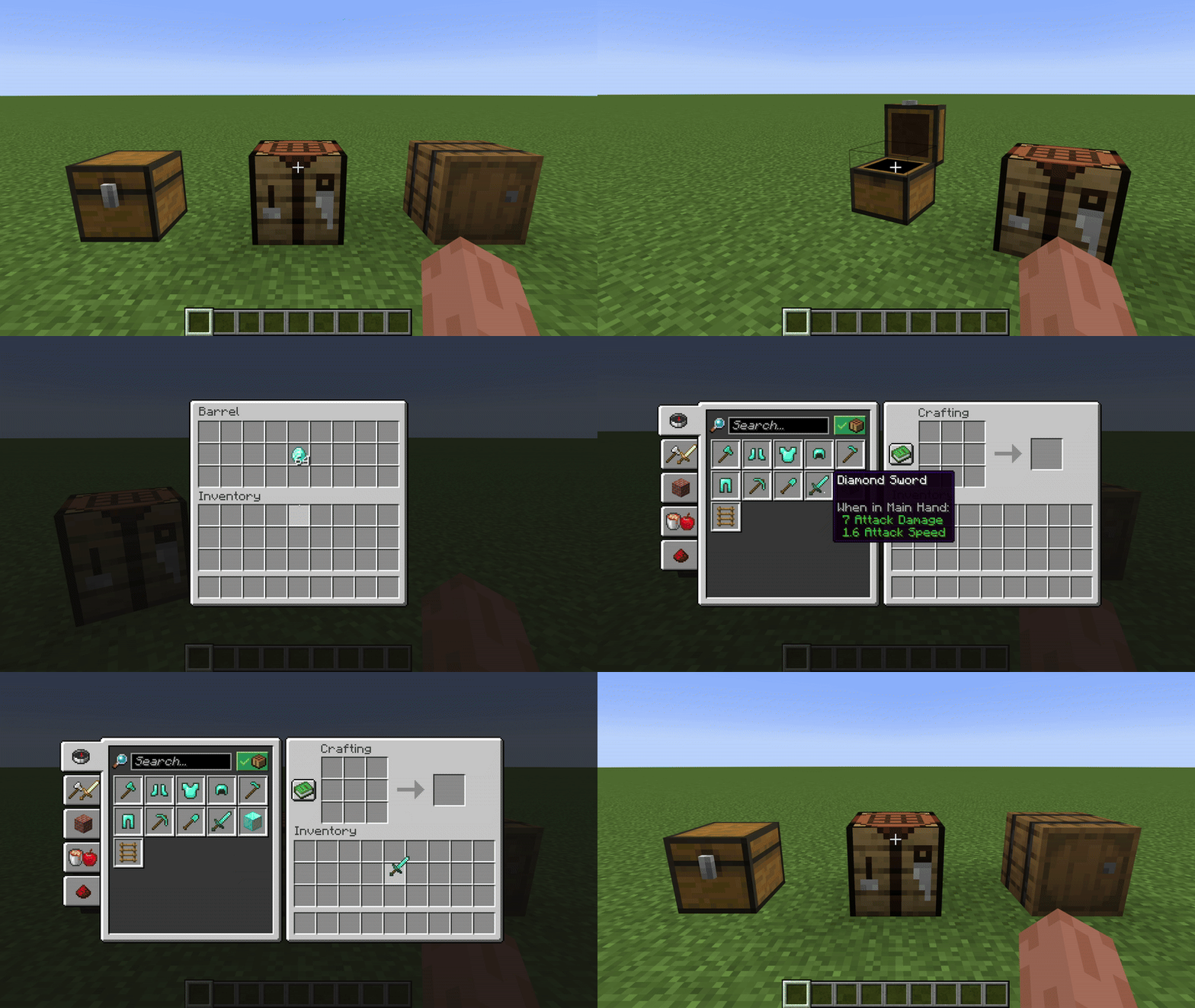
Nearby crafting is a simple mod for Fabric which enables crafting from nearby container blocks, such as barrels and chests.
A massive timesaver, and absolute essential for your survival world or server modpacks.
Nearby Crafting Demonstration

Features

Crafting from nearby containers

This works for both crafting tables, and crafting within the player's inventory

Completley Customisable

Nearby crafting supports customising the reach radius, or toggling the reach functionality altogether.

This can be done seperatley for different crafting scenarios (i.e. Crafting Tables and Player Inventory Crafting)
By default, the reach functionality is enabled and the radius is 8 blocks for all crafting scenarios.

These can be changed using modmenu, or commands.
If you are playing on a server, you must use commands to change the config, the modmenu config page will only affect the clients settings for singleplayer.

FAQs

  • Q: I think I found an issue...
    A: Feel free to create an issue on Github or reach out directly on discord @joonty

  • Q: Will you release support for x ?
    A: I plan to release support for older versions soon, I don't currently plan to release support outside of Fabric. If you would like to make a verion for another loader (Forge, NeoForge, etc) feel free to reach out on discord! @joonty

Commands Guide

Use the /nearbycrafting command to customize server-wide behavior for Nearby Crafting. You must be a server operator to change the server's Nearby Crafting configuration.
The command follows a simple, modular format:

/nearbycrafting <target> <action> [value]

Command Structure

<target>

This defines which crafting scenario you're configuring:

  • craftingtable – Affects vanilla crafting tables.
  • playerinventorycrafting – Affects the player's inventory crafting (2x2 crafting grid).

<action>

Defines the type of action you want to perform:

  • enable – Turns the functionality ON.
  • disable – Turns the functionality OFF.
  • setReach <number> – Sets the radius (in blocks) from which inventories are accessible.
  • getReach – Displays the current reach radius.

Examples

Enable crafting table inventory access:

/nearbycrafting craftingtable enable

Disable player inventory crafting access:

/nearbycrafting playerinventorycrafting disable

Set reach radius to 10 blocks for crafting tables:

/nearbycrafting craftingtable setReach 10

Check current reach radius for player inventory crafting:

/nearbycrafting playerinventorycrafting getReach

Note: These commands require operator permissions on the server.

👥 Team & Contributors

Jomlom
JomlomOwner

⚙️ Compatibility

Environment
✅ Client & Server
Loaders
fabric
Minecraft Versions
1.20.1

🔗 Links

Modrinth Page