


Natural Temperature
Natural Temperature is a mod that overhauls the way biomes are placed in the world, creating a layout that more closely resembles Earth’s climate zones with cold biomes in the north and warm biomes in the south.
📖About Natural Temperature
Natural Temperature

Natural Temperature is a mod that overhauls the way biomes are placed in the world, creating a layout that more closely resembles Earth’s climate zones.
Instead of Minecraft’s typical random patchwork of biomes, this mod introduces a structured, configurable, latitude-based biome generation system:
- Polar regions feature icy biomes such as Snowy Tundra and Ice Spikes.
- Cold zones include taigas that aren’t covered in snow.
- Temperate zones contain forests, plains, and seasonal biomes.
- Warm regions are covered by dry biomes such as savannas.
- Tropical regions are dominated by hot biomes like deserts and badlands.
- Equatorial regions are populated by jungles
This creates a more immersive, believable world that mimics Earth's natural climate bands, making exploration feel more organic and meaningful.
Whether you're building realistic cities, survival challenges, or just want a more coherent world, this mod brings climate logic to your overworld.
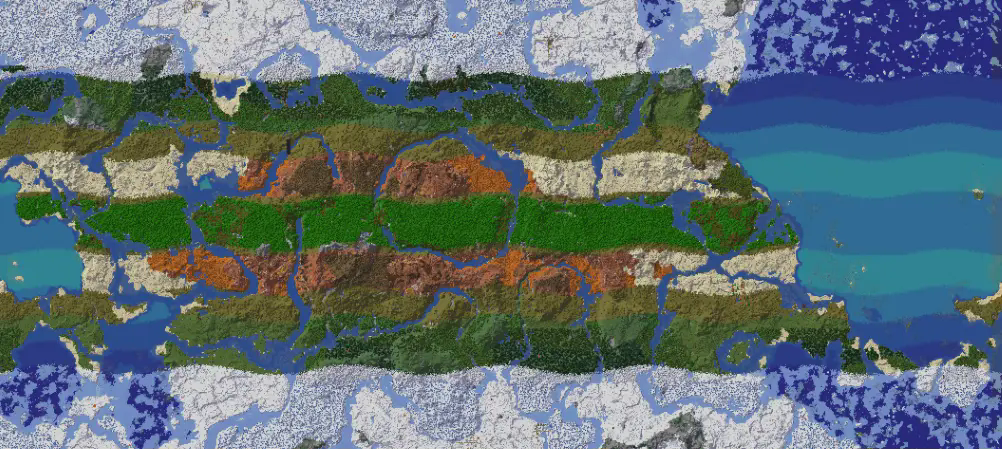
This is an image from 1.0.5 mod version
Features
- Latitude-based biome generation
- Configurable world width in config file
- Full compatibility with vanilla and many modded biomes
- Lightweight and performance-friendly
Configuration
In the config folder you will find the configuration file for natural-temperature. Here you can change some parameters to customize your world
Equatorial Distance
The "equatorial_distance" is the distance of the equator from the spawn point (it's also the distance from the north pole). By default it is 50000.0 blocks.
Looping
You can also enable looping of the biomes' distribution after you pass the poles. By default it is set to false, to enable it set "looping_world" to true. This setting is possible in mod versions 1.0.4+.
Modes
Starting from version 1.0.6, you can change the "modes" and choose between default, simplified, and linear. These are generation patterns that determine where biomes will spawn. You can see them in the gallery. Use the parameter "generation_mode" to change mode.
Equator Offset
You can change "equator_offset" to move the equator north and south. Positive values will move the equator north, while negative values will move it south. If you want the equator to be at 0 set this value the same as your equatorial_distance
Randomize Underground
Use "randomize_underground" to randomize the biomes distribution below a y that you can define with "randomize_underground_below_y". You can choose between two type of randomization: random (total randomness) and half_random (some degree of similarity with biomes on the surface)
Multi-dimensions
Use "multidimensional_bands" to enable/disable the banded generation in all the dimensions. It's false by default
Global Temperature Parameters
Use "global_temperature_modifier_percentage" to heat or cool the planet.
Use "global_temperature_mitigation_percentage" to mitigate temperature extremes, making extreme climatic regions smaller and temperate regions larger.
Extra Bands
You can set "extra_bands" to true to enable a wider transition between the desert region and the jungle, this will help if some modded biomes are missing. This will free some space in the map for different biomes to spawn. This setting is available in mod version 1.0.14+ .
This works well with "Oh The Biomes We've Gone" mod and a lot of other mods.
Wave Magnification
Since 1.0.15 you can use "wave_magnification" option to amplify the wave of the transition between the climatic bands
Temperature of the zones
Since 1.0.15 you can use "temperature_zone_x" options to customize some of the modes like the Custom Circular mode to shape the world as you like.
After you make changes, remember to save the file and restart Minecraft.
Compatibility
- Compatible with world generation mods (e.g. Tectonic, Lithosphere) – results may vary
- Compatible with the vast majority of mods that add biomes
- Likely not compatible with total conversion mod, but this depends on the mod
Known Issues
- [Solved in mod version 1.0.10] Mods that use TerraBlender, like Biomes O’ Plenty, will likely generate the Nether with bands regardless of the settings.
- [Solved in mod version 1.0.11.1] Mods that use the Blueprint mod will generate the Nether with bands regardless of the settings.