Logo
MINECRAFTBIBLE
Items
Items

All game items

Blocks
Blocks

Building blocks

Mobs
Mobs

Creatures & monsters

Biomes
Biomes

World biomes

Structures
Structures

Generated structures

Recipes
Recipes

Crafting guides

Advancements
Advancements

Achievements

Loot Tables
Loot Tables

Drop rates

Tags
Tags

Item groupings

All Versions
View all data →
Capes
Cape ArchiveNEW

Browse rare Minecon capes, OptiFine capes, and custom capes from players worldwide

Browse

Player Database
Player DatabasePopular

Search any player

Skin Browser
Skin Browser

Browse & download skins

Cape Gallery
Cape GalleryNEW

Minecon & OptiFine capes

Seed Vault
Seed Vault

Curated seeds

Learn

Guides
GuidesNew

Tutorials & tips

Blog
Blog

News & updates

Community

Community Hub
Community HubHub

Posts, discussions & more

All Versions
View community →
Seed Analyzer
Seed Analyzer

World seed analysis

Loot Explorer
Loot Explorer

Drop rates

Crafting Calculator
Crafting Calculator

Material planning

Enchant Calculator
Enchant Calculator

Probability math

Redstone Lab
Redstone Lab

Signal timing

Trading Profit
Trading Profit

Villager ROI

All Versions
View all tools →
Mods
Mods

Browse all mods

Plugins
Plugins

Server plugins

Resource Packs
Resource Packs

Textures & sounds

Shaders
Shaders

Visual enhancements

Datapacks
Datapacks

World logic

Scanner
Mod Intelligence

Scan & analyze any mod

All Versions
View all mods →
Loading...
IntroductionIntroductionVersion HistoryVersion HistoryGuidesGuidesBlog & NewsBlog & News
ItemsItemsBlocksBlocksMobsMobsRecipesRecipesBiomesBiomesStructuresStructuresAdvancementsAdvancementsLoot TablesLoot TablesTagsTags
ModsModsPluginsPluginsResource PacksResource PacksShadersShadersDatapacksDatapacks

MinecraftBible

The Ultimate Wiki

Logo
MINECRAFTBIBLE

The ultimate Minecraft reference. Every item, block, mob, and recipe documented with precision.

Community

  • Skin Browser
  • Cape Gallery
  • Seed Vault
  • Blog
  • Guides

Database

  • Items
  • Blocks
  • Mobs
  • Recipes
  • Biomes
  • Structures

Tools

  • Seed Analyzer
  • Mod Intelligence
  • Crafting Calculator
  • Enchant Calculator

Mods & Packs

  • Mods
  • Plugins
  • Resource Packs
  • Shaders
  • Datapacks

Site & Legal

  • About
  • Authors
  • Editorial Policy
  • Corrections
  • Contact
  • Privacy Policy
  • Terms of Service
  • DMCA
  • Sitemap

© 2026 MinecraftBible. Not affiliated with Mojang or Microsoft.

PrivacyTermsContact
Mc2Discord
ModApache-2.0

Mc2Discord

Link your Minecraft server chat with your Discord (integration, bridge)

19.9K
Downloads
35
Followers
4 months ago
Updated
📦
30
Versions
managementsocialutilityfabricforgeneoforgequilt
Download Latestv4.2.7View on Modrinth

📖About Mc2Discord

Mc2Discord

Link your Minecraft server chat with your Discord


/!\ This mod needs configuration to work properly. Please take a look to the wiki: https://github.com/DenisD3D/Mc2Discord/wiki

Features

  • Send Minecraft chat message to your Discord server
  • Send message in your Discord server to the Minecraft chat
  • Send game events message to Discord (player join, player leave, death, etc.)
  • Display player's head as profile picture in Discord thanks to webhook mode
  • Execute Minecraft commands on Discord
  • Customize bot presence (eg: playing at xxx) and channel name / topic
  • Provide an invitation link to your Discord server with the /discord command
  • Forward the server console to discord (useful for admins)
  • Hide player on Discord (useful for admins, integrate with VanishMod)
  • Account linking (forced or optional)
  • Fully customizable, easy configuration (messages, behavior, etc.)
  • Relay others mods announcements
  • Works with Emojiful to display emojis ingame
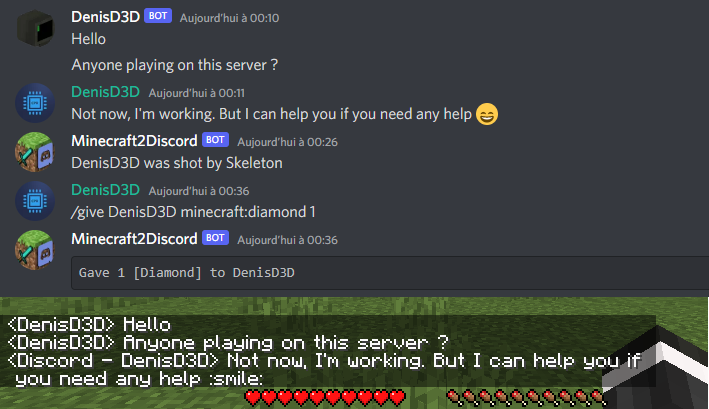
Features

Try without installing

Join the official demo server hosted by MtxServ

  • Join the demo discord channel #access-demo
  • Start the sever with /start command (server is usually stopped)
  • Connect to m2d-demo.denisd3d.fr with minecraft 1.20.2 Vanilla

Installation

A quick configuration is mandatory for the mod to work. Steps are described on the wiki: https://github.com/DenisD3D/Mc2Discord/wiki

If you need any help or want new features, you can join the Discord support server

You can also watch the video tutorial:

Misc

Links

  • Discord (Support): https://discord.gg/rzzd76c
  • CurseForge (Download): https://www.curseforge.com/minecraft/mc-mods/mc2discord/
  • Modrinth (Download): https://modrinth.com/mod/mc2discord
  • Github (Source): https://github.com/DenisD3D/Mc2Discord
  • Wiki: https://github.com/DenisD3D/Mc2Discord/wiki

Demo server hosted thanks to MtxServ

👥 Team & Contributors

DenisD3D
DenisD3DOwner

⚙️ Compatibility

Environment
🖥️ Server-side
Loaders
fabricforgeneoforgequilt
Minecraft Versions
1.21.71.21.81.21.91.21.101.21.11

🔗 Links

Modrinth Page