Logo
MINECRAFTBIBLE
Items
Items

All game items

Blocks
Blocks

Building blocks

Mobs
Mobs

Creatures & monsters

Biomes
Biomes

World biomes

Structures
Structures

Generated structures

Recipes
Recipes

Crafting guides

Advancements
Advancements

Achievements

Loot Tables
Loot Tables

Drop rates

Tags
Tags

Item groupings

All Versions
View all data →
Capes
Cape ArchiveNEW

Browse rare Minecon capes, OptiFine capes, and custom capes from players worldwide

Browse

Player Database
Player DatabasePopular

Search any player

Skin Browser
Skin Browser

Browse & download skins

Cape Gallery
Cape GalleryNEW

Minecon & OptiFine capes

Seed Vault
Seed Vault

Curated seeds

Learn

Guides
GuidesNew

Tutorials & tips

Blog
Blog

News & updates

Community

Community Hub
Community HubHub

Posts, discussions & more

All Versions
View community →
Seed Analyzer
Seed Analyzer

World seed analysis

Loot Explorer
Loot Explorer

Drop rates

Crafting Calculator
Crafting Calculator

Material planning

Enchant Calculator
Enchant Calculator

Probability math

Redstone Lab
Redstone Lab

Signal timing

Trading Profit
Trading Profit

Villager ROI

All Versions
View all tools →
Mods
Mods

Browse all mods

Plugins
Plugins

Server plugins

Resource Packs
Resource Packs

Textures & sounds

Shaders
Shaders

Visual enhancements

Datapacks
Datapacks

World logic

Scanner
Mod Intelligence

Scan & analyze any mod

All Versions
View all mods →
Loading...
IntroductionIntroductionVersion HistoryVersion HistoryGuidesGuidesBlog & NewsBlog & News
ItemsItemsBlocksBlocksMobsMobsRecipesRecipesBiomesBiomesStructuresStructuresAdvancementsAdvancementsLoot TablesLoot TablesTagsTags
ModsModsPluginsPluginsResource PacksResource PacksShadersShadersDatapacksDatapacks

MinecraftBible

The Ultimate Wiki

Logo
MINECRAFTBIBLE

The ultimate Minecraft reference. Every item, block, mob, and recipe documented with precision.

Community

  • Player Database
  • Skin Browser
  • Cape Gallery
  • Community Hub
  • Seed Vault

Database

  • Items
  • Blocks
  • Mobs
  • Recipes
  • Biomes
  • Structures

Tools

  • Seed Analyzer
  • Mod Intelligence
  • Crafting Calculator
  • Enchant Calculator

Mods & Packs

  • Mods
  • Plugins
  • Resource Packs
  • Shaders
  • Datapacks

© 2026 MinecraftBible. Not affiliated with Mojang or Microsoft.

PrivacyTermsContact
LUMP: Less Ugly Mob Proofing
ModMIT

LUMP: Less Ugly Mob Proofing

Adds a block that prevents mob spawns in a large area at night without torch spam. (sky light based)

1.0K
Downloads
13
Followers
4 months ago
Updated
📦
15
Versions
mobsutilityfabric
Download Latestv1.21.11-0.3.0-clothView on Modrinth

📖About LUMP: Less Ugly Mob Proofing

LUMP aims to eradicate torch spam around your base,
without affecting your mob grinders or other farms.

It achieves this by adding a craftable block, called the Amethyst Beacon, which prevents mob spawns within its range, but only for blocks that would be otherwise safe during the day (it is skylight based).

This means:
✅ you only need to light up the interiors of your base
✅ your mob farms should still work (as long as they are dark)
✅ caves are still dangerous until you light them up

✨ This mod also includes a color-coded light overlay to see which blocks are spawnable and which are safe,
the overlay is always displayed when you have the fashionable Amethyst Goggles equipped on your head.

⛏️ This mod aims to be 100% survival friendly.
Added blocks & items

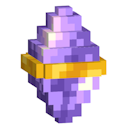
Amethyst Beacon

amethyst beacon
Prevents most hostile mob spawns within it's range of 128 blocks (horizontally) from where it is placed .

You can craft Amethyst Beacons from:
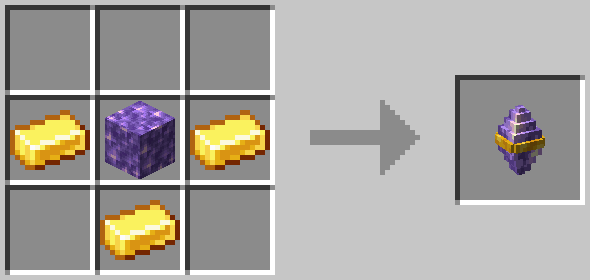
  • 1 Block of Amethyst
  • 3 Gold Ingots

Crafting recipe for amethyst beacon, a block of amethyst in the middle with 3 gold ingots surrounding it like a bucket.

Amethyst Goggles

amethyst goggles
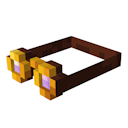
These goggles add a color-coded light overlay to the game, in an immersive & survival friendly way.

You can craft Amethyst Goggles from:

  • 2 Blocks of Amethyst
  • 3 pieces of Leather
  • 1 Gold Ingot

They do not stack, but can be equipped on the head.
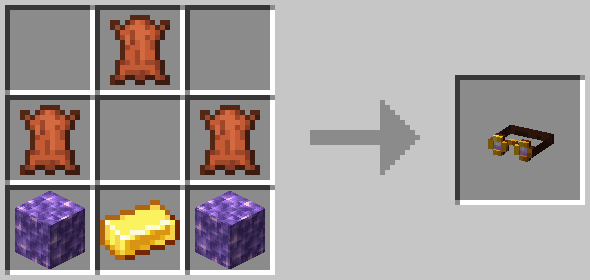
Crafting recipe for the amethyst goggles, two blocks of amethyst at the bottom on either side, a gold ingot between them, two leathers on either side in the middle row, one leather in the middle at the top row.

When advanced tooltips are enabled (F3 + H), the item shows the legend for the light overlay:
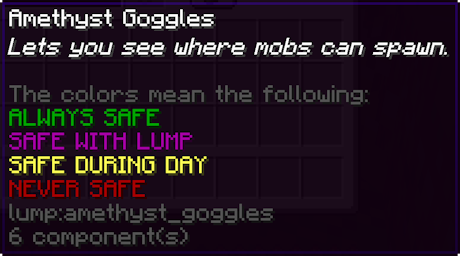
The advanced tooltip for the amethyst goggles, it shows the legend of the colors for the light overlay. Green = always safe, purple = safe with this mod, yellow = safe during the day, red = never safe.

Additional Resources

For More Technical Details see: GitHub README
If you found a bug, or have a feature you think the mod is missing: Open An Issue

👥 Team & Contributors

bdev42
bdev42Owner

⚙️ Compatibility

Environment
✅ Client & Server
Loaders
fabric
Minecraft Versions
1.21.11

🔗 Links

Modrinth Page