Logo
MINECRAFTBIBLE
Items
Items

All game items

Blocks
Blocks

Building blocks

Mobs
Mobs

Creatures & monsters

Biomes
Biomes

World biomes

Structures
Structures

Generated structures

Recipes
Recipes

Crafting guides

Advancements
Advancements

Achievements

Loot Tables
Loot Tables

Drop rates

Tags
Tags

Item groupings

All Versions
View all data →
Capes
Cape ArchiveNEW

Browse rare Minecon capes, OptiFine capes, and custom capes from players worldwide

Browse

Player Database
Player DatabasePopular

Search any player

Skin Browser
Skin Browser

Browse & download skins

Cape Gallery
Cape GalleryNEW

Minecon & OptiFine capes

Seed Vault
Seed Vault

Curated seeds

Learn

Guides
GuidesNew

Tutorials & tips

Blog
Blog

News & updates

Community

Community Hub
Community HubHub

Posts, discussions & more

All Versions
View community →
Seed Analyzer
Seed Analyzer

World seed analysis

Loot Explorer
Loot Explorer

Drop rates

Crafting Calculator
Crafting Calculator

Material planning

Enchant Calculator
Enchant Calculator

Probability math

Redstone Lab
Redstone Lab

Signal timing

Trading Profit
Trading Profit

Villager ROI

All Versions
View all tools →
Mods
Mods

Browse all mods

Plugins
Plugins

Server plugins

Resource Packs
Resource Packs

Textures & sounds

Shaders
Shaders

Visual enhancements

Datapacks
Datapacks

World logic

Scanner
Mod Intelligence

Scan & analyze any mod

All Versions
View all mods →
Loading...
IntroductionIntroductionVersion HistoryVersion HistoryGuidesGuidesBlog & NewsBlog & News
ItemsItemsBlocksBlocksMobsMobsRecipesRecipesBiomesBiomesStructuresStructuresAdvancementsAdvancementsLoot TablesLoot TablesTagsTags
ModsModsPluginsPluginsResource PacksResource PacksShadersShadersDatapacksDatapacks

MinecraftBible

The Ultimate Wiki

Logo
MINECRAFTBIBLE

The ultimate Minecraft reference. Every item, block, mob, and recipe documented with precision.

Community

  • Skin Browser
  • Cape Gallery
  • Seed Vault
  • Blog
  • Guides

Database

  • Items
  • Blocks
  • Mobs
  • Recipes
  • Biomes
  • Structures

Tools

  • Seed Analyzer
  • Mod Intelligence
  • Crafting Calculator
  • Enchant Calculator

Mods & Packs

  • Mods
  • Plugins
  • Resource Packs
  • Shaders
  • Datapacks

Site & Legal

  • About
  • Authors
  • Editorial Policy
  • Corrections
  • Contact
  • Privacy Policy
  • Terms of Service
  • DMCA
  • Sitemap

© 2026 MinecraftBible. Not affiliated with Mojang or Microsoft.

PrivacyTermsContact
Locator Triangulation
ModMIT

Locator Triangulation

A client-side Fabric mod that allows determining players' coordinates using data from the locator and triangulation

765
Downloads
14
Followers
6 months ago
Updated
📦
3
Versions
utilityfabric
Download Latestv1.1.0+mc1.21.10-fabricView on Modrinth

📖About Locator Triangulation

Locator Triangulation

A client-side Fabric mod that allows determining players' coordinates using triangulation.

The mod calculates coordinates using publicly available data accessible to regular vanilla players and acts solely as a calculator.
If the vanilla locator is disabled on the server or a player has hidden from it, the mod will not be able to determine their coordinates.
Essentially, all calculations performed by the mod can be done manually with a calculator and the vanilla client.

icon.png

Quick start

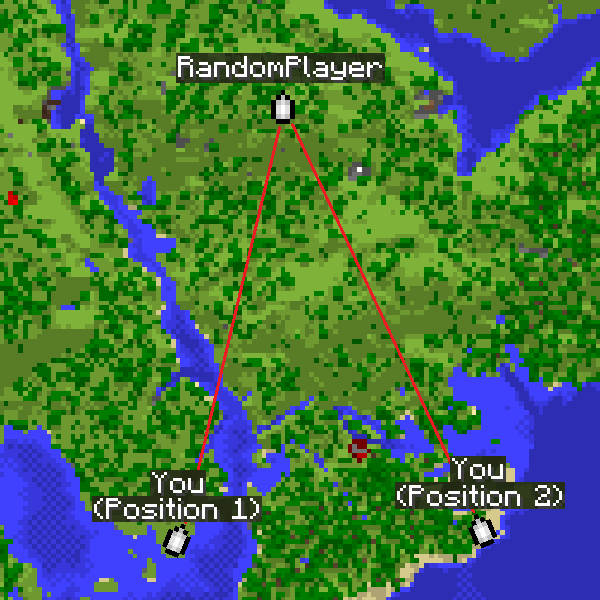
The map is for example purposes only.
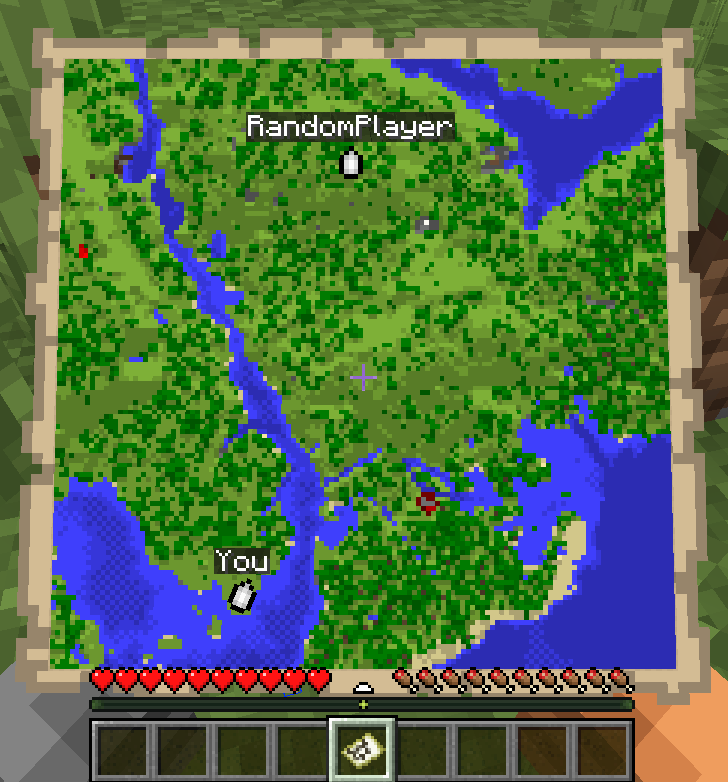
map

  • Run /locator_pos1 - the mod will remember the locator's state, your current position and your view yaw.
  • Move away as far as possible so the angle to the target becomes as large as possible, then run /locator_pos2.
  • Run:
    • /locator_locate <name> - attempt to compute the coordinates of player <name>, or
    • /locator_locate_all - attempt to compute coordinates of all known targets.
/locator_pos1
/locator_pos2
/locator_locate RandomPlayer

locate_RandomPlayer command

triangulation lines

The larger the angle between directions from the two points, the more accurate the coordinates.

For regular triangulation use the same commands but with the triangulation prefix.

Command description

Locator commands

  • /locator_data - print current locator state
  • /locator_pos1 - save the first position (locator state and your coordinates)
  • /locator_pos2 - save the second position (locator state and your coordinates)
  • /locator_get_poses - print the saved positions
  • /locator_clear_pos1 - clear the first position
  • /locator_clear_pos2 - clear the second position
  • /locator_clear_poses - clear both positions
  • /locator_locate <name> - compute coordinates of player <name> (if both positions are saved)
  • /locator_locate_all - compute coordinates for all known targets (if both positions are saved)

Regular triangulation commands

  • /triangulation_pos1 - save the first position (your coordinates + yaw)
  • /triangulation_pos2 - save the second position (your coordinates + yaw)
  • /triangulation_get_poses - print the saved positions
  • /triangulation_clear_pos1 - clear the first position
  • /triangulation_clear_pos2 - clear the second position
  • /triangulation_clear_poses - clear both positions
  • /triangulation_locate — compute the intersection coordinates of the view directions (if both positions are saved)

Keybinds

For convenience, keybinds have been added for locator and triangulation.
The purpose is to simplify the process of setting points and calculating results.

How it works:

  • The first press of the selected key will set the first point.
  • Pressing the key with Shift will skip setting the second point.
  • Pressing the key again will reset the first point.
  • Pressing it again will set the second point.
  • If both points are already set, pressing the key with Ctrl will return the calculated result for those two points.

Accuracy notes

Triangulation accuracy strongly depends on the angle between view directions from the two positions.
Good results are achieved with an angle between directions from 20° to 150°.
Near-perfect accuracy occurs at about 70-100°.
If the angle is too small (less than 20°) or too large (150° and above), accuracy drops significantly.

For maximum accuracy, take positions so that the target is roughly at a right angle relative to you.

The corner color in the message indicates the calculation quality.
Green means near-perfect accuracy, yellow is acceptable but may include a small error, and red indicates poor accuracy.
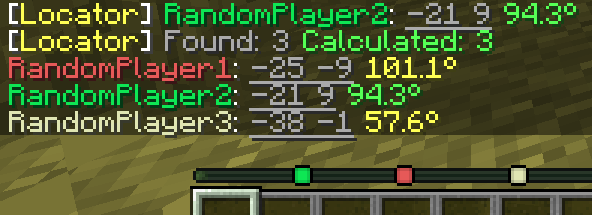
colored_locate

How to hide from the locator

There are several ways to hide from the radar: sneaking (Shift), a mob's or another player's head, a carved pumpkin, or an invisibility potion.

👥 Team & Contributors

EgorKhabarov
EgorKhabarovOwner

⚙️ Compatibility

Environment
💻 Client-side
Loaders
fabric
Minecraft Versions
1.21.10

🔗 Links

Modrinth Page