Logo
MINECRAFTBIBLE
Items
Items

All game items

Blocks
Blocks

Building blocks

Mobs
Mobs

Creatures & monsters

Biomes
Biomes

World biomes

Structures
Structures

Generated structures

Recipes
Recipes

Crafting guides

Advancements
Advancements

Achievements

Loot Tables
Loot Tables

Drop rates

Tags
Tags

Item groupings

All Versions
View all data →
Capes
Cape ArchiveNEW

Browse rare Minecon capes, OptiFine capes, and custom capes from players worldwide

Browse

Player Database
Player DatabasePopular

Search any player

Skin Browser
Skin Browser

Browse & download skins

Cape Gallery
Cape GalleryNEW

Minecon & OptiFine capes

Seed Vault
Seed Vault

Curated seeds

Learn

Guides
GuidesNew

Tutorials & tips

Blog
Blog

News & updates

Community

Community Hub
Community HubHub

Posts, discussions & more

All Versions
View community →
Seed Analyzer
Seed Analyzer

World seed analysis

Loot Explorer
Loot Explorer

Drop rates

Crafting Calculator
Crafting Calculator

Material planning

Enchant Calculator
Enchant Calculator

Probability math

Redstone Lab
Redstone Lab

Signal timing

Trading Profit
Trading Profit

Villager ROI

All Versions
View all tools →
Mods
Mods

Browse all mods

Plugins
Plugins

Server plugins

Resource Packs
Resource Packs

Textures & sounds

Shaders
Shaders

Visual enhancements

Datapacks
Datapacks

World logic

Scanner
Mod Intelligence

Scan & analyze any mod

All Versions
View all mods →
Loading...
IntroductionIntroductionVersion HistoryVersion HistoryGuidesGuidesBlog & NewsBlog & News
ItemsItemsBlocksBlocksMobsMobsRecipesRecipesBiomesBiomesStructuresStructuresAdvancementsAdvancementsLoot TablesLoot TablesTagsTags
ModsModsPluginsPluginsResource PacksResource PacksShadersShadersDatapacksDatapacks

MinecraftBible

The Ultimate Wiki

Logo
MINECRAFTBIBLE

The ultimate Minecraft reference. Every item, block, mob, and recipe documented with precision.

Community

  • Skin Browser
  • Cape Gallery
  • Seed Vault
  • Blog
  • Guides

Database

  • Items
  • Blocks
  • Mobs
  • Recipes
  • Biomes
  • Structures

Tools

  • Seed Analyzer
  • Mod Intelligence
  • Crafting Calculator
  • Enchant Calculator

Mods & Packs

  • Mods
  • Plugins
  • Resource Packs
  • Shaders
  • Datapacks

Site & Legal

  • About
  • Authors
  • Editorial Policy
  • Corrections
  • Contact
  • Privacy Policy
  • Terms of Service
  • DMCA
  • Sitemap

© 2026 MinecraftBible. Not affiliated with Mojang or Microsoft.

PrivacyTermsContact
Glance
ModMIT

Glance

GUI Tweaks for Minecraft

106
Downloads
12
Followers
1 years ago
Updated
📦
2
Versions
decorationgame-mechanicsutilityfabric
Download Latestv1.0.1View on Modrinth

📖About Glance

Glance: GUI Tweaks for Minecraft

Features

Health Bar

When the health exceeds 20, the additional health is displayed as an overlapping bar in a different color rather than stacking up as new lines.
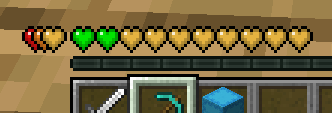
Health Bar

Hunger Bar

Displays the saturation level alongside the hunger bar.
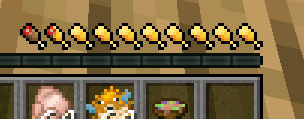
Hunger Bar

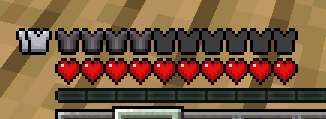
Armor Bar

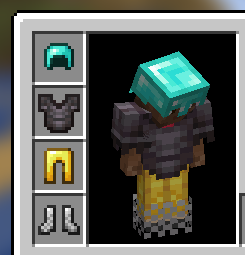
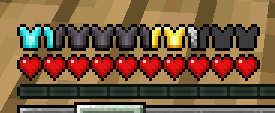
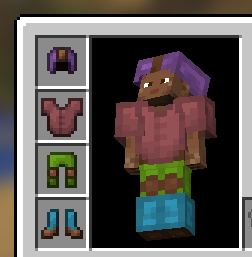
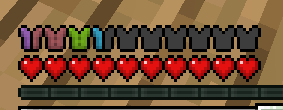
When the armor value exceeds 20, the extra armor is stacked on the left. The armor icon texture changes based on the equipped armor.

  • Armor icon texture variant

    Current Armor
    Current Armor Bar

    Current Leather Armor
    Current Leather Armor Bar

  • When armor exceeds 20

    When Armor Exceed 20

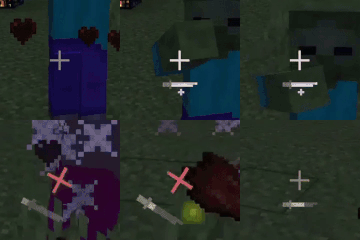
Dynamic Crosshair Animation
  • Appears during melee and critical attacks.

    Attack Crosshair
    Critical Attack Crosshair

  • Activates while charging a bow, crossbow, or trident.

    Hit Crosshair

ItemStack Overlay

Shows overlays for beehives based on their honey level.
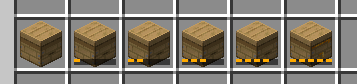
Honey Level Overlay

New Tooltips
  • Changes tooltip appearances based on disc, enchanted book, and rarity.
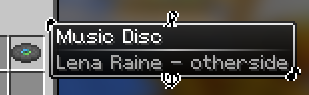
    Disc
    Enchanted Book

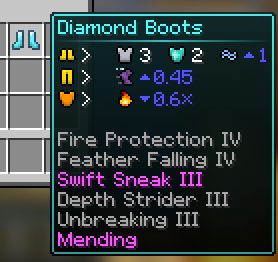
  • Simplifies and makes tooltips more intuitive by using icons.
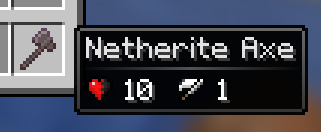
    Simple Icon Tooltip
    Complex Icon Tooltip

  • Displays detailed text tooltips when holding Shift.
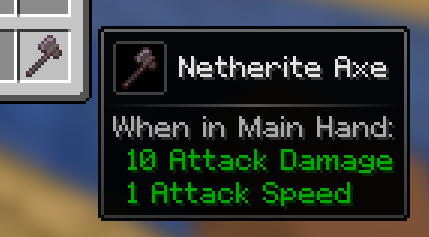
    Shift Tooltip

    • For armor, holding Shift shows a 3D model.
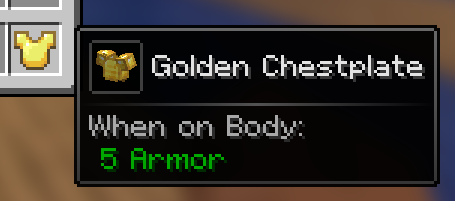
      Armor 3D Tooltip

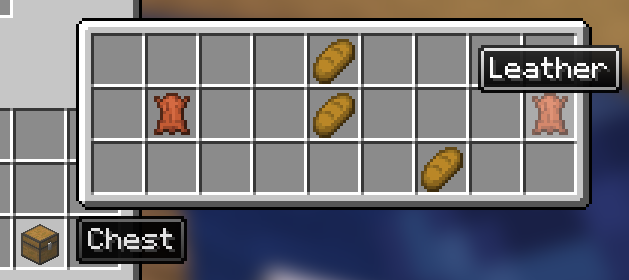
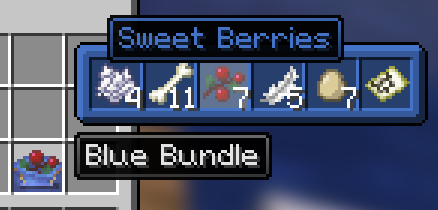
  • Previews the inventory of items like bundle, shulker box, and any items with internal inventory stored via NBT when hovering over them with the cursor.
    Scroll with the mouse to access the inventory.
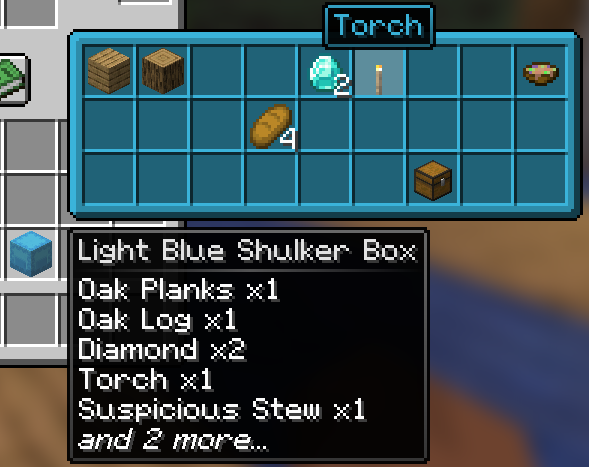
    Shulker Box Tooltip
    NBT Container Tooltip
    Bundle Tooltip

    • Displays durability tooltips for tools in anvil and grindstone.
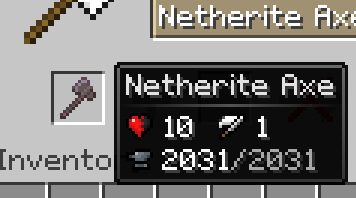
      Anvil Tooltip

  • Shows the burn time of items usable as fuel in smoker, blast furnace, and furnace.
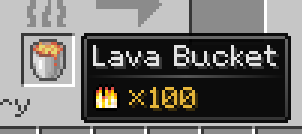
    Furnace Tooltip

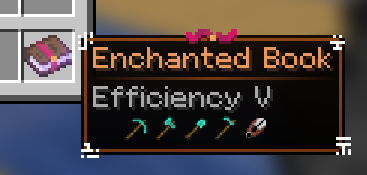
  • Indicates the compatibility of each enchantment on enchanted books with specific items.

    Enchanted Book

  • Shows the hunger and saturation values restored by food when consumed.
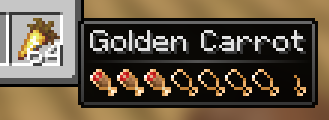
    Food Tooltip

  • Allows map previewing by hovering the cursor over it.
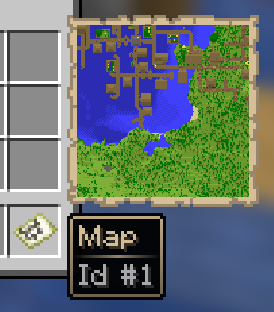
    Map Tooltip

👥 Team & Contributors

Rhseung
RhseungOwner

⚙️ Compatibility

Environment
❓ Unknown
Loaders
fabric
Minecraft Versions
1.21.3

🔗 Links

Modrinth Page