Logo
MINECRAFTBIBLE
Items
Items

All game items

Blocks
Blocks

Building blocks

Mobs
Mobs

Creatures & monsters

Biomes
Biomes

World biomes

Structures
Structures

Generated structures

Recipes
Recipes

Crafting guides

Advancements
Advancements

Achievements

Loot Tables
Loot Tables

Drop rates

Tags
Tags

Item groupings

All Versions
View all data →
Capes
Cape ArchiveNEW

Browse rare Minecon capes, OptiFine capes, and custom capes from players worldwide

Browse

Player Database
Player DatabasePopular

Search any player

Skin Browser
Skin Browser

Browse & download skins

Cape Gallery
Cape GalleryNEW

Minecon & OptiFine capes

Seed Vault
Seed Vault

Curated seeds

Learn

Guides
GuidesNew

Tutorials & tips

Blog
Blog

News & updates

Community

Community Hub
Community HubHub

Posts, discussions & more

All Versions
View community →
Seed Analyzer
Seed Analyzer

World seed analysis

Loot Explorer
Loot Explorer

Drop rates

Crafting Calculator
Crafting Calculator

Material planning

Enchant Calculator
Enchant Calculator

Probability math

Redstone Lab
Redstone Lab

Signal timing

Trading Profit
Trading Profit

Villager ROI

All Versions
View all tools →
Mods
Mods

Browse all mods

Plugins
Plugins

Server plugins

Resource Packs
Resource Packs

Textures & sounds

Shaders
Shaders

Visual enhancements

Datapacks
Datapacks

World logic

Scanner
Mod Intelligence

Scan & analyze any mod

All Versions
View all mods →
Loading...
IntroductionIntroductionVersion HistoryVersion HistoryGuidesGuidesBlog & NewsBlog & News
ItemsItemsBlocksBlocksMobsMobsRecipesRecipesBiomesBiomesStructuresStructuresAdvancementsAdvancementsLoot TablesLoot TablesTagsTags
ModsModsPluginsPluginsResource PacksResource PacksShadersShadersDatapacksDatapacks

MinecraftBible

The Ultimate Wiki

Logo
MINECRAFTBIBLE

The ultimate Minecraft reference. Every item, block, mob, and recipe documented with precision.

Community

  • Skin Browser
  • Cape Gallery
  • Seed Vault
  • Blog
  • Guides

Database

  • Items
  • Blocks
  • Mobs
  • Recipes
  • Biomes
  • Structures

Tools

  • Seed Analyzer
  • Mod Intelligence
  • Crafting Calculator
  • Enchant Calculator

Mods & Packs

  • Mods
  • Plugins
  • Resource Packs
  • Shaders
  • Datapacks

Site & Legal

  • About
  • Authors
  • Editorial Policy
  • Corrections
  • Contact
  • Privacy Policy
  • Terms of Service
  • DMCA
  • Sitemap

© 2026 MinecraftBible. Not affiliated with Mojang or Microsoft.

PrivacyTermsContact
gently holds
ModMIT

gently holds

Pick up mobs as items. Very configurable!

4.9K
Downloads
26
Followers
5 months ago
Updated
📦
13
Versions
game-mechanicsmobsstoragefabricquilt
Download Latestv1.2.1+mc26.1-snapshot-7View on Modrinth

📖About gently holds

Allows you to pick up mobs as items by Shift+right clicking them (crouch+use).
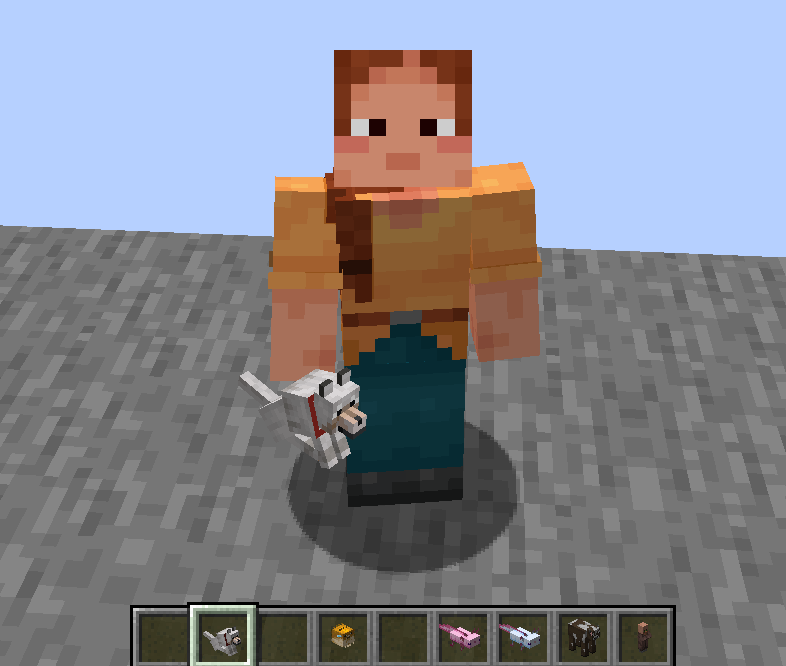
Holding a wolf with other mobs in hotbar

You can place the mob back in the world by using it on the ground, or dropping it (configurable).

As a bonus, you can also wear them on your head!
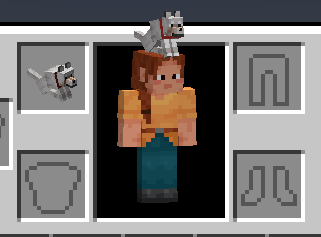
Wearing a wolf on head

By default, you must have empty hands, and only animals that are smaller than 2x2 blocks can be picked up, but you can configure all of these parameters.

Configuration

Configuration should match between server and client to avoid visual glitches.

Option TOML name Description Type Default Note
Entity Restriction entity_restriction Determines what entities can be picked up and when Enum (see below) All Animals
Maximum Width max_width Entities must be this wide or below to be picked up Float 2.0
Maximum Height max_height Entities must be this tall or below to be picked up Float 2.0
Empty Hands empty_hands If players must have both hands empty in order to pick up entities Boolean Yes
Spawn Drop spawn_drop If dropping an entity item in any manner should spawn the entity Boolean Yes
Can Wear Hat can_wear_hat If entity items can be equipped in the head slot Boolean Yes Requires restart
Creative Tab creative_tab If a creative mode tab (item group) of most entities as items should be added Boolean Yes Requires relog
Entity Whitelist entity_whitelist Entities that can always be picked up regardless of above requirements String List Empty Requires restart
Entity Blacklist entity_blacklist Entities that can never be picked up regardless of above requirements String List Empty Requires restart

Entity Restriction

Players can never be picked up.

Value Description
ANY Any targetable entity can be picked up, including armor stands, vehicles, and attackable projectiles
LIVING Any mob can be picked up
NON_BOSS Any mob that is not a boss mob can be picked up
NON_MONSTER All mobs that are not considered monsters can be picked up
NOT_AGGROED All mobs that are not currently attacking a target, e.g. zombies attacking villagrs or wolves attacking sheep, can be picked up
NOT_AGGROED_PLAYER All mobs can be picked up if they are not attacking you
ANIMAL All animal mobs can be picked up
OWNED Tameable pets owned by you

Credits

Inspired by Carry On, Easy Villagers, and some of doctor4t's mods

👥 Team & Contributors

ThePotatoArchivist
ThePotatoArchivistOwner

⚙️ Compatibility

Environment
✅ Client & Server
Loaders
fabricquilt
Minecraft Versions
26.1-snapshot-7

🔗 Links

Modrinth Page