Logo
MINECRAFTBIBLE
Items
Items

All game items

Blocks
Blocks

Building blocks

Mobs
Mobs

Creatures & monsters

Biomes
Biomes

World biomes

Structures
Structures

Generated structures

Recipes
Recipes

Crafting guides

Advancements
Advancements

Achievements

Loot Tables
Loot Tables

Drop rates

Tags
Tags

Item groupings

All Versions
View all data →
Capes
Cape ArchiveNEW

Browse rare Minecon capes, OptiFine capes, and custom capes from players worldwide

Browse

Player Database
Player DatabasePopular

Search any player

Skin Browser
Skin Browser

Browse & download skins

Cape Gallery
Cape GalleryNEW

Minecon & OptiFine capes

Seed Vault
Seed Vault

Curated seeds

Learn

Guides
GuidesNew

Tutorials & tips

Blog
Blog

News & updates

Community

Community Hub
Community HubHub

Posts, discussions & more

All Versions
View community →
Seed Analyzer
Seed Analyzer

World seed analysis

Loot Explorer
Loot Explorer

Drop rates

Crafting Calculator
Crafting Calculator

Material planning

Enchant Calculator
Enchant Calculator

Probability math

Redstone Lab
Redstone Lab

Signal timing

Trading Profit
Trading Profit

Villager ROI

All Versions
View all tools →
Mods
Mods

Browse all mods

Plugins
Plugins

Server plugins

Resource Packs
Resource Packs

Textures & sounds

Shaders
Shaders

Visual enhancements

Datapacks
Datapacks

World logic

Scanner
Mod Intelligence

Scan & analyze any mod

All Versions
View all mods →
Loading...
IntroductionIntroductionVersion HistoryVersion HistoryGuidesGuidesBlog & NewsBlog & News
ItemsItemsBlocksBlocksMobsMobsRecipesRecipesBiomesBiomesStructuresStructuresAdvancementsAdvancementsLoot TablesLoot TablesTagsTags
ModsModsPluginsPluginsResource PacksResource PacksShadersShadersDatapacksDatapacks

MinecraftBible

The Ultimate Wiki

Logo
MINECRAFTBIBLE

The ultimate Minecraft reference. Every item, block, mob, and recipe documented with precision.

Community

  • Player Database
  • Skin Browser
  • Cape Gallery
  • Community Hub
  • Seed Vault

Database

  • Items
  • Blocks
  • Mobs
  • Recipes
  • Biomes
  • Structures

Tools

  • Seed Analyzer
  • Mod Intelligence
  • Crafting Calculator
  • Enchant Calculator

Mods & Packs

  • Mods
  • Plugins
  • Resource Packs
  • Shaders
  • Datapacks

© 2026 MinecraftBible. Not affiliated with Mojang or Microsoft.

PrivacyTermsContact
Food Effect Tooltips [Fabric / NeoForge]
ModLGPL-3.0-only

Food Effect Tooltips [Fabric / NeoForge]

Adds Tooltips to food that gives Status Effects when eaten

1.4M
Downloads
293
Followers
3 months ago
Updated
📦
28
Versions
foodfabricneoforgequilt
Download Latestv2.1.2+1.21.11View on Modrinth

📖About Food Effect Tooltips [Fabric / NeoForge]

Your one-drop-shop for everything Consumable

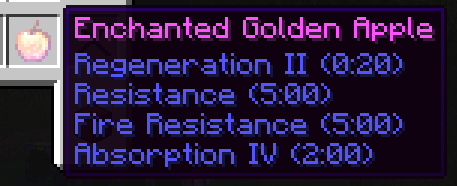
Quite a few food items grant the player bonuses in the form of status effects. These effects, however, are never listed ingame. Which is a nuisance, especially in modded scenarios, where the player is not acquainted with all food options and their effects.

With Food Effect Tooltips all effects are shown in the items tooltip!

  • fully client side
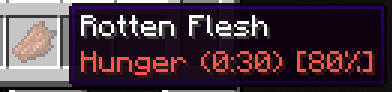
  • handles effects that only get applied with a % chance
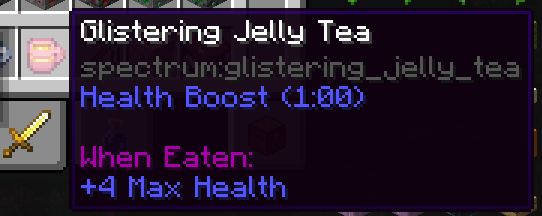
  • shows stat changes for effects
  • compatible with other mods that display food information, like AppleSkin
  • also lists effects of items that clear status effects (like Milk), items that teleport (like Chrorus Fruit), Mushromm Stew and items that apply effects on death (like Totems of Undying)
  • Fully compatible with other mods

How it works

The mod reads components of hovered items, parses their data and displays them in the tooltip. As of v2.0.0 FoodEffectTooltips handles:

  • consume_component
    • apply_effects
    • remove_effects
    • clear_all_effects
    • teleport_randomly
  • death_protection
  • suspicious_stew_effects

normal effects

% effects

stat changes

👥 Team & Contributors

DaFuqs
DaFuqsOwner

⚙️ Compatibility

Environment
💻 Client-side
Loaders
fabricneoforgequilt
Minecraft Versions
1.21.11

🔗 Links

Modrinth Page