

ExtraPvP
A lightweight client side PvP enhancement mod that adds customizable hitbox highlights, Elytra indicators, golden apple reminders and other useful visual improvements to help players in the PvP.
📖About ExtraPvP
ExtraPvP
ExtraPvP is a client-side PvP mod i made that adds a bunch of useful stuff for fighting. Everything is safe to use on servers.
Features
Hitboxes
Colored outlines on players, mobs and projectiles. Choose between wireframe box or glow through walls. Add friends by username so their hitbox shows green instead of enemy color. Customize color and thickness for everything separately.
Elytra Indicator
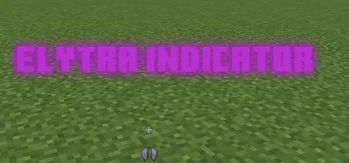
Small Elytra icon below your crosshair. Choose to show it only while gliding or always while wearing one. Has a durability bar too so you don't break it mid fight.
Golden Apple Reminder
Warning on screen when your HP or food saturation drops too low. You pick the threshold and the trigger mode.
Conditional Crosshair Coloring
Crosshair changes color based on what's running low. Low saturation? Yellow. Low pearls? Blue. Low wind charges? White. Multiple active at once? The crosshair arms split into colored segments. Every condition has its own toggle.
Shield Indicator & Break Animation
Small shield icon appears below your crosshair when the enemy is blocking. Break their shield and it plays a crack and fade animation. Two styles: Normal or Thick. Works cleanly alongside the Elytra indicator without overlapping.
Shield Break Alerts
Custom sound and text notification when you break a shield or land a breach swap. Load your own sound files, configure text color, size, position and duration.
Shield Raise Delay
Hides the shield animation until the shield is actually fully active. 5 ticks (250ms) plus your ping. No more fake shields showing before the block is real.
Fight Cam
Camera zooms out when you're in combat. Auto Distance keeps both players in frame no matter how far apart. Don't Phase makes blocks transparent instead of clipping through walls. Keybind to toggle it on and off.
Jump Reset Indicator
Detects your jump resets and rates them. Perfect, Great, Good, Late or Miss. Shows the exact millisecond timing and a timing bar on screen. Custom sound per tier loaded from your local folder.
Range Ping
Plays a sound the instant you land a hit within your configured block range. Just audio. No HUD clutter.
Crosshair Manager
Two tabs. One crosshair for normal gameplay. One for when you're looking at an enemy. Pick them independently.
Pitch Angle Indicator
Shows your vertical look angle when you're not wearing an Elytra. Useful for pearl catches. Set custom angle ranges with their own colors.
Visual Ratio
Change your aspect ratio independently from your window size. Good for ultrawide setups.
Other stuff
Rebindable pause menu key, inventory cursor fix, item hitbox toggle.
Credits
- FatalFlare — Elytra Pitch function, go check him out
- Sootysplash — inspired by his Combat Hitboxes mod
- TheobaldTheBird — inspired by his Fight Cam, a friend asked me to implement it
- Uku (BetterShields) — inspired by his shield mods, check the changelogs for more info
- hxragi — Visual Ratio based on Visual-Ratio (MIT)
Requirements
- Fabric API
- Cloth Config
- Mod Menu
- Fzzy Config
- Fabric Kotlin Language