Logo
MINECRAFTBIBLE
Items
Items

All game items

Blocks
Blocks

Building blocks

Mobs
Mobs

Creatures & monsters

Biomes
Biomes

World biomes

Structures
Structures

Generated structures

Recipes
Recipes

Crafting guides

Advancements
Advancements

Achievements

Loot Tables
Loot Tables

Drop rates

Tags
Tags

Item groupings

All Versions
View all data →
Capes
Cape ArchiveNEW

Browse rare Minecon capes, OptiFine capes, and custom capes from players worldwide

Browse

Player Database
Player DatabasePopular

Search any player

Skin Browser
Skin Browser

Browse & download skins

Cape Gallery
Cape GalleryNEW

Minecon & OptiFine capes

Seed Vault
Seed Vault

Curated seeds

Learn

Guides
GuidesNew

Tutorials & tips

Blog
Blog

News & updates

Community

Community Hub
Community HubHub

Posts, discussions & more

All Versions
View community →
Seed Analyzer
Seed Analyzer

World seed analysis

Loot Explorer
Loot Explorer

Drop rates

Crafting Calculator
Crafting Calculator

Material planning

Enchant Calculator
Enchant Calculator

Probability math

Redstone Lab
Redstone Lab

Signal timing

Trading Profit
Trading Profit

Villager ROI

All Versions
View all tools →
Mods
Mods

Browse all mods

Plugins
Plugins

Server plugins

Resource Packs
Resource Packs

Textures & sounds

Shaders
Shaders

Visual enhancements

Datapacks
Datapacks

World logic

Scanner
Mod Intelligence

Scan & analyze any mod

All Versions
View all mods →
Loading...
IntroductionIntroductionVersion HistoryVersion HistoryGuidesGuidesBlog & NewsBlog & News
ItemsItemsBlocksBlocksMobsMobsRecipesRecipesBiomesBiomesStructuresStructuresAdvancementsAdvancementsLoot TablesLoot TablesTagsTags
ModsModsPluginsPluginsResource PacksResource PacksShadersShadersDatapacksDatapacks

MinecraftBible

The Ultimate Wiki

Logo
MINECRAFTBIBLE

The ultimate Minecraft reference. Every item, block, mob, and recipe documented with precision.

Community

  • Player Database
  • Skin Browser
  • Cape Gallery
  • Community Hub
  • Seed Vault

Database

  • Items
  • Blocks
  • Mobs
  • Recipes
  • Biomes
  • Structures

Tools

  • Seed Analyzer
  • Mod Intelligence
  • Crafting Calculator
  • Enchant Calculator

Mods & Packs

  • Mods
  • Plugins
  • Resource Packs
  • Shaders
  • Datapacks

© 2026 MinecraftBible. Not affiliated with Mojang or Microsoft.

PrivacyTermsContact
Strange Items
ModMIT

Strange Items

Track stats on individual tools so you can see which of your Diamond Pickaxes you actually use

764
Downloads
2
Followers
4 months ago
Updated
📦
5
Versions
equipmentmanagementutilityfabric
Download Latestv1.5.0View on Modrinth

📖About Strange Items

This mod (inspired by Team Fortress 2) allows individual tools to track stats on them, seprarately from the statistics screen.

Now you can know which of your Diamond Pickaxes you've used more!

By default, every trackable item tracks Blocks Mined, Mobs Hit, and Times Dropped. Certain items have more trackers, such as swords and axes tracking Mobs Killed.

Some trackers, specifically Blocks Mined, Mobs Killed, and Time Spent in Dimensions can track what specific blocks you've mined and amounts, what amount of a specific mob you've killed, and how much time you've spent in each dimension.

You can configure which item has what trackers with datapacks using certain item tags (though some items won't be able to track certain statistics).

By default, every trackable item is:

  • Every Sword, Pickaxe, Axe, Shovel, and Hoe
  • Mace
  • Bow
  • Flint And Steel
  • Shears
  • Elytra
  • Trident
  • Brush
  • Fishing Rod
  • Every Helmet
  • Every Chestplate
  • Every Legging
  • Every Boots
  • Crossbow

If you don't like the order the trackers appear in on the item tooltip, you can change it by overriding the tag in data/strangeitems/tags/strangeitems/tracker/tooltip_order.json tag, just like enchantments
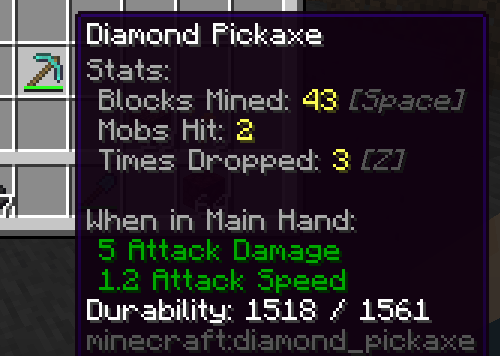
Diamond Pickaxe tooltip with statistics shown on it

Collector's Items

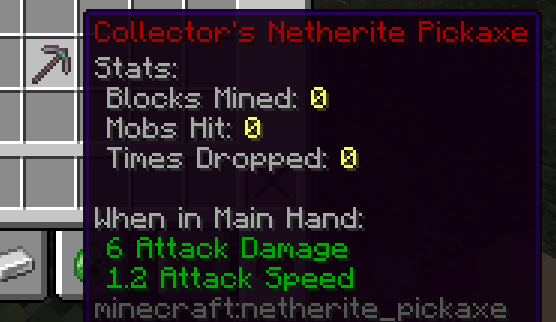
You can also mark specific items as a "Collector's Item" (also inspired by Team Fortress 2) by combining the item you want to be a Collector's variant of with an Echo Shard and duplicate of the item your converting.

While with commands you can make any item a Collector's Item, by default in Survival Mode the items you can make a Collector's Variant are:

  • Every Trackable item listed above (I think)
  • Every Color Bundle
  • Every Music Disc
  • Saddle
  • Spyglass
  • Shield
  • Nether Star
  • Heavy Core
  • Compass
  • Clock
  • Carrot on a Stick
  • Dragon Egg (Good Luck)
  • Goat Horn
  • Recovery Compass
  • Warped Fungus on a Stick
  • Wolf Armor

A Collector's Netherite Pickaxe

👥 Team & Contributors

Embin
EmbinOwner

⚙️ Compatibility

Environment
✅ Client & Server
Loaders
fabric
Minecraft Versions
1.21.11-rc11.21.11-rc21.21.11-rc31.21.11

🔗 Links

Modrinth Page