Logo
MINECRAFTBIBLE
Items
Items

All game items

Blocks
Blocks

Building blocks

Mobs
Mobs

Creatures & monsters

Biomes
Biomes

World biomes

Structures
Structures

Generated structures

Recipes
Recipes

Crafting guides

Advancements
Advancements

Achievements

Loot Tables
Loot Tables

Drop rates

Tags
Tags

Item groupings

All Versions
View all data →
Capes
Cape ArchiveNEW

Browse rare Minecon capes, OptiFine capes, and custom capes from players worldwide

Browse

Player Database
Player DatabasePopular

Search any player

Skin Browser
Skin Browser

Browse & download skins

Cape Gallery
Cape GalleryNEW

Minecon & OptiFine capes

Seed Vault
Seed Vault

Curated seeds

Learn

Guides
GuidesNew

Tutorials & tips

Blog
Blog

News & updates

Community

Community Hub
Community HubHub

Posts, discussions & more

All Versions
View community →
Seed Analyzer
Seed Analyzer

World seed analysis

Loot Explorer
Loot Explorer

Drop rates

Crafting Calculator
Crafting Calculator

Material planning

Enchant Calculator
Enchant Calculator

Probability math

Redstone Lab
Redstone Lab

Signal timing

Trading Profit
Trading Profit

Villager ROI

All Versions
View all tools →
Mods
Mods

Browse all mods

Plugins
Plugins

Server plugins

Resource Packs
Resource Packs

Textures & sounds

Shaders
Shaders

Visual enhancements

Datapacks
Datapacks

World logic

Scanner
Mod Intelligence

Scan & analyze any mod

All Versions
View all mods →
Loading...
IntroductionIntroductionVersion HistoryVersion HistoryGuidesGuidesBlog & NewsBlog & News
ItemsItemsBlocksBlocksMobsMobsRecipesRecipesBiomesBiomesStructuresStructuresAdvancementsAdvancementsLoot TablesLoot TablesTagsTags
ModsModsPluginsPluginsResource PacksResource PacksShadersShadersDatapacksDatapacks

MinecraftBible

The Ultimate Wiki

Logo
MINECRAFTBIBLE

The ultimate Minecraft reference. Every item, block, mob, and recipe documented with precision.

Community

  • Skin Browser
  • Cape Gallery
  • Seed Vault
  • Blog
  • Guides

Database

  • Items
  • Blocks
  • Mobs
  • Recipes
  • Biomes
  • Structures

Tools

  • Seed Analyzer
  • Mod Intelligence
  • Crafting Calculator
  • Enchant Calculator

Mods & Packs

  • Mods
  • Plugins
  • Resource Packs
  • Shaders
  • Datapacks

Site & Legal

  • About
  • Authors
  • Editorial Policy
  • Corrections
  • Contact
  • Privacy Policy
  • Terms of Service
  • DMCA
  • Sitemap

© 2026 MinecraftBible. Not affiliated with Mojang or Microsoft.

PrivacyTermsContact
ElevatorMod
ModMIT

ElevatorMod

Simple port of the elevator from OpenBlocks to 1.8+

1.3M
Downloads
180
Followers
5 months ago
Updated
📦
30
Versions
transportationfabricforgeneoforge
Download Latestvfabric-1.21.11-1.15.0View on Modrinth

📖About ElevatorMod

DatHost

ElevatorMod

GitHub
CurseForge
Modrinth

Port of the elevator from OpenBlocks to Minecraft 1.8+.

Crafting

The default recipe is the same as in OpenBlocks.

Example of the white elevator recipe:
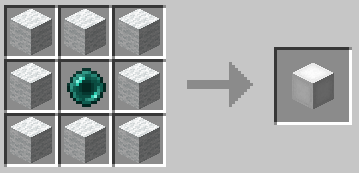
Elevator recipe

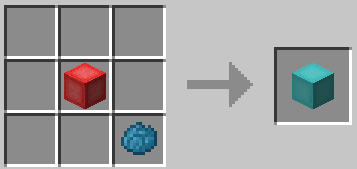
You can also re-dye any elevator:

Dyeing

Usage

To use them place two or more elevators in the same X and Z coordinates, to move between them simply jump to go to the
elevator above or sneak to go to the one below.

You can configure the range of the elevators and if they should require XP to teleport in
the configuration file.

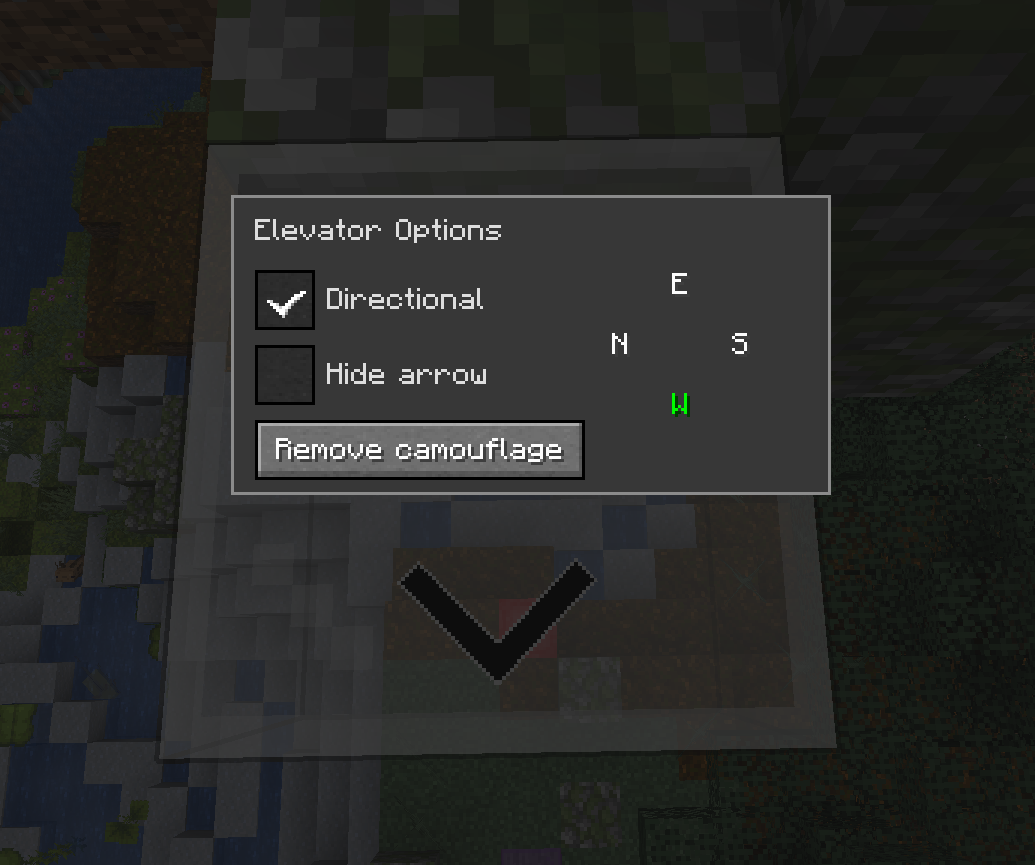
Options Interface

You can access the options interface by right-clicking on the elevator with an empty hand.
Options

Directional

When the Directional checkbox is enabled, the elevator will adjust the yaw rotation of players who teleport to it
based on the configured direction.

You can change the direction by clicking on the desired direction button. The display order of the buttons will match
the current direction the player is facing.

It will also show an arrow on the elevator to indicate the direction it is facing. You can hide it by selecting
the Hide arrow checkbox.

Note: This has nothing to do with horizontal movement, it only changes the direction the player is facing.

Camouflage

You can use any solid block to camouflage the elevator, just right-click on the elevator with the desired block on your
hand.

Most blocks can be used as camouflage with some exceptions. For example, you can't use a chest because it uses a
different rendering method.

Configuration

The configuration file is per-world and is located at <world-directory>/serverconfig/elevatorid-server.toml.

Here are the default values:
[General]
#Should elevators have the same color in order to teleport ?
sameColor = false

#Elevator range
#Range: 3 ~ 4064
range = 384

#Realign players to the center of elevator ?
precisionTarget = true

#Can mobs spawn on elevators ?
mobSpawn = false

#Reset pitch to 0 when teleporting to normal elevators ?
resetPitchNormal = false

#Reset pitch to 0 when teleporting to directional elevators ?
resetPitchDirectional = true

#Should teleporting require XP ?
useXP = false

#Amount of XP points to use when useXP is enabled
#Note this is NOT experience levels
#Range: > 1
XPPointsAmount = 1

Thanks

  • OpenBlocks Team
  • All contributors on GitHub

Modpacks

Feel free to use this in any modpack.

👥 Team & Contributors

VsnGamer
VsnGamerOwner

⚙️ Compatibility

Environment
✅ Client & Server
Loaders
fabricforgeneoforge
Minecraft Versions
1.21.11

🔗 Links

Modrinth Page