Logo
MINECRAFTBIBLE
Items
Items

All game items

Blocks
Blocks

Building blocks

Mobs
Mobs

Creatures & monsters

Biomes
Biomes

World biomes

Structures
Structures

Generated structures

Recipes
Recipes

Crafting guides

Advancements
Advancements

Achievements

Loot Tables
Loot Tables

Drop rates

Tags
Tags

Item groupings

All Versions
View all data →
Capes
Cape ArchiveNEW

Browse rare Minecon capes, OptiFine capes, and custom capes from players worldwide

Browse

Player Database
Player DatabasePopular

Search any player

Skin Browser
Skin Browser

Browse & download skins

Cape Gallery
Cape GalleryNEW

Minecon & OptiFine capes

Seed Vault
Seed Vault

Curated seeds

Learn

Guides
GuidesNew

Tutorials & tips

Blog
Blog

News & updates

Community

Community Hub
Community HubHub

Posts, discussions & more

All Versions
View community →
Seed Analyzer
Seed Analyzer

World seed analysis

Loot Explorer
Loot Explorer

Drop rates

Crafting Calculator
Crafting Calculator

Material planning

Enchant Calculator
Enchant Calculator

Probability math

Redstone Lab
Redstone Lab

Signal timing

Trading Profit
Trading Profit

Villager ROI

All Versions
View all tools →
Mods
Mods

Browse all mods

Plugins
Plugins

Server plugins

Resource Packs
Resource Packs

Textures & sounds

Shaders
Shaders

Visual enhancements

Datapacks
Datapacks

World logic

Scanner
Mod Intelligence

Scan & analyze any mod

All Versions
View all mods →
Loading...
IntroductionIntroductionVersion HistoryVersion HistoryGuidesGuidesBlog & NewsBlog & News
ItemsItemsBlocksBlocksMobsMobsRecipesRecipesBiomesBiomesStructuresStructuresAdvancementsAdvancementsLoot TablesLoot TablesTagsTags
ModsModsPluginsPluginsResource PacksResource PacksShadersShadersDatapacksDatapacks

MinecraftBible

The Ultimate Wiki

Logo
MINECRAFTBIBLE

The ultimate Minecraft reference. Every item, block, mob, and recipe documented with precision.

Community

  • Skin Browser
  • Cape Gallery
  • Seed Vault
  • Blog
  • Guides

Database

  • Items
  • Blocks
  • Mobs
  • Recipes
  • Biomes
  • Structures

Tools

  • Seed Analyzer
  • Mod Intelligence
  • Crafting Calculator
  • Enchant Calculator

Mods & Packs

  • Mods
  • Plugins
  • Resource Packs
  • Shaders
  • Datapacks

Site & Legal

  • About
  • Authors
  • Editorial Policy
  • Corrections
  • Contact
  • Privacy Policy
  • Terms of Service
  • DMCA
  • Sitemap

© 2026 MinecraftBible. Not affiliated with Mojang or Microsoft.

PrivacyTermsContact
DefinitelyMyCoords
ModMIT

DefinitelyMyCoords

A mod to modify/hide the coordinates shown on the f3 screen.
3.7K
Downloads
16
Followers
1 years ago
Updated
📦
30
Versions
utilityfabric
Download Latestv1.3.1-hotfix.1View on Modrinth

📖About DefinitelyMyCoords

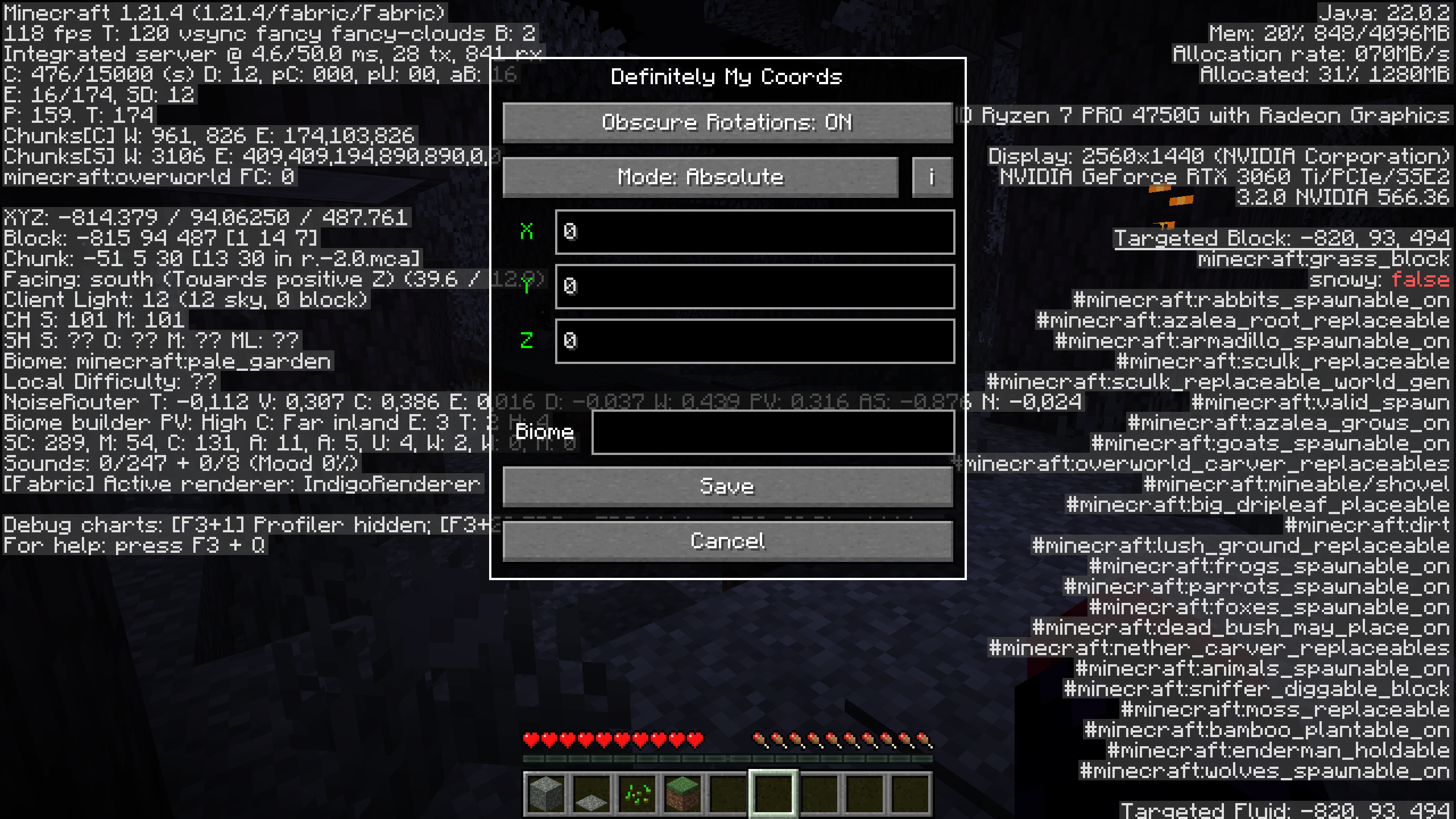
Settings Menu
DefinitelyMyCoords helps you hide your coordinates on the F3 screen with 4 different modes.

Why do I want this mod?

If you're a streamer or share your screen with somebody,
this mod could save you from leaking your coordinates.
While still being able to use F3 to measure distances,
check the direction you are facing, etc.

Usage

To open the mods settings, press the F6 key or your configured key.
You can configure the settings key in the keybindings menu.

Compatibility

A non-exhaustive list of compatible mods.
These mods are neither made by me nor affiliated with me.

  • BetterF3 (requested by @Omena0)
  • Xaero's World Map
  • Xaero's Minimap (requested by @kittenvr)
  • Xaero's Minimap (Fair-Play)
  • Sodium Extra
  • Litematica (requested by @NanoBunTV)

You want me to add compatibility for another mod? Create an issue

Modes

Vanilla

suggested by @JackyXYZGaming

Doesn't modify your position at all.

Relative

TLDR: Changes your coords

The coordinates you enter are relative to your current positions. That means if you are standing at 100 60 -30 and enter -10 5 20 your current coordinates will be -10 5 20 and 0 0 0 will have turned into -110 -55 50.

Absolute

TLDR: Changes 0 0 0

The coordinates you enter are relative to 0 0 0. In this case, if you are standing at 100 60 -30 and enter -10 5 20 your current coordinates will turn into 90 65 -10 and 0 0 0 will be -10 5 20.

Custom

This mode sets your coordinates upon opening F3 to 0 0 0.

Biome Spoofing

suggested by @kittenvr

On

To enable biome spoofing, enter a valid biome id into the text widget.

Off

To disable biome spoofing, simply leave the text empty.

Block Rotations

Obscure Rotations

If enabled, offset block rotations, flower positions, etc. by the same amount as blocks.

Note: This feature doesn't play well with Mode: Custom

👥 Team & Contributors

agent-LuluDodo
agent-LuluDodoOwner

⚙️ Compatibility

Environment
💻 Client-side
Loaders
fabric
Minecraft Versions
1.20.31.20.41.20.51.20.61.211.21.11.21.21.21.3+1 more

🔗 Links

Modrinth Page