Logo
MINECRAFTBIBLE
Items
Items

All game items

Blocks
Blocks

Building blocks

Mobs
Mobs

Creatures & monsters

Biomes
Biomes

World biomes

Structures
Structures

Generated structures

Recipes
Recipes

Crafting guides

Advancements
Advancements

Achievements

Loot Tables
Loot Tables

Drop rates

Tags
Tags

Item groupings

All Versions
View all data →
Capes
Cape ArchiveNEW

Browse rare Minecon capes, OptiFine capes, and custom capes from players worldwide

Browse

Player Database
Player DatabasePopular

Search any player

Skin Browser
Skin Browser

Browse & download skins

Cape Gallery
Cape GalleryNEW

Minecon & OptiFine capes

Seed Vault
Seed Vault

Curated seeds

Learn

Guides
GuidesNew

Tutorials & tips

Blog
Blog

News & updates

Community

Community Hub
Community HubHub

Posts, discussions & more

All Versions
View community →
Seed Analyzer
Seed Analyzer

World seed analysis

Loot Explorer
Loot Explorer

Drop rates

Crafting Calculator
Crafting Calculator

Material planning

Enchant Calculator
Enchant Calculator

Probability math

Redstone Lab
Redstone Lab

Signal timing

Trading Profit
Trading Profit

Villager ROI

All Versions
View all tools →
Mods
Mods

Browse all mods

Plugins
Plugins

Server plugins

Resource Packs
Resource Packs

Textures & sounds

Shaders
Shaders

Visual enhancements

Datapacks
Datapacks

World logic

Scanner
Mod Intelligence

Scan & analyze any mod

All Versions
View all mods →
Loading...
IntroductionIntroductionVersion HistoryVersion HistoryGuidesGuidesBlog & NewsBlog & News
ItemsItemsBlocksBlocksMobsMobsRecipesRecipesBiomesBiomesStructuresStructuresAdvancementsAdvancementsLoot TablesLoot TablesTagsTags
ModsModsPluginsPluginsResource PacksResource PacksShadersShadersDatapacksDatapacks

MinecraftBible

The Ultimate Wiki

Logo
MINECRAFTBIBLE

The ultimate Minecraft reference. Every item, block, mob, and recipe documented with precision.

Community

  • Player Database
  • Skin Browser
  • Cape Gallery
  • Community Hub
  • Seed Vault

Database

  • Items
  • Blocks
  • Mobs
  • Recipes
  • Biomes
  • Structures

Tools

  • Seed Analyzer
  • Mod Intelligence
  • Crafting Calculator
  • Enchant Calculator

Mods & Packs

  • Mods
  • Plugins
  • Resource Packs
  • Shaders
  • Datapacks

© 2026 MinecraftBible. Not affiliated with Mojang or Microsoft.

PrivacyTermsContact
Defense
ModMIT

Defense

A mod designed to protect players from unwanted PvP interactions while still allowing PvP on servers! Originally designed for the Empty World SMP

5.0K
Downloads
84
Followers
3 months ago
Updated
📦
12
Versions
game-mechanicssocialutilityfabric
Download Latestv1.21.11-0.5.0View on Modrinth

📖About Defense

Defense

A mod designed to protect players from unwanted PvP interactions while still allowing PvP on servers!

Originally created for and tested by the Empty World SMP

SHOWCASE VIDEO:

Features

  • This mod adds a PvP toggle button in the survival player inventory.
  • When checked on, the player is now immune to all incoming PvP damage. Examples include direct attacks, projectiles, and lit TNT.
    This also disables the same outgoing attacks from the player. They cannot recieve damage from players or deal damage to players while toggled on.
  • When toggled on, Defense lasts for 20 minutes. One minute before the player's immunity runs out, they will be notified with a chat message prompting them to enable it again if they wish. The player may also enable or disable defense anytime they wish to reset the cooldown.
  • If a player's defense is toggled on, a shield icon will display next to their nametag.
  • You can change the icon you are displaying to others and that shows on your toggle switch in your Skin Customization Settings.
  • AFK system that will toggle on Defense after 1 minute to prevent players from attacking you. Use the afkTimerSeconds gamerule to change the time it takes to toggle AFK (set to 0 to disable this feature). Still very early, but improvements and changes will be made over time!

Available Icons:
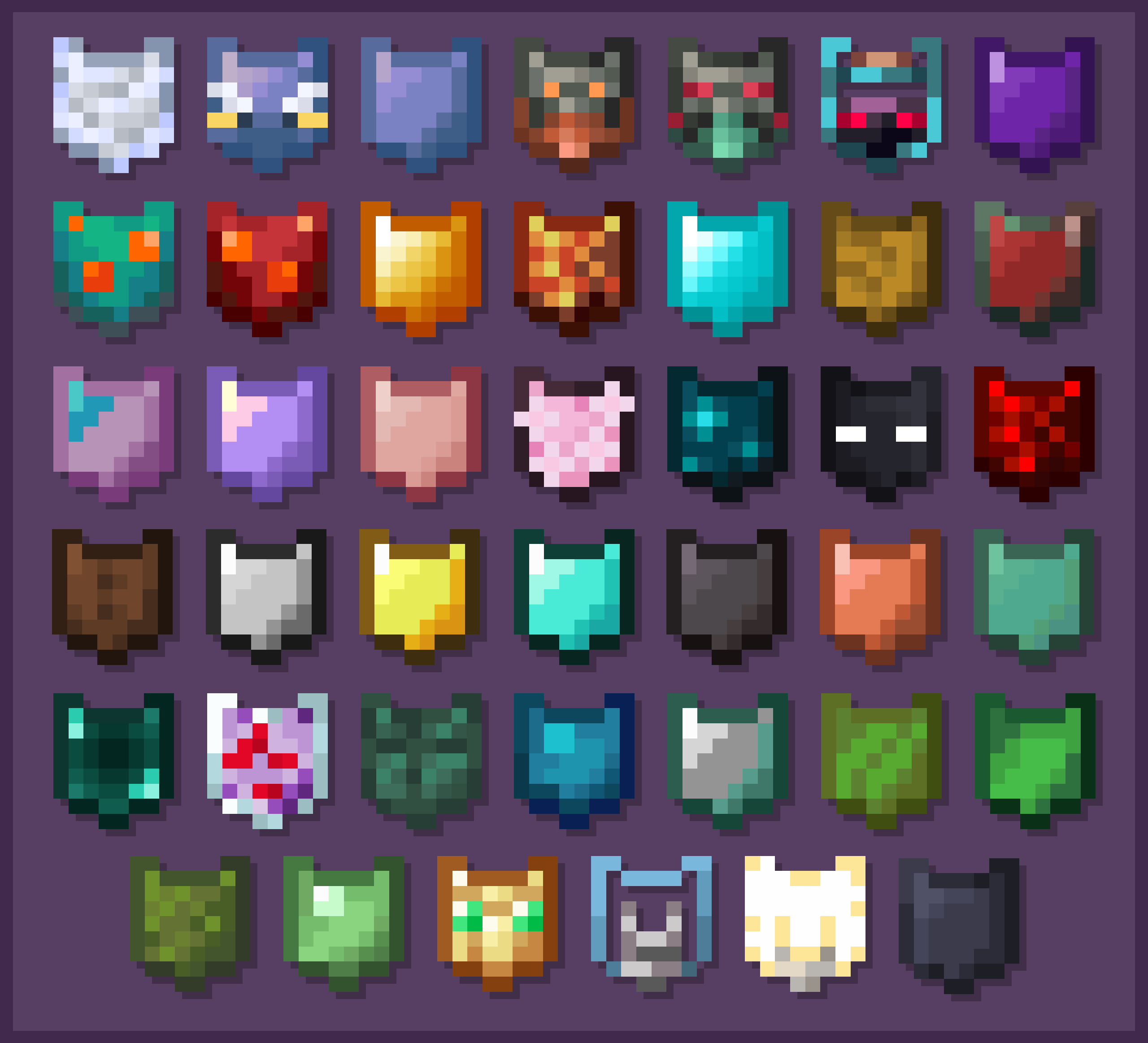
Available Icons

(These Icons are selectable via the Skin Customization Settings within Minecraft)

More features are planned, and updates will add new functionality to the mod, along with quality of life changes to make it even better to use.

Why the 20 Minute Timer?

The 20 minute timer for defense naturally encourages players to keep defense toggled off most of the time. This provides for the occasional funny interaction with another player, like an accidental punch, or for a challenge during a PvE battle to not hit your friends. It is meant to be used as a tool to defend against an unwanted interaction rather than something to give a competitive advantage.

For more information on this mod, and access to the code, go to this mod's GitHub page!

👥 Team & Contributors

Mortimer-Kerman
Mortimer-Kerman
Developer
Knarfy
KnarfyOwner

⚙️ Compatibility

Environment
✅ Client & Server
Loaders
fabric
Minecraft Versions
1.21.11

🔗 Links

Modrinth Page