Logo
MINECRAFTBIBLE
Items
Items

All game items

Blocks
Blocks

Building blocks

Mobs
Mobs

Creatures & monsters

Biomes
Biomes

World biomes

Structures
Structures

Generated structures

Recipes
Recipes

Crafting guides

Advancements
Advancements

Achievements

Loot Tables
Loot Tables

Drop rates

Tags
Tags

Item groupings

All Versions
View all data →
Capes
Cape ArchiveNEW

Browse rare Minecon capes, OptiFine capes, and custom capes from players worldwide

Browse

Player Database
Player DatabasePopular

Search any player

Skin Browser
Skin Browser

Browse & download skins

Cape Gallery
Cape GalleryNEW

Minecon & OptiFine capes

Seed Vault
Seed Vault

Curated seeds

Learn

Guides
GuidesNew

Tutorials & tips

Blog
Blog

News & updates

Community

Community Hub
Community HubHub

Posts, discussions & more

All Versions
View community →
Seed Analyzer
Seed Analyzer

World seed analysis

Loot Explorer
Loot Explorer

Drop rates

Crafting Calculator
Crafting Calculator

Material planning

Enchant Calculator
Enchant Calculator

Probability math

Redstone Lab
Redstone Lab

Signal timing

Trading Profit
Trading Profit

Villager ROI

All Versions
View all tools →
Mods
Mods

Browse all mods

Plugins
Plugins

Server plugins

Resource Packs
Resource Packs

Textures & sounds

Shaders
Shaders

Visual enhancements

Datapacks
Datapacks

World logic

Scanner
Mod Intelligence

Scan & analyze any mod

All Versions
View all mods →
Loading...
IntroductionIntroductionVersion HistoryVersion HistoryGuidesGuidesBlog & NewsBlog & News
ItemsItemsBlocksBlocksMobsMobsRecipesRecipesBiomesBiomesStructuresStructuresAdvancementsAdvancementsLoot TablesLoot TablesTagsTags
ModsModsPluginsPluginsResource PacksResource PacksShadersShadersDatapacksDatapacks

MinecraftBible

The Ultimate Wiki

Logo
MINECRAFTBIBLE

The ultimate Minecraft reference. Every item, block, mob, and recipe documented with precision.

Community

  • Player Database
  • Skin Browser
  • Cape Gallery
  • Community Hub
  • Seed Vault

Database

  • Items
  • Blocks
  • Mobs
  • Recipes
  • Biomes
  • Structures

Tools

  • Seed Analyzer
  • Mod Intelligence
  • Crafting Calculator
  • Enchant Calculator

Mods & Packs

  • Mods
  • Plugins
  • Resource Packs
  • Shaders
  • Datapacks

© 2026 MinecraftBible. Not affiliated with Mojang or Microsoft.

PrivacyTermsContact
Cobblemon Spawn Notification Discord Integration
ModMIT

Cobblemon Spawn Notification Discord Integration

A simple addon/extension mod that bridges tmetcalfe89's Cobblemon Spawn Notification Mod and various Discord Integration Mods

8.1K
Downloads
11
Followers
4 months ago
Updated
📦
15
Versions
socialfabricneoforge
Download Latestv0.4.0-1.21.1View on Modrinth

📖About Cobblemon Spawn Notification Discord Integration

Cobblemon Spawn Notification Discord Integration

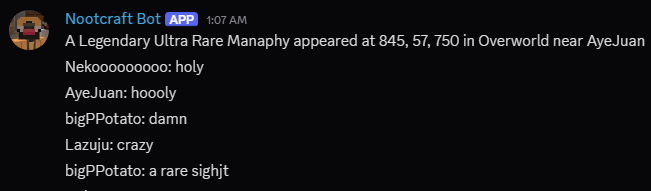
Cobblemon Spawn Notification Discord Integration is an addon/extension for the original Cobblemon Spawn Notification Mod by tmetcalfe89, adding Discord integration to various Discord Integration Mods.
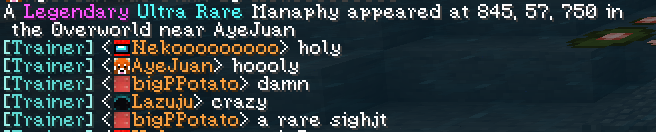
DCIntegration example: in-game

DCIntegration example: discord

Currently Supported Discord Integration Mods

  • Discord Integration by ErdbeerbaerLP
  • MC2Discord by DenisD3D
  • Discord-MC-Chat by Xujiayao
  • Fabricord* by RiriFa

*1.21.1 only

How to Enable

For versions 0.3 and above

No need to change anything in spawn_notification.json now. It should work by default but if you want to it to respect announceCrossDimensions setting from spawn_notification.json, refer to the config section.

For versions 0.2 and below

Currently, the mod only works when announceCrossDimensions is set to true in spawn_notification.json as I thought that would make the most sense.

To enable it:

  1. Open spawn_notification.json inside the config/ folder.
  2. Set "announceCrossDimensions" to true.

For all versions and using MC2Discord

  1. Open mc2discord.toml inside the config/ folder.
  2. Add "cobblemon_spawn_notification_discord" to the subscriptions = [...] section.

For example:

[Channels]
 [[Channels.Channel]]
  id = 0
  subscriptions = ["info", "chat", "command", "cobblemon_spawn_notification_discord"]
  mode = "WEBHOOK"

Config

The config file for this mod can be found at:
config/csn-discord-integration.json

  • bypassCrossDimension
    If set to true, this will ignore the announceCrossDimension setting from spawn_notification.json will always broadcast announcements to discord.
    If set to false, it will follow whatever is set in announceCrossDimension.
    Note: Setting this to false will effectively disable the mod unless announceCrossDimension is also set to true.
    Default: true
    ⚠ Currently doesn't do anything in version 0.4

  • botName
    Sets the display name of the webhook.
    Default: "Cobblemon Spawn Notification"

  • botAvatarUrl
    Sets the avatar image URL of the webhook.

Commands

  • /csn-discord reload: Reloads the config

Dependencies

Cobblemon

Cobblemon Spawn Notification

One of the various supported Discord Integration Mods

  • Discord Integration
  • MC2Discord
  • Discord-MC-Chat
  • Fabricord

Credits

This mod is based on the Cobblemon Spawn Notification mod by tmetcalfe89. Full credit to them for the base implementation. Additionally, this mod utilizes various Discord Integration APIs and functions, not limited to; ErdbeerbaerLP, DenisD3D, Xujiayao, RiriFa. Thanks to the developers for their work in making this functionality possible.

Special thanks to tmetcalfe89 for their valuable input towards the mod and allowing me to use their original mod's name for this mod.

👥 Team & Contributors

nekooooooooo
nekoooooooooOwner

⚙️ Compatibility

Environment
🖥️ Server-side
Loaders
fabricneoforge
Minecraft Versions
1.21.1

🔗 Links

Modrinth Page