Logo
MINECRAFTBIBLE
Items
Items

All game items

Blocks
Blocks

Building blocks

Mobs
Mobs

Creatures & monsters

Biomes
Biomes

World biomes

Structures
Structures

Generated structures

Recipes
Recipes

Crafting guides

Advancements
Advancements

Achievements

Loot Tables
Loot Tables

Drop rates

Tags
Tags

Item groupings

All Versions
View all data →
Capes
Cape ArchiveNEW

Browse rare Minecon capes, OptiFine capes, and custom capes from players worldwide

Browse

Player Database
Player DatabasePopular

Search any player

Skin Browser
Skin Browser

Browse & download skins

Cape Gallery
Cape GalleryNEW

Minecon & OptiFine capes

Seed Vault
Seed Vault

Curated seeds

Learn

Guides
GuidesNew

Tutorials & tips

Blog
Blog

News & updates

Community

Community Hub
Community HubHub

Posts, discussions & more

All Versions
View community →
Seed Analyzer
Seed Analyzer

World seed analysis

Loot Explorer
Loot Explorer

Drop rates

Crafting Calculator
Crafting Calculator

Material planning

Enchant Calculator
Enchant Calculator

Probability math

Redstone Lab
Redstone Lab

Signal timing

Trading Profit
Trading Profit

Villager ROI

All Versions
View all tools →
Mods
Mods

Browse all mods

Plugins
Plugins

Server plugins

Resource Packs
Resource Packs

Textures & sounds

Shaders
Shaders

Visual enhancements

Datapacks
Datapacks

World logic

Scanner
Mod Intelligence

Scan & analyze any mod

All Versions
View all mods →
Loading...
IntroductionIntroductionVersion HistoryVersion HistoryGuidesGuidesBlog & NewsBlog & News
ItemsItemsBlocksBlocksMobsMobsRecipesRecipesBiomesBiomesStructuresStructuresAdvancementsAdvancementsLoot TablesLoot TablesTagsTags
ModsModsPluginsPluginsResource PacksResource PacksShadersShadersDatapacksDatapacks

MinecraftBible

The Ultimate Wiki

Logo
MINECRAFTBIBLE

The ultimate Minecraft reference. Every item, block, mob, and recipe documented with precision.

Community

  • Player Database
  • Skin Browser
  • Cape Gallery
  • Community Hub
  • Seed Vault

Database

  • Items
  • Blocks
  • Mobs
  • Recipes
  • Biomes
  • Structures

Tools

  • Seed Analyzer
  • Mod Intelligence
  • Crafting Calculator
  • Enchant Calculator

Mods & Packs

  • Mods
  • Plugins
  • Resource Packs
  • Shaders
  • Datapacks

© 2026 MinecraftBible. Not affiliated with Mojang or Microsoft.

PrivacyTermsContact
Camera Utils
ModLicenseRef-All-Rights-Reserved

Camera Utils

Helpful camera utilities

4.4M
Downloads
1,858
Followers
4 months ago
Updated
📦
30
Versions
adventureutilityfabricquilt
Download Latestvfabric-1.21.11-1.1.2View on Modrinth

📖About Camera Utils

Camera Utils is a client side Fabric mod that adds convenient features related to the players camera.

Features

  • Dynamic zoom
  • Camera detaching
  • Adjustable third person distance
  • Two customizable third person perspectives
  • Advanced cinematic camera controls
  • Movement smoothing

Dynamic Zoom

By default the zoom key is bound to Z.
Holding the zoom key and scrolling dynamically adjusts the zoom value.

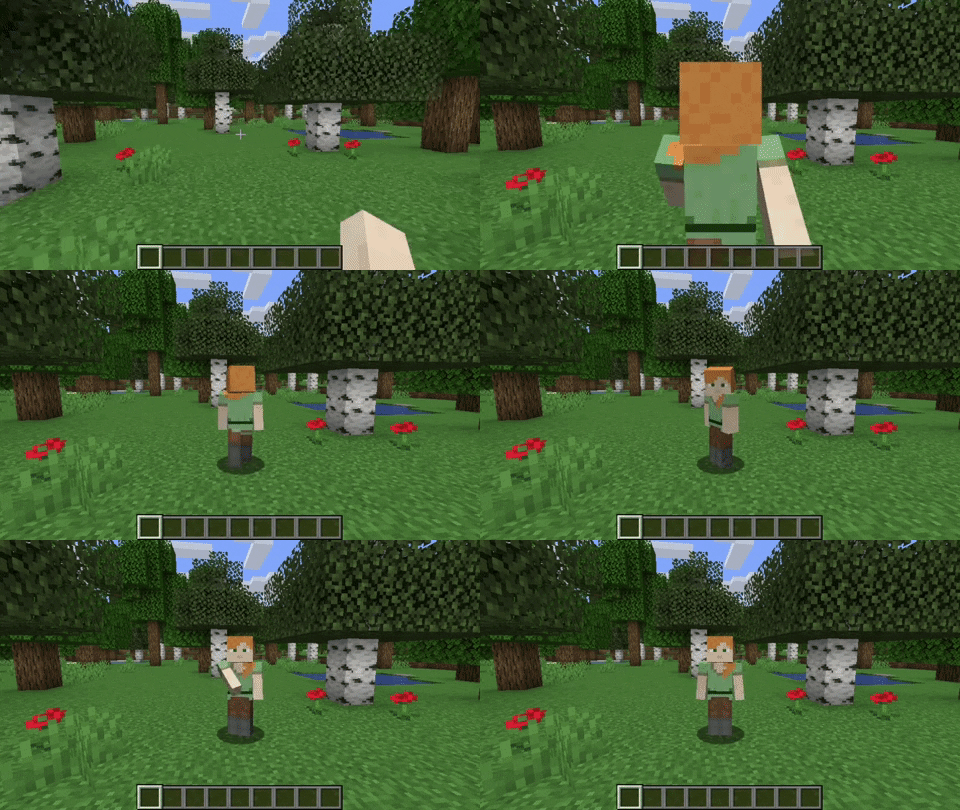
Camera Detaching

By hitting the detach camera button, the players camera is locked to the current position.
You can still control the player like before, just from another point of view.
By pressing RIGHT ALT in combination with the detach camera key, the camera goes back to the position, the camera was last detached.
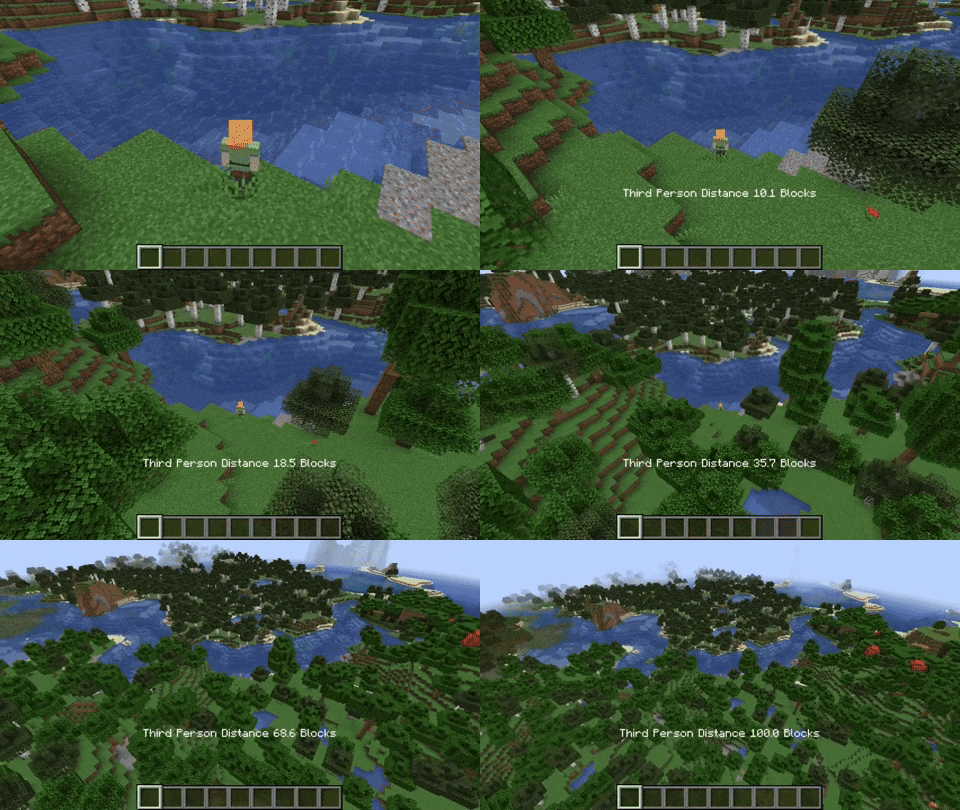
Adjustable Third Person Distance

When holding the third person distance modifier in third person, you are able to scroll out up to 100 blocks away from the player.
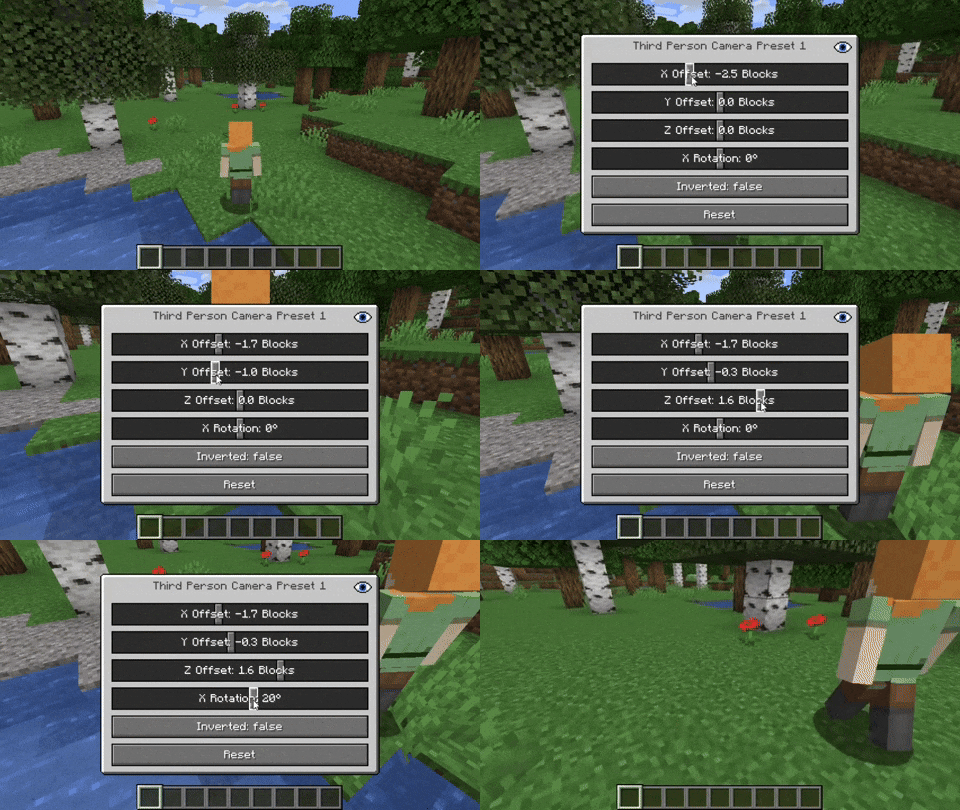
Customizable Third Person Perspectives

This mod allows for two custom third person perspectives.
These are bound to F6 and F7 by default.
These can be modified by pressing RIGHT ALT and F6 or F7 respectively.
Advanced Cinematic Camera Controls

By pressing RIGHT ALT and the cinematic camera button, you can adjust the properties of the cinematic camera.

Additional Information

Pressing any key related to the camera utils mod in combination with RIGHT ALT
will open a settings GUI which allows you to change properties
or to reset them back to their default values.

Note that this mod is not compatible with OptiFine.

👥 Team & Contributors

henkelmax
henkelmaxOwner

⚙️ Compatibility

Environment
💻 Client-side
Loaders
fabricquilt
Minecraft Versions
1.21.11

🔗 Links

Modrinth Page