


Basic Storage
Drawer-style, vanilla-friendly mass item storage
📖About Basic Storage






Crate
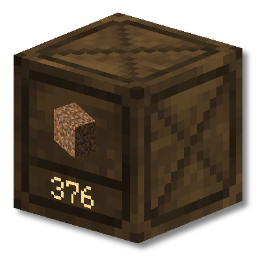
Basic Storage adds a new block, the Crate. It can hold up to 1 billion items of a single
type. Items can be quickly deposited and withdrawn by:
- directly interacting with crates (no GUI)
- Right Click inserts one item
- Shift Right Click inserts all matching items from your inventory
- Left Click takes out one item
- Shift Left Click takes out a single stack of items
- using hoppers/hopper carts
- using third party mods (e.g. AE2, RS, Tom's Storage, Copper Pipes)
Why use this mod?
Basic Storage is not the first mod to add blocks that function like crates. This mod exists
specifically to fulfil the following requirements:
- Simplified vanilla-esque design (no upgrades, no multiple crate types)
- Large storage size, low crafting cost (1 billion items, made from planks and sticks)
- Low file size & performance footprint
- Up to date with modern Minecraft versions
If you'd prefer to use a similar mod with blocks that support item compacting, block locking, an
upgrade system etc., then please scroll further down to the Acknowledgments section. Some
similar mods are listed there.
Crate Station
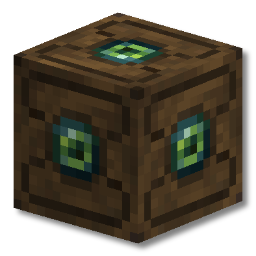
The crate station functions as a quick-insert hub for a network of crates.
Any crates connected directly to the crate station, or to a crate which is connected to a crate
station, are part of the same network.
Interacting with the crate station is similar to crates:
- Right Click inserts the entire stack of what you're holding into a compatible crate
- Shift Right Click inserts all items from your inventory which match crates in the
network.
What's its use?
Imagine you have a crate wall for materials such as stone, dirt, gravel and raw ore.
You've just been on a mining trip and your inventory is full of these items.
Simply shift right click on the Crate Station and your inventory will be freed up super quick, with
every item in the right place!
Recipes
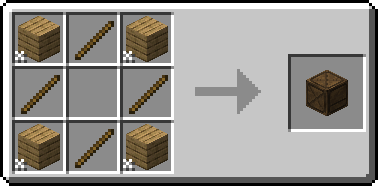
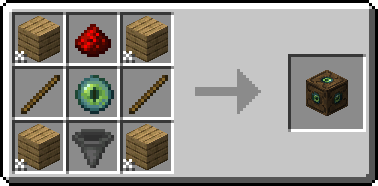
While resources to make crates are available at the very start of the game, a crate station is
slightly harder. This is to encourage players to use crates however they see fit in the early game,
and then adapt their storage systems to work on a larger scale later in the game if they wish.
Transporting Crates
Crates are fantastic for keeping your storage organized and accessible, but what if you need to move
that storage?
There are two distinct features in this mod which will help you immensely:
- Crate Hammer Item
- Dynamic Item Models
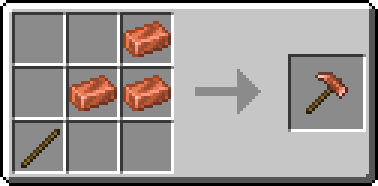
Crate Hammer
Right Click any crate with a hammer and it'll be broken instantly, retaining all its
contents. Simply place the crate down somewhere else, and you'll see that all your items have been
safely transferred with it.
This doesn't mean you must use a hammer though. Simply breaking a crate with your hands or an axe
will still yield the crate with all the items within - the hammer is just faster.
Dynamic Item Models
Once you've broken a crate with items in and picked it up you'll notice that it looks different.
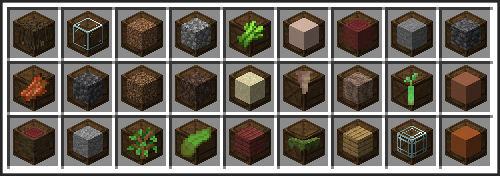
Crates with items in them will show the item it contains on both the item model itself, and in the
crate's tooltip. The number of items in the crate can be found in the tooltip too.

Frequently Asked Questions
What are the mod's dependencies?
Basic Storage has no extra dependencies
Is there a NeoForge/Fabric/quilt version?
There is currently a Fabric version.
NeoForge is planned. Quilt may work, but is not explicitly supported.
Can you backport the mod to Minecraft 1.X.X?
Unfortunately I don't have the time to backport Basic Storage to earlier versions.
The mod will however support each new major version of Minecraft.
I found a bug / my game crashed
If you find any problems with Basic Storage, please feel encouraged
to create an issue on the GitHub repository issue tracker.
Bug reports are incredibly helpful, and help make Basic Storage the best it can be.
Acknowledgements
Basic Storage wouldn't exist without the hard work and creativity of those that came before it. I'd
like to give special thanks to the talented developers and artists behind JABBA, Storage Drawers and
Extended Drawers, as well as every other barrel/drawer mod that came before them.
Thank you to all the wonderful translation contributors!
| EmrysAkalp | EnderKTS |
| Pascal | QueDoom |