Logo
MINECRAFTBIBLE
Items
Items

All game items

Blocks
Blocks

Building blocks

Mobs
Mobs

Creatures & monsters

Biomes
Biomes

World biomes

Structures
Structures

Generated structures

Recipes
Recipes

Crafting guides

Advancements
Advancements

Achievements

Loot Tables
Loot Tables

Drop rates

Tags
Tags

Item groupings

All Versions
View all data →
Capes
Cape ArchiveNEW

Browse rare Minecon capes, OptiFine capes, and custom capes from players worldwide

Browse

Player Database
Player DatabasePopular

Search any player

Skin Browser
Skin Browser

Browse & download skins

Cape Gallery
Cape GalleryNEW

Minecon & OptiFine capes

Seed Vault
Seed Vault

Curated seeds

Learn

Guides
GuidesNew

Tutorials & tips

Blog
Blog

News & updates

Community

Community Hub
Community HubHub

Posts, discussions & more

All Versions
View community →
Seed Analyzer
Seed Analyzer

World seed analysis

Loot Explorer
Loot Explorer

Drop rates

Crafting Calculator
Crafting Calculator

Material planning

Enchant Calculator
Enchant Calculator

Probability math

Redstone Lab
Redstone Lab

Signal timing

Trading Profit
Trading Profit

Villager ROI

All Versions
View all tools →
Mods
Mods

Browse all mods

Plugins
Plugins

Server plugins

Resource Packs
Resource Packs

Textures & sounds

Shaders
Shaders

Visual enhancements

Datapacks
Datapacks

World logic

Scanner
Mod Intelligence

Scan & analyze any mod

All Versions
View all mods →
Loading...
IntroductionIntroductionVersion HistoryVersion HistoryGuidesGuidesBlog & NewsBlog & News
ItemsItemsBlocksBlocksMobsMobsRecipesRecipesBiomesBiomesStructuresStructuresAdvancementsAdvancementsLoot TablesLoot TablesTagsTags
ModsModsPluginsPluginsResource PacksResource PacksShadersShadersDatapacksDatapacks

MinecraftBible

The Ultimate Wiki

Logo
MINECRAFTBIBLE

The ultimate Minecraft reference. Every item, block, mob, and recipe documented with precision.

Community

  • Player Database
  • Skin Browser
  • Cape Gallery
  • Community Hub
  • Seed Vault

Database

  • Items
  • Blocks
  • Mobs
  • Recipes
  • Biomes
  • Structures

Tools

  • Seed Analyzer
  • Mod Intelligence
  • Crafting Calculator
  • Enchant Calculator

Mods & Packs

  • Mods
  • Plugins
  • Resource Packs
  • Shaders
  • Datapacks

© 2026 MinecraftBible. Not affiliated with Mojang or Microsoft.

PrivacyTermsContact
Accurate Block Placement Reborn
ModMIT

Accurate Block Placement Reborn

Makes block placement smarter by timing it for you.

1.8M
Downloads
1,207
Followers
2 months ago
Updated
📦
25
Versions
game-mechanicsutilityfabric
Download Latestv1.4.2View on Modrinth

📖About Accurate Block Placement Reborn

Accurate Block Placement: Reborn

Current Modrinth Release
Current CurseForge Release
Current GitHub Release

Modrinth Downloads
CurseForge Downloads

Crowdin

AccurateBlockPlacement: Reborn is a client-side mod for Fabric.

Fabric API is required, Mod Menu and Cloth Config API are optional, but strongly recommended.


Although many experienced minecraft players know exactly how to time their clicks in order to rapidly place blocks with no mistakes, why should it be that difficult? In this mod, if you hold your 'use key' (usually RMB) and look at a new block it will automatically place it no matter how fast you move. No more need to time when you click or look in order to accurately place blocks quickly!

Features

WARNING: This mod may be considered a "cheat" on some servers (and detected as such)! Please check the server's rules before using this mod. Use this at your own risk.

Accurate Block Placement

Accurate Block Placement makes placing blocks a smooth and reliable process when holding right click. The best way to explain it is the following GIF:
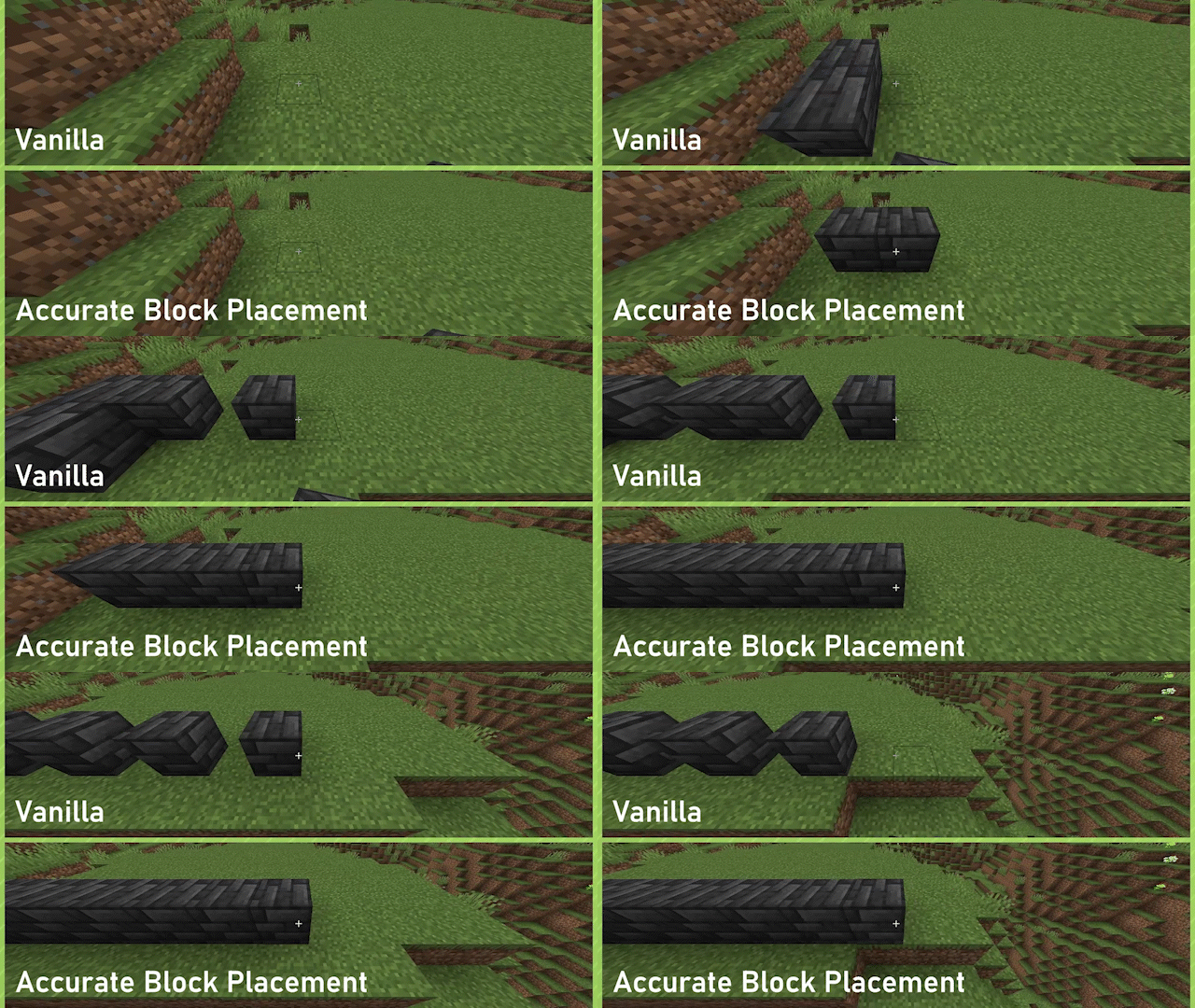
Mod Showcase

Enabled by default, can be toggled on or off through the config or by way of a configurable keybind (default: Not Bound).

Fast Block Breaking (v1.3.0+ for 1.21.3+)

Fast Block Breaking makes breaking blocks much easier and more consistent, by removing the Mining Cooldown when breaking blocks.

No GIF for this one yet :(, essentially haste insta-mining but for creative mode

Disabled by default, can be toggled on or off through the config or by way of a configurable keybind (default: Not Bound).

License

Accurate Block Placement: Reborn is provided under the MIT License.

👥 Team & Contributors

Kaddicus
KaddicusOwner
schwar
schwar
Former Owner

⚙️ Compatibility

Environment
💻 Client-side
Loaders
fabric
Minecraft Versions
1.21.91.21.101.21.11

🔗 Links

Modrinth Page



